MongoDB provides several features for building AI agents. As both a vector and document database, MongoDB supports various search methods for agentic RAG, as well as storing agent interactions in the same database for short and long-term agent memory.
Get StartedWhat is an AI agent?
In the context of generative AI, an AI agent typically refers to a system that can complete a task autonomously or semi-autonomously by combining AI models such as LLMs with a set of pre-defined tools.
AI agents can use tools to gather context, interact with external systems, and perform actions. They can define their own execution flow (planning) and remember previous interactions to inform their responses (memory). Therefore, AI agents are best suited for complex tasks that require reasoning, planning, and decision-making.
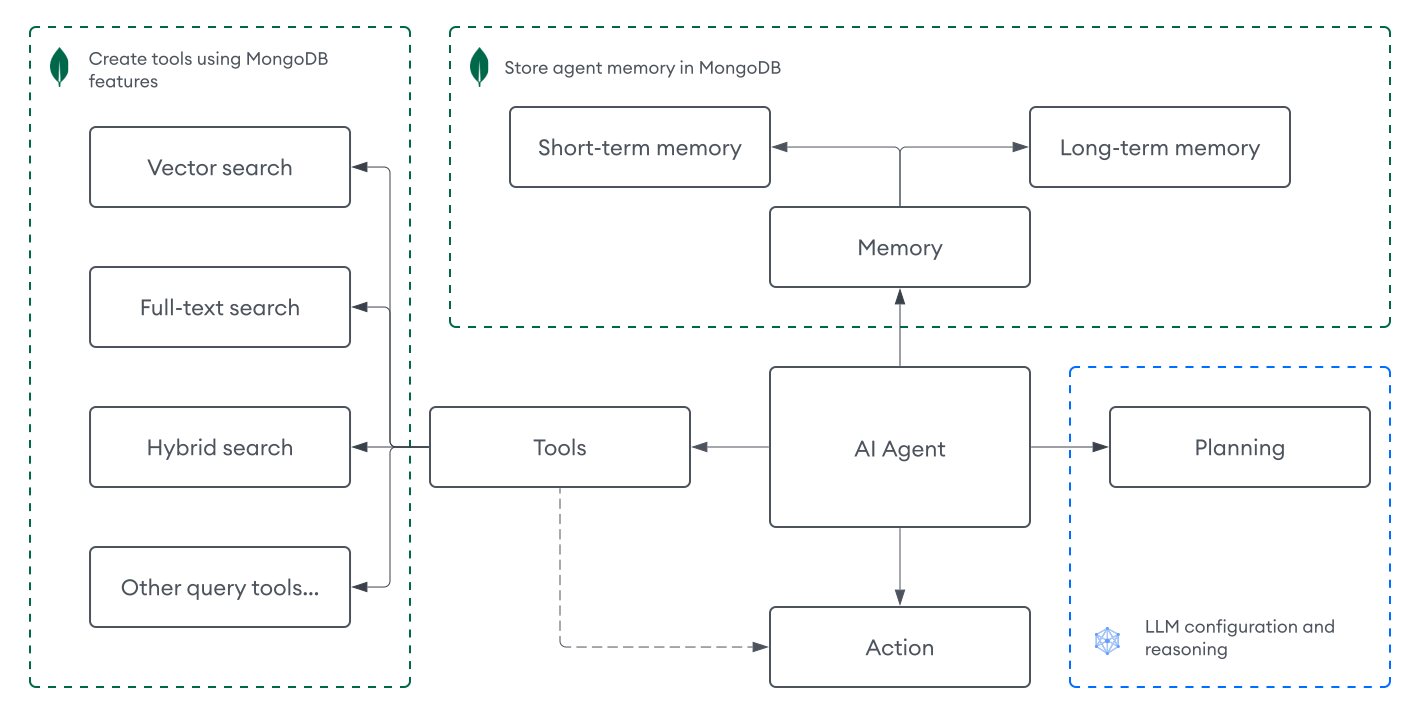
Architecture
An AI agent typically includes a combination of the following components:
Perception | Your input for the agent. Text inputs are the most common perception mechanism for AI agents, but inputs can also be audio, images, or multimodal data. |
Planning | How the agent determines what to do next. This component typically includes LLMs and prompts, using feedback loops and various prompt engineering techniques such as chain-of-thought and reAct, to help the LLM reason through complex tasks. AI agents can consist of a single LLM as the decision maker, LLM with multiple prompts, multiple LLMs working together, or any combination of these approaches. |
Tools | How the agent gathers context for a task. Tools allow agents to interact with external systems and perform actions such as vector search, web search, or calling APIs from other services. |
Memory | A system for storing agent interactions, so the agent can learn from past experiences to inform its responses. Memory can be short-term (for the current session) or long-term (persisted across sessions). |
Note
AI agents vary in design pattern, function, and complexity. To learn about other agent architectures, including multi-agent systems, see Agentic Design Patterns.
Build AI Agents with MongoDB
MongoDB supports the following components for building AI agents:
Tools: Leverage MongoDB search features as tools for your agent to retrieve relevant information and implement agentic RAG.
Memory: Store agent interactions in MongoDB collections for both short and long-term memory.
Agent Tools
In addition to standard MongoDB queries, MongoDB provides several search capabilities that you can implement as tools for your agent.
MongoDB Vector Search: Perform vector search to retrieve relevant context based on semantic meaning and similarity. To learn more, see MongoDB Vector Search Overview.
MongoDB Search: Perform full-text search to retrieve relevant context based on keyword matching and relevance scoring. To learn more, see MongoDB Search Overview.
Hybrid Search: Combine MongoDB Vector Search with MongoDB Search to leverage the strengths of both approaches. To learn more, see How to Perform Hybrid Search.
You can define tools manually or by using frameworks such as LangChain and LangGraph, which provide built-in abstractions for tool creation and calling.
Tool definition
Tools are defined as functions that the agent can call to perform specific tasks. For example, the following syntax illustrates how you might define a tool that runs a vector search query:
def vector_search_tool(query: str) -> str: pipeline = [ { "$vectorSearch": { # Vector search query pipeline... } } ] results = collection.aggregate(pipeline) array_of_results = [] for doc in results: array_of_results.append(doc) return array_of_results
async function vectorSearchTool(query) { const pipeline = [ { $vectorSearch: { // Vector search query pipeline... } } ]; const results = await collection.aggregate(pipeline).toArray(); return results; }
Tool call
Tool calls are what the agent uses to execute the tools. You can define how to process tool calls in your agent, or use a framework to handle this for you. These are typically defined as JSON objects that include the tool name and other arguments to pass to the tool, so the agent can call the tool with the appropriate parameters. For example, the following syntax illustrates how an agent might call the vector search tool:
{ "tool": "vector_search_tool", "args": { "query": "What is MongoDB?" }, "id": "call_H5TttXb423JfoulF1qVfPN3m" }
Agentic RAG
By using MongoDB as a vector database, you can create retrieval tools that implement agentic RAG, which is an advanced form of RAG that allows you to dynamically orchestrate the retrieval and generation process through an AI agent.
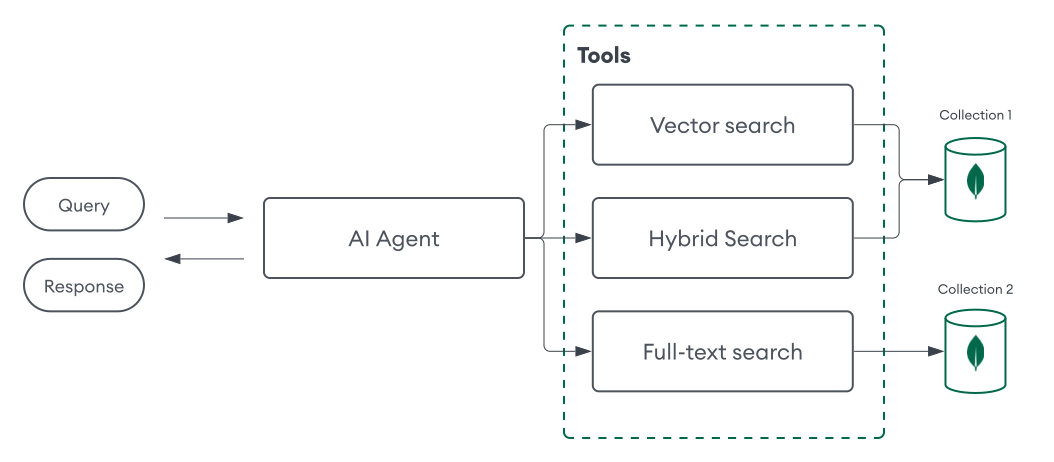
This approach enables more complex workflows and user interactions. For example, you can configure your AI agent to determine the optimal retrieval tool based on the task, such as using MongoDB Vector Search for semantic search and MongoDB Search for full-text search. You can also define different retrieval tools for different collections to further customize the agent's retrieval capabilities.
Agent Memory
Since MongoDB is also a document database, you can implement memory for agents by storing its interactions in a MongoDB collection. The agent can then query or update this collection as needed. There are several ways to implement agent memory with MongoDB:
For short-term memory, you might include a
session_idfield to identify a specific session when storing interactions, and then query for interactions with the same ID to pass to the agent as context.For long-term memory, you might process several interactions with an LLM to extract relevant information such as user preferences or important context, and then store this information in a separate collection that the agent can query when needed.
To build robust memory management systems that enable more efficient and complex retrieval of conversation histories, leverage MongoDB Search or MongoDB Vector Search to store, index, and query important interactions across sessions.
A document in a collection that stores short-term memory might resemble the following:
{ "session_id": "123", "user_id": "jane_doe", "interactions": [ { "role": "user", "content": "What is MongoDB?", "timestamp": "2025-01-01T12:00:00Z" }, { "role": "assistant", "content": "MongoDB is the world's leading modern database.", "timestamp": "2025-01-01T12:00:05Z" } ] }
A document in a collection that stores long-term memory might resemble the following:
{ "user_id": "jane_doe", "last_updated": "2025-05-22T09:15:00Z", "preferences": { "conversation_tone": "casual", "custom_instructions": [ "I prefer concise answers." ], }, "facts": [ { "interests": ["AI", "MongoDB"], } ] }
The following frameworks also provide direct abstractions for agent memory with MongoDB:
Framework | Features |
|---|---|
LangChain |
To learn more, see the tutorial. |
LangGraph |
To learn more, see LangGraph and LangGraph.js. |
Get Started
The following tutorial demonstrates how to build an AI agent using MongoDB for agentic RAG and memory, without an agent framework.
Prerequisites
To complete this tutorial, you must have the following:
One of the following MongoDB cluster types:
An Atlas cluster running MongoDB version 6.0.11, 7.0.2, or later. Ensure that your IP address is included in your Atlas project's access list.
A local Atlas deployment created using Python and Docker. Install
atlas-local-lib-py(pip install atlas-local-lib-py) to programmatically create and manage local deployments. To learn more, see the atlas-local-lib-py repository.A MongoDB Community or Enterprise cluster with Search and Vector Search installed.
A Voyage AI API key.
An OpenAI API key.
Note
This tutorial uses models from Voyage AI and OpenAI, but you can modify the code to use your models of choice.
Procedure
This AI agent can be used to answer questions about a custom data source and perform calculations. It can also remember previous interactions to inform its responses. It uses the following components:
Perception: Text inputs.
Planning: An LLM and various prompts to reason through the task.
Tools: A vector search tool and calculator tool.
Memory: Stores the interactions in a MongoDB collection.
Set up the environment.
Initialize the project and install dependencies.
Create a new project directory, then install the required dependencies:
mkdir mongodb-ai-agent cd mongodb-ai-agent pip install --quiet --upgrade pymongo voyageai openai langchain langchain-mongodb langchain-community langchain-text-splitters python-dotenv Note
Your project will use the following structure:
mongodb-ai-agent ├── .env ├── config.py ├── ingest_data.py ├── tools.py ├── memory.py ├── planning.py ├── main.py
Use MongoDB as a vector database.
Create a file named ingest_data.py in your project. This script ingests a sample PDF that contains a recent MongoDB earnings report into a collection in MongoDB by using the voyage-4-large embedding model. This code also includes a function to create a vector search index on your data if it doesn't already exist.
To learn more, see Ingestion.
Define tools for the agent.
Create a file named tools.py in your project. This file defines the tools that the agent can use to answer questions. In this example, you define the following tools:
vector_search_tool: Runs a vector search query to retrieve relevant documents from your collection.calculator_tool: Uses theeval()function for basic math operations.
Add memory to the agent.
Create a file named memory.py in your project. This file defines the system that the agent uses to store its interactions. In this example, you implement short-term memory by defining the following functions:
store_chat_message: to store information about an interaction in a MongoDB collection.retrieve_session_history: to get all interactions for a specific session by using thesession_idfield.
Define the agent's planning.
Create a file named planning.py in your project. This file will include various prompts and LLM calls to determine the agent's execution flow. In this example, you define the following functions:
tool_selector: Determines how the LLM selects the appropriate tool for a task.generate_response: Orchestrates the agent's execution flow by using tools, calling the LLM, and processing the results.get_llm_response: Helper function for LLM response generation.
Test the agent.
Finally, create a file named main.py in your project. This file runs the agent and allows you to interact with it.
Save your project, then run the following command. When you run the agent:
If you haven't already, instruct the agent to ingest the sample data.
Enter a session ID to start a new session or continue an existing session.
Ask questions. The agent generates a response based on your tools, the previous interactions, and the prompts defined in the planning phase.
Refer to the example output for a sample interaction:
python main.py
Ingest sample data? (y/n): y Successfully split PDF into 104 chunks. Generating embeddings and ingesting documents... Inserted 104 documents into the collection. Search index 'vector_index' creation initiated. Polling to check if the index is ready. This may take up to a minute. vector_index is ready for querying. Enter a session ID: 123 Enter your query (or type 'quit' to exit): What was MongoDB's latest acquisition? Tool selected: vector_search_tool Answer: MongoDB's latest acquisition was Voyage AI. Enter your query (or type 'quit' to exit): What do they do? Tool selected: vector_search_tool Answer: Voyage AI is a company that specializes in state-of-the-art embedding and reranking models designed to power next-generation AI applications. These technologies help organizations build more advanced and trustworthy AI capabilities. Enter your query (or type 'quit' to exit): What is 123+456? Tool selected: calculator_tool Answer: 579
Tip
If you're using Atlas, you can verify your embeddings and interactions by navigating to the ai_agent_db.embeddings namespace in the Atlas UI.
Continue building.
Now that you have a basic AI agent, you can continue developing it by:
Improving the performance of your vector search tools and fine tuning your RAG pipelines.
Adding more tools to the agent, such as hybrid or full-text search tools.
Refining the planning phase by using more advanced prompts and LLM calls.
Implementing long-term memory and more advanced memory systems by using MongoDB Search and MongoDB Vector Search to store and retrieve important interactions across sessions.
Set up the environment.
Initialize the project and install dependencies.
Create a new project directory, then install the required dependencies:
mkdir mongodb-ai-agent cd mongodb-ai-agent npm init -y npm install --quiet dotenv mongodb voyageai openai langchain @langchain/community @langchain/core mathjs pdf-parse@1 Note
Your project will use the following structure:
mongodb-ai-agent ├── .env ├── config.js ├── ingest-data.js ├── tools.js ├── memory.js ├── planning.js └── index.js
Use MongoDB as a vector database.
Create a file named ingest-data.js in your project. This script ingests a sample PDF that contains a recent MongoDB earnings report into a collection in MongoDB by using the voyage-4-large embedding model. This code also includes a function to create a vector search index on your data if it doesn't already exist.
To learn more, see Ingestion.
Define tools for the agent.
Create a file named tools.js in your project. This file defines the tools that the agent can use to answer questions. In this example, you define the following tools:
vectorSearchTool: Runs a vector search query to retrieve relevant documents from your collection.calculatorTool: Uses themathjslibrary for basic math operations.
Add memory to the agent.
Create a file named memory.js in your project. This file defines the system that the agent uses to store its interactions. In this example, you implement short-term memory by defining the following functions:
storeChatMessage: to store information about an interaction in a MongoDB collection.retrieveSessionHistory: to get all interactions for a specific session by using thesession_idfield.
Define the agent's planning.
Create a file named planning.js in your project. This file will include various prompts and LLM calls to determine the agent's execution flow. In this example, you define the following functions:
openAIChatCompletion: Helper function to call the OpenAI API for generating responses.toolSelector: Determines how the LLM selects the appropriate tool for a task.generateAnswer: Orchestrates the agent's execution flow by using tools, calling the LLM, and processing the results.getLLMResponse: Helper function for LLM response generation.
Test the agent.
Finally, create a file named index.js in your project. This file runs the agent and allows you to interact with it.
Save your project, then run the following command. When you run the agent:
If you haven't already, instruct the agent to ingest the sample data.
Enter a session ID to start a new session or continue an existing session.
Ask questions. The agent generates a response based on your tools, the previous interactions, and the prompts defined in the planning phase.
Refer to the example output for a sample interaction:
node index.js
Ingest sample data? (y/n): y Chunked PDF into 100 documents. Inserted documents: 100 Attempting to create/verify Vector Search Index... New index named vector_index is building. Polling to check if the index is ready. This may take up to a minute. vector_index is ready for querying. Enter a session ID: 123 Enter your query (or type 'quit' to exit): What was MongoDB's latest acquisition? Tool selected: vector_search_tool Answer: MongoDB recently acquired Voyage AI, a pioneer in embedding and reranking models that power next-generation AI applications. Enter your query (or type 'quit' to exit): What do they do? Tool selected: vector_search_tool Answer: Voyage AI is a company that specializes in state-of-the-art embedding and reranking models designed to power next-generation AI applications. These technologies help organizations build more advanced and trustworthy AI capabilities. Enter your query (or type 'quit' to exit): What is 123+456? Tool selected: calculator_tool Answer: 579
Tip
If you're using Atlas, you can verify your embeddings and interactions by navigating to the ai_agent_db.embeddings namespace in the Atlas UI.
Continue building.
Now that you have a basic AI agent, you can continue developing it by:
Improving the performance of your vector search tools and fine tuning your RAG pipelines.
Adding more tools to the agent, such as hybrid or full-text search tools.
Refining the planning phase by using more advanced prompts and LLM calls.
Implementing long-term memory and more advanced memory systems by using MongoDB Search and MongoDB Vector Search to store and retrieve important interactions across sessions.
Tutorials
For more tutorials on building AI agents with MongoDB, refer to the following table:
Frameworks | |
Enterprise platforms | |
Tools | |
Additional resources |