You can use the Kubernetes Operator to deploy MongoDB Search and Vector Search on a single Kubernetes cluster with your MongoDB deployment. The mongot process supports MongoDB Search and Vector Search.
Select your configuration to filter the installation procedure for your deployment.
Note
Community edition offers a single deployment configuration. If you select Community for MongoDB Server, the other three selectors lock. MongoDB Deployment is set to Managed, Cluster Topology to Replica Set, and Mongot Instances to Single, and you can't change them.
Overview
You can use the Kubernetes Operator and deploy the mongot process to run with MongoDB Community Edition v8.3 or higher on a Kubernetes cluster. The mongot process supports both MongoDB Search and Vector Search. Optionally, you can enable and configure Vector Search to automatically generate vector embeddings for text data in your collections and queries using a supported Voyage AI embedding model.
Important
Automated embedding is in Preview. The feature and the corresponding documentation might change at any time during the preview period. To learn more, see Preview Features.
This procedure demonstrates how to deploy and configure MongoDB Search and Vector Search to run with a new or existing replica set in your Kubernetes cluster. The deployment uses TLS certificates to ensure secure communication between MongoDB nodes and the mongot search process.
You can use the Kubernetes Operator to deploy MongoDB Search and Vector Search resources to run with MongoDB Enterprise v8.3 or later on a Kubernetes cluster. This procedure demonstrates how to deploy and configure one mongot process to run with a new or existing replica set in your Kubernetes cluster. The deployment uses TLS certificates to ensure secure communication between MongoDB nodes and the mongot search process.
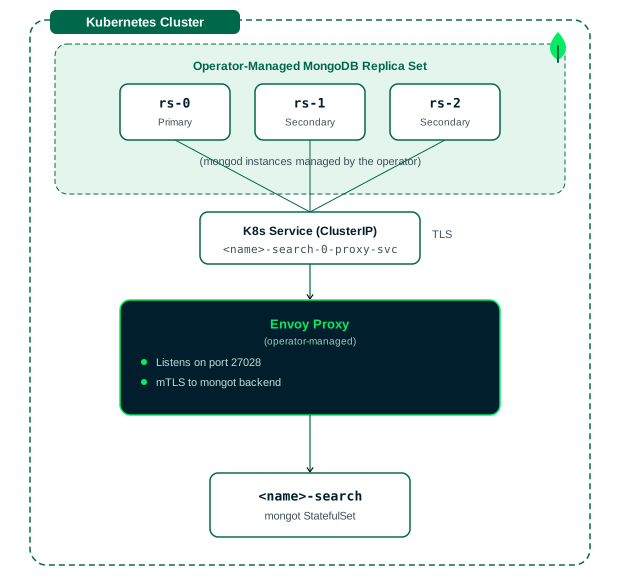
You can use the Kubernetes Operator to deploy MongoDB Search and Vector Search resources to run with MongoDB Enterprise v8.3 or later on a Kubernetes cluster. This procedure demonstrates how to deploy and configure multiple mongot processes behind a managed Envoy load balancer to run with a replica set in your Kubernetes cluster.
About the Managed Envoy Load Balancer
When you set spec.clusters[].loadBalancer.managed in your MongoDB Search resource, the operator automatically:
Deploys an Envoy load balancer that distributes traffic across the
mongotpods at the application layer (L7). An L7 load balancer is required because eachmongod-to-mongotconnection is a single, long-lived gRPC stream that an L4 load balancer can't distribute acrossmongotreplicas.Generates the Envoy configuration, including the listener and cluster definitions that route traffic to the
mongotpods.Creates a Kubernetes Service that exposes the Envoy load balancer so the replica set's
mongodprocesses connect to it instead of to the individualmongotpods.Manages TLS by configuring mTLS between
mongod, the Envoy load balancer, andmongot.Sets the
mongotHostandsearchIndexManagementHostAndPortsearch parameters on eachmongodso they point to the Envoy load balancer endpoint.
Important
You don't need to write Envoy configuration, deploy Envoy, create the Kubernetes Service manually, or configure mongod search parameters.
You can use the Kubernetes Operator to deploy MongoDB Search and Vector Search resources to run with MongoDB Enterprise v8.3 or later on an operator-managed sharded cluster in your Kubernetes cluster. This procedure demonstrates how to deploy and configure a single mongot process to run with a new or existing sharded cluster. The deployment uses TLS certificates to ensure secure communication between MongoDB nodes and the mongot search process.
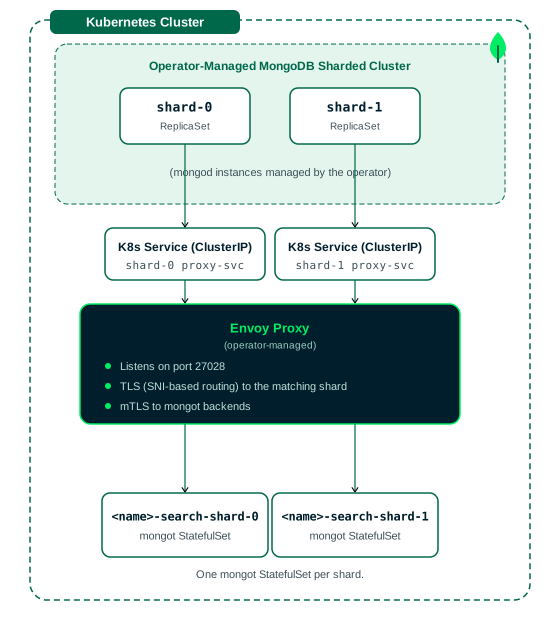
This guide walks you through deploying MongoDB Search against an operator-managed MongoDB sharded cluster using the operator's managed Envoy load balancer. Setting spec.source.mongodbResourceRef lets the operator select the sharded cluster as the sync source and automatically configure each mongod process with the correct mongot search parameters and proxy endpoints.
About the Managed Envoy Load Balancer
When you set spec.clusters[].loadBalancer.managed in your MongoDB Search resource, the operator automatically:
Deploys an Envoy load balancer that distributes traffic to each shard's
mongotgroup at the application layer (L7). An L7 load balancer is required because eachmongod-to-mongotconnection is a single, long-lived gRPC stream that an L4 load balancer can't distribute acrossmongotreplicas.Generates the Envoy configuration, including the listener and cluster definitions and the SNI-based routing rules that direct each shard's traffic to the correct
mongotgroup.Creates a Kubernetes Service for each shard to expose the Envoy load balancer to that shard's
mongodprocesses.Manages TLS by configuring mTLS between
mongod, the Envoy load balancer, andmongot.Sets the
mongotHostandsearchIndexManagementHostAndPortsearch parameters on each shard'smongodso they point to the Envoy load balancer endpoint for that shard.
Important
You don't need to write Envoy configuration, deploy Envoy, create the Kubernetes Services manually, or configure mongod search parameters.
About Per-Shard Routing
In a sharded cluster, each shard has its own data, so MongoDB Search deploys a separate mongot group per shard, and each shard's mongod must connect to its corresponding mongot group. Each shard's mongod search parameters point to a server name that is unique to that shard. The Envoy load balancer reads the TLS SNI field from each incoming connection and uses that server name to route the request to the mongot group for the matching shard.
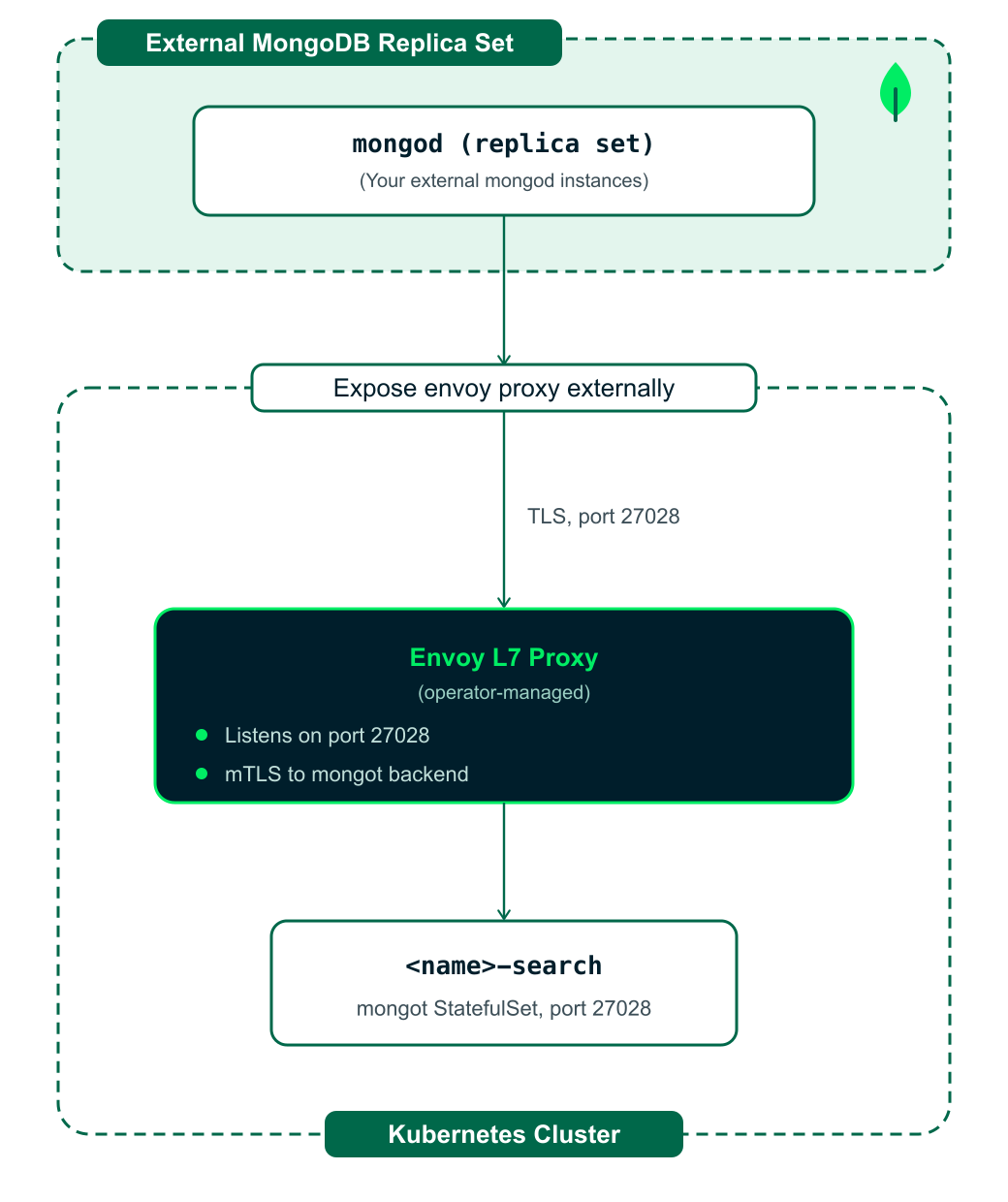
You can use the Kubernetes Operator to deploy MongoDB Search and Vector Search on a Kubernetes cluster to run with an external MongoDB Enterprise Edition 8.3 or later replica set. This procedure shows you how to deploy and configure a single mongot process in your Kubernetes cluster to use a new or existing external replica set. This tutorial shows you how to configure a secure deployment with TLS enabled. You must provide the TLS certificates:
The server certificate and key for the MongoDBSearch service.
The public CA certificate for the external MongoDB database.
This tutorial shows you how to deploy MongoDB Search against your existing external MongoDB replica set (running on VMs, another Kubernetes cluster, or a self-managed deployment) using the operator's managed Envoy load balancer. The Kubernetes Operator automatically deploys and configures the Envoy proxy. You don't need to create Envoy ConfigMaps, Deployments, or Services.
You can use the Kubernetes Operator to deploy MongoDB Search and Vector Search on a Kubernetes cluster to run with an external MongoDB Enterprise Edition 8.3 or later sharded cluster. This procedure shows you how to deploy and configure a single mongot process in your Kubernetes cluster to use a new or existing external sharded cluster. The deployment uses TLS certificates to ensure secure communication between your external MongoDB nodes and the mongot search process.
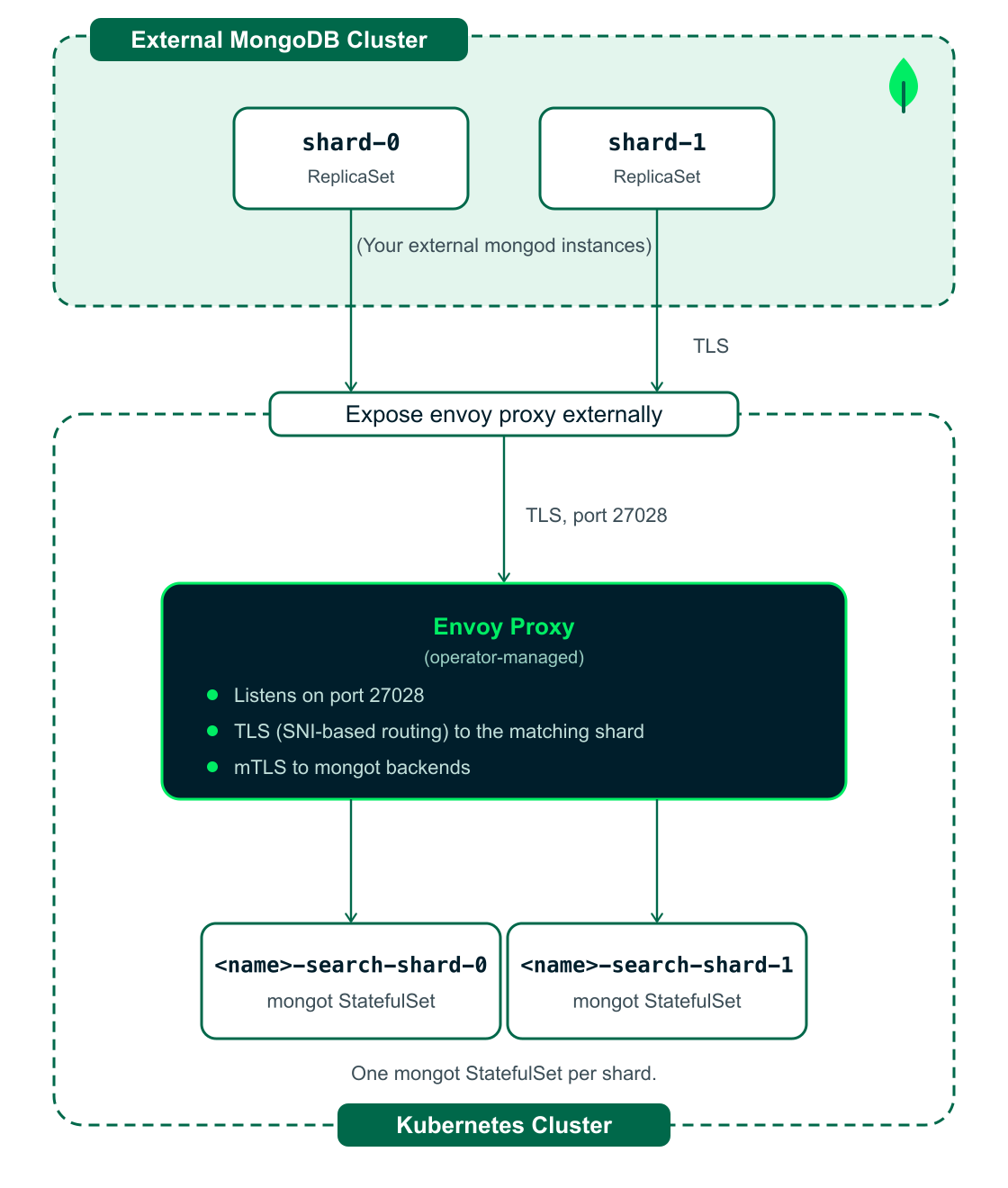
This tutorial shows you how to deploy MongoDB Search against your existing external MongoDB sharded cluster (running on VMs, bare metal, or another Kubernetes cluster) using the operator's managed Envoy load balancer.
The Kubernetes Operator can deploy and manage MongoDB Search and Vector Search components in your Kubernetes cluster. It can also deploy and manage an Envoy proxy to load balance traffic between your external MongoDB sharded cluster and the mongot pods.
About the Managed Envoy Load Balancer
Envoy is a high-performance L7 load balancer. An L7 load balancer is required because each mongod-to-mongot connection is a single, long-lived gRPC stream. An L4 load balancer can't distribute that stream across the mongot replicas. When you set spec.clusters[].loadBalancer.managed in your MongoDBSearch resource, the Kubernetes Operator automatically:
Deploys an Envoy load balancer that distributes traffic to each shard's
mongotgroup at the application layer (L7).Generates the Envoy configuration, including the listener and cluster definitions and the SNI-based routing rules that direct each shard's traffic to the correct
mongotgroup.Creates a Kubernetes Service for each shard to expose the Envoy load balancer to that shard's
mongodprocesses.Manages TLS by configuring mTLS between
mongod, the Envoy load balancer, andmongot.
You don't need to write Envoy configuration, deploy Envoy, or create the Kubernetes Services manually. Because your external mongod and mongos processes aren't operator-managed, you set their search parameters to the Envoy load balancer endpoint yourself in a later step.
About Per-Shard Routing
In a sharded cluster, each shard has its own data, so the Kubernetes Operator deploys a separate mongot group per shard, and each shard's mongod must connect to its corresponding mongot group. Each shard's mongod search parameters point to a server name that is unique to that shard. The Envoy load balancer reads the TLS SNI field from each incoming connection and uses that server name to route the request to the mongot group for the matching shard.
Prerequisites
To deploy MongoDB Search and Vector Search, you must have the following:
A running Kubernetes cluster.
Kubernetes command-line tool,
kubectl, configured to communicate with your cluster.Helm, the package manager for Kubernetes, to install the Kubernetes Operator.
cert-manager or an alternative certificate management solution for TLS certificate provisioning.
Bash v5.1 or higher for running the commands in this tutorial.
Optionally, to configure Vector Search to automatically generate vector embeddings for text data in your collections and queries, you must create API keys for the embedding service. We recommend creating two keys, one for generating embeddings at index-time for text data in your collection and another for generating embeddings at query-time for your query text. If you don't have the keys, you can create the keys from the Atlas UI.
To deploy MongoDB Search and Vector Search, you must have the following:
A running Kubernetes cluster with
kubeconfigavailable locally.Kubernetes command-line tool,
kubectl, configured to communicate with your cluster.Helm, the package manager for Kubernetes, to install the Kubernetes Operator.
Bash v5.1 or later for running the commands in this tutorial.
MongoDB Ops Manager or MongoDB Cloud Manager project and API credentials.
An operating system and architecture that are supported for MongoDB Enterprise.
To deploy MongoDB Search and Vector Search, you must have the following:
Kubernetes cluster with
kubectlaccessHelm 3.x version installed
cert-managerinstalled (for TLS certificates)MongoDB Kubernetes Operator installed
MongoDB Ops Manager or MongoDB Cloud Manager access
An operating system and architecture that are supported for MongoDB Enterprise.
Important
Shard names must follow RFC 1123 DNS label rules, which allows lowercase alphanumeric characters or hyphens (-) and requires starting with a letter and ending with an alphanumeric character. Underscores are not allowed. The combined length of the resource name and shard name must be less than 50 characters.
To deploy MongoDB Search and Vector Search, you must have the following:
Kubernetes cluster with
kubectlaccessHelm 3.x version installed
cert-managerinstalled (for TLS certificates)MongoDB Kubernetes Operator installed
MongoDB Ops Manager or MongoDB Cloud Manager access
An operating system and architecture that are supported for MongoDB Enterprise.
Important
Shard names must follow RFC 1123 DNS label rules, which allows lowercase alphanumeric characters or hyphens (-) and requires starting with a letter and ending with an alphanumeric character. Underscores are not allowed. The combined length of the resource name and shard name must be less than 50 characters.
To deploy MongoDB Search and Vector Search, you must have the following:
Kubernetes cluster with
kubectlaccessHelm 3.x version installed
cert-managerinstalled (for TLS certificates)MongoDB Kubernetes Operator installed
MongoDB Ops Manager or MongoDB Cloud Manager access
An operating system and architecture that are supported for MongoDB Enterprise.
To deploy MongoDB Search and Vector Search, you must have the following:
A running Kubernetes cluster with
kubeconfigavailable locally.Kubernetes command-line tool,
kubectl, configured to communicate with your cluster.Helm, the package manager for Kubernetes, to install the Kubernetes Operator.
Bash v5.1 or later for running the commands in this tutorial.
A MongoDB Enterprise Edition replica set running version 8.3 or later for storing data.
Important
The version format for the Enterprise edition is X.Y.Z-ent. Ensure that you choose 8.3 or later. To learn more about MongoDB versioning, see MongoDB Versioning in the MongoDB Manual.
To learn more about deploying MongoDB Enterprise, see Deploy and Configure MongoDB Database Resources.
A running MongoDB Cloud Manager or Ops Manager for managing MongoDB tasks.
External DB TLS
Your external MongoDB Enterprise deployment must be configured to use and require TLS connections.
External DB CA file
You must have the Certificate Authority (CA) certificate file (for example,
external-ca.crt) that was used to sign your external MongoDB deployment's server certificates.Search Service certificate files
You must have a valid TLS server certificate and private key (for example,
search-service.crt,search-service.key) for theMongoDBSearchservice that your externalmongodprocesses connect to. The certificate must be valid for the hostname of that service (for example,mdbs-search.example.com). You store the certificate in a secret and reference it from theMongoDBSearchresource throughspec.security.tls.certsSecretPrefix, which the operator uses to locate the secret. To learn more, see MongoDB Search and Vector Search Settings.
To deploy MongoDB Search and Vector Search, you must have the following:
A running Kubernetes cluster with
kubeconfigavailable locally.Kubernetes command-line tool,
kubectl, configured to communicate with your cluster.Helm, the package manager for Kubernetes, to install the Kubernetes Operator.
Bash v5.1 or later for running the commands in this tutorial.
A MongoDB Enterprise Edition replica set running version 8.3 or later for storing data.
Important
The version format for the Enterprise edition is X.Y.Z-ent. Ensure that you choose 8.3 or later. To learn more about MongoDB versioning, see MongoDB Versioning in the MongoDB Manual.
To learn more about deploying MongoDB Enterprise, see Deploy and Configure MongoDB Database Resources.
A running MongoDB Cloud Manager or Ops Manager for managing MongoDB tasks.
External DB TLS
Your external MongoDB Enterprise deployment must be configured to use and require TLS connections.
External DB CA file
You must have the Certificate Authority (CA) certificate file (for example,
external-ca.crt) that was used to sign your external MongoDB deployment's server certificates.Search Service certificate files
You must have a valid TLS server certificate and private key (for example,
search-service.crt,search-service.key) for theMongoDBSearchservice that your externalmongodprocesses connect to. The certificate must be valid for the hostname of that service (for example,mdbs-search.example.com). You store the certificate in a secret and reference it from theMongoDBSearchresource throughspec.security.tls.certsSecretPrefix, which the operator uses to locate the secret. To learn more, see MongoDB Search and Vector Search Settings.
To deploy MongoDB Search and Vector Search, you must have the following:
A running Kubernetes cluster with
kubeconfigavailable locally.Kubernetes command-line tool,
kubectl, configured to communicate with your cluster.Helm, the package manager for Kubernetes, to install the Kubernetes Operator.
Bash v5.1 or later for running the commands in this tutorial.
A MongoDB Enterprise Edition sharded cluster running version 8.3 or later for storing data.
Important
The version format for the Enterprise edition is X.Y.Z-ent. Ensure that you choose 8.3 or later. To learn more about MongoDB versioning, see MongoDB Versioning in the MongoDB Manual.
To learn more about deploying MongoDB Enterprise, see Deploy and Configure MongoDB Database Resources.
A running MongoDB Cloud Manager or Ops Manager for managing MongoDB tasks.
External DB TLS
Your external MongoDB Enterprise deployment must be configured to use and require TLS connections.
External DB CA file
You must have the Certificate Authority (CA) certificate file (for example,
external-ca.crt) that was used to sign your external MongoDB deployment's server certificates.Search Service certificate files
You must have a valid TLS server certificate and private key for the
MongoDBSearchservice. You store the certificate in a secret and reference it from theMongoDBSearchresource throughspec.security.tls.certsSecretPrefix, which the operator uses to locate the secret. To learn more, see MongoDB Search and Vector Search Settings.
To deploy MongoDB Search and Vector Search, you must have the following:
A running Kubernetes cluster with
kubeconfigavailable locally.Kubernetes command-line tool,
kubectl, configured to communicate with your cluster.Helm, the package manager for Kubernetes, to install the Kubernetes Operator.
Bash v5.1 or later for running the commands in this tutorial.
A MongoDB Enterprise Edition sharded cluster running version 8.3 or later for storing data.
Important
The version format for the Enterprise edition is X.Y.Z-ent. Ensure that you choose 8.3 or later. To learn more about MongoDB versioning, see MongoDB Versioning in the MongoDB Manual.
To learn more about deploying MongoDB Enterprise, see Deploy and Configure MongoDB Database Resources.
A running MongoDB Cloud Manager or Ops Manager for managing MongoDB tasks.
External DB TLS
Your external MongoDB Enterprise deployment must be configured to use and require TLS connections.
External DB CA file
You must have the Certificate Authority (CA) certificate file (for example,
external-ca.crt) that was used to sign your external MongoDB deployment's server certificates.Search Service certificate files
When using a sharded cluster with the managed Envoy load balancer, you must have the following certificate files:
A separate server certificate and private key for each shard.
A server certificate and private key for the Envoy load balancer.
A client certificate and private key for the Envoy load balancer.
A server certificate and private key for each group of
mongotpods per shard.
In this guide, all certificates are issued using
cert-manager. For simplicity, this guide uses wildcard certificates.You reference these certificates from the
MongoDBSearchresource throughspec.security.tls.certsSecretPrefix. The operator locates each shard'smongotserver certificate secret using the naming pattern{prefix}-{resource}-search-0-{shard}-cert. To learn more about how the operator uses these certificates, see MongoDB Search and Vector Search Settings.
Before You Begin
Before you install MongoDB Search and Vector Search using the Kubernetes Operator, complete the steps in the following sections:

Before you install MongoDB Search and Vector Search using the Kubernetes Operator, complete the steps in the following sections:
Before you install MongoDB Search and Vector Search using the Kubernetes Operator, complete the steps in the following sections:
Before you install MongoDB Search and Vector Search using the Kubernetes Operator, complete the steps in the following sections:

Before you install MongoDB Search and Vector Search using the Kubernetes Operator, complete the steps in the following sections:

Install MongoDB Search and Vector Search
Procedure
Required. Set the environment variables.
Set the environment variables for use in the subsequent steps in this procedure. Copy the following commands, update the values for your environment, and then run them to load the variables:
1 # set it to the context name of the k8s cluster 2 export K8S_CTX="<local cluster context>" 3 4 # the following namespace will be created if not exists 5 export MDB_NS="mongodb" 6 7 # MongoDBCommunity resource name referenced throughout the guide 8 export MDB_RESOURCE_NAME="mdbc-rs" 9 # Number of replica set members deployed in the sample MongoDBCommunity 10 export MDB_MEMBERS=3 11 12 # TLS-related secret names used for MongoDBCommunity and MongoDBSearch 13 export MDB_TLS_CA_SECRET_NAME="${MDB_RESOURCE_NAME}-ca" 14 export MDB_TLS_SERVER_CERT_SECRET_NAME="${MDB_RESOURCE_NAME}-tls" 15 export MDB_SEARCH_TLS_SECRET_NAME="${MDB_RESOURCE_NAME}-search-tls" 16 17 export MDB_TLS_CA_CONFIGMAP="${MDB_RESOURCE_NAME}-ca-configmap" 18 export MDB_TLS_SELF_SIGNED_ISSUER="${MDB_RESOURCE_NAME}-selfsigned-cluster-issuer" 19 export MDB_TLS_CA_CERT_NAME="${MDB_RESOURCE_NAME}-selfsigned-ca" 20 export MDB_TLS_CA_ISSUER="${MDB_RESOURCE_NAME}-cluster-issuer" 21 22 export MDB_VERSION="8.3.4" 23 24 # root admin user for convenience, not used here at all in this guide 25 export MDB_ADMIN_USER_PASSWORD="admin-user-password-CHANGE-ME" 26 # regular user performing restore and search queries on sample mflix database 27 export MDB_USER_PASSWORD="mdb-user-password-CHANGE-ME" 28 # user for MongoDB Search to connect to the replica set to synchronise data from 29 export MDB_SEARCH_SYNC_USER_PASSWORD="search-sync-user-password-CHANGE-ME" 30 31 export OPERATOR_HELM_CHART="mongodb/mongodb-kubernetes" 32 # comma-separated key=value pairs for additional parameters passed to the helm-chart installing the operator 33 export OPERATOR_ADDITIONAL_HELM_VALUES="" 34 35 # TLS is mandatory; connection string must include tls=true 36 export MDB_CONNECTION_STRING="mongodb://mdb-user:${MDB_USER_PASSWORD}@${MDB_RESOURCE_NAME}-0.${MDB_RESOURCE_NAME}-svc.${MDB_NS}.svc.cluster.local:27017/?replicaSet=${MDB_RESOURCE_NAME}&tls=true&tlsCAFile=/tls/ca.crt" 37 38 export CERT_MANAGER_NAMESPACE="cert-manager" 39 40 # Vector Search auto embedding related configurations 41 export AUTO_EMBEDDING_API_KEY_SECRET_NAME="voyage-api-keys" 42 export AUTO_EMBEDDING_API_QUERY_KEY="<embedding-model-query-key>" 43 export AUTO_EMBEDDING_API_INDEXING_KEY="<embedding-model-indexing-key>" 44 export PROVIDER_ENDPOINT="https://ai.mongodb.com/v1/embeddings" 45 export EMBEDDING_MODEL="voyage-4"
Note
If you have the API keys to enable Vector Search to automatically generate embeddings, replace the following placeholder values in the environment variables:
AUTO_EMBEDDING_API_QUERY_KEY: API key for generating embeddings for the query text.AUTO_EMBEDDING_API_INDEXING_KEY: API key for generating embeddings for text data in your collection at index-time.PROVIDER_ENDPOINT: Embedding model provider's endpoint. Value defaults tohttps://ai.mongodb.com/v1/embeddingsfor keys created from the Atlas UI. Replace withhttps://api.voyageai.com/v1/embeddingsif you created the API keys directly from Voyage AI.
Conditional. Add the MongoDB Helm repository.
Helm automates the deployment and management of MongoDB instances on Kubernetes. If you already have the Helm repository that contains the Helm chart for installing the Kubernetes Operator, skip this step. Otherwise, add the Helm repository.
To add the Helm repository, copy, paste, and run the following:
1 helm repo add mongodb https://mongodb.github.io/helm-charts 2 helm repo update mongodb 3 helm search repo mongodb/mongodb-kubernetes
1 "mongodb" has been added to your repositories 2 Hang tight while we grab the latest from your chart repositories... 3 ...Successfully got an update from the "mongodb" chart repository 4 Update Complete. ⎈Happy Helming!⎈ 5 NAME CHART VERSION APP VERSION DESCRIPTION 6 mongodb/mongodb-kubernetes 1.14.0 MongoDB Controllers for Kubernetes translate th...
Conditional. Install the MongoDB Controllers for Kubernetes Operator.
The Kubernetes Operator watches MongoDBCommunity and MongoDBSearch custom resources and manages the lifecycle of your MongoDB deployments. If you already installed the MongoDB Controllers for Kubernetes Operator, skip this step. Otherwise, install the MongoDB Controllers for Kubernetes Operator from the Helm repository you added in the previous step.
To install the MongoDB Controllers for Kubernetes Operator in the mongodb namespace, copy, paste, and run the following commands:
1 helm upgrade --install --debug --kube-context "${K8S_CTX}" \ 2 --create-namespace \ 3 --namespace="${MDB_NS}" \ 4 mongodb-kubernetes \ 5 {OPERATOR_ADDITIONAL_HELM_VALUES:+--set ${OPERATOR_ADDITIONAL_HELM_VALUES}} \ 6 "${OPERATOR_HELM_CHART}"
1 Release "mongodb-kubernetes" does not exist. Installing it now. 2 NAME: mongodb-kubernetes 3 LAST DEPLOYED: Tue Sep 29 11:07:22 2026 4 NAMESPACE: mongodb 5 STATUS: deployed 6 REVISION: 1 7 TEST SUITE: None 8 USER-SUPPLIED VALUES: 9 {} 10 11 COMPUTED VALUES: 12 agent: 13 name: mongodb-agent 14 version: 109.0.1.9310-1 15 community: 16 agent: 17 name: mongodb-agent 18 version: 109.0.1.9310-1 19 mongodb: 20 imageType: ubi8 21 name: mongodb-community-server 22 repo: quay.io/mongodb 23 registry: 24 agent: quay.io/mongodb 25 resource: 26 members: 3 27 name: mongodb-replica-set 28 tls: 29 caCertificateSecretRef: tls-ca-key-pair 30 certManager: 31 certDuration: 8760h 32 renewCertBefore: 720h 33 certificateKeySecretRef: tls-certificate 34 enabled: false 35 sampleX509User: false 36 useCertManager: true 37 useX509: false 38 version: 4.4.0 39 database: 40 name: mongodb-kubernetes-database 41 version: 1.14.0 42 initDatabase: 43 name: mongodb-kubernetes-init-database 44 version: 1.14.0 45 initOpsManager: 46 name: mongodb-kubernetes-init-ops-manager 47 version: 1.14.0 48 managedSecurityContext: false 49 mongodb: 50 appdbAssumeOldFormat: false 51 name: mongodb-enterprise-server 52 repo: quay.io/mongodb 53 multiCluster: 54 clusterClientTimeout: 10 55 clusters: [] 56 kubeConfigSecretName: mongodb-enterprise-operator-multi-cluster-kubeconfig 57 memberClusterRequiredHealthyStreak: 5 58 performFailOver: true 59 operator: 60 additionalArguments: [] 61 affinity: {} 62 clusterIdentity: 63 clusterName: "" 64 createOperatorServiceAccount: true 65 createResourcesServiceAccountsAndRoles: true 66 enableClusterMongoDBRoles: true 67 enablePVCResize: true 68 env: prod 69 maxConcurrentReconciles: 1 70 mdbDefaultArchitecture: non-static 71 name: mongodb-kubernetes-operator 72 nodeSelector: {} 73 operator_image_name: mongodb-kubernetes 74 podSecurityContext: 75 runAsNonRoot: true 76 runAsUser: 2000 77 seccompProfile: 78 type: RuntimeDefault 79 replicas: 1 80 resources: 81 limits: 82 cpu: 1100m 83 memory: 1Gi 84 requests: 85 cpu: 500m 86 memory: 200Mi 87 securityContext: 88 allowPrivilegeEscalation: false 89 capabilities: 90 drop: 91 - ALL 92 telemetry: 93 collection: 94 clusters: {} 95 deployments: {} 96 frequency: 1h 97 operators: {} 98 send: 99 frequency: 168h 100 tolerations: [] 101 vaultSecretBackend: 102 enabled: false 103 tlsSecretRef: "" 104 version: 1.14.0 105 watchedResources: 106 - mongodb 107 - opsmanagers 108 - mongodbusers 109 - mongodbcommunity 110 - mongodbsearch 111 - voyageais 112 webhook: 113 installClusterRole: true 114 name: "" 115 registerConfiguration: true 116 opsManager: 117 name: mongodb-enterprise-ops-manager-ubi 118 readinessProbe: 119 name: mongodb-kubernetes-readinessprobe 120 version: 1.0.24 121 registry: 122 agent: quay.io/mongodb 123 database: quay.io/mongodb 124 imagePullSecrets: null 125 initDatabase: quay.io/mongodb 126 initOpsManager: quay.io/mongodb 127 operator: quay.io/mongodb 128 opsManager: quay.io/mongodb 129 pullPolicy: Always 130 readinessProbe: quay.io/mongodb 131 versionUpgradeHook: quay.io/mongodb 132 search: 133 envoyImage: envoyproxy/envoy:v1.37-latest 134 metricsForwarderImage: otel/opentelemetry-collector-contrib:0.152.0 135 name: mongodb-search 136 repo: quay.io/mongodb 137 version: 1.70.1 138 versionUpgradeHook: 139 name: mongodb-kubernetes-operator-version-upgrade-post-start-hook 140 version: 1.0.10 141 voyageai: 142 repo: quay.io/mongodb/voyageai 143 144 HOOKS: 145 MANIFEST: 146 --- 147 Source: mongodb-kubernetes/templates/database-roles.yaml 148 apiVersion: v1 149 kind: ServiceAccount 150 metadata: 151 name: mongodb-kubernetes-appdb 152 namespace: mongodb 153 --- 154 Source: mongodb-kubernetes/templates/database-roles.yaml 155 apiVersion: v1 156 kind: ServiceAccount 157 metadata: 158 name: mongodb-kubernetes-database-pods 159 namespace: mongodb 160 --- 161 Source: mongodb-kubernetes/templates/database-roles.yaml 162 apiVersion: v1 163 kind: ServiceAccount 164 metadata: 165 name: mongodb-kubernetes-ops-manager 166 namespace: mongodb 167 --- 168 Source: mongodb-kubernetes/templates/operator-sa.yaml 169 apiVersion: v1 170 kind: ServiceAccount 171 metadata: 172 name: mongodb-kubernetes-operator 173 namespace: mongodb 174 --- 175 Source: mongodb-kubernetes/templates/operator-roles-clustermongodbroles.yaml 176 kind: ClusterRole 177 apiVersion: rbac.authorization.k8s.io/v1 178 metadata: 179 name: mongodb-kubernetes-operator-mongodb-cluster-mongodb-role 180 rules: 181 - apiGroups: 182 - mongodb.com 183 verbs: 184 - '*' 185 resources: 186 - clustermongodbroles 187 --- 188 Source: mongodb-kubernetes/templates/operator-roles-telemetry.yaml 189 Additional ClusterRole for clusterVersionDetection 190 kind: ClusterRole 191 apiVersion: rbac.authorization.k8s.io/v1 192 metadata: 193 name: mongodb-kubernetes-operator-cluster-telemetry 194 rules: 195 Non-resource URL permissions 196 - nonResourceURLs: 197 - "/version" 198 verbs: 199 - get 200 Cluster-scoped resource permissions 201 - apiGroups: 202 - '' 203 resources: 204 - namespaces 205 resourceNames: 206 - kube-system 207 verbs: 208 - get 209 - apiGroups: 210 - '' 211 resources: 212 - nodes 213 verbs: 214 - list 215 --- 216 Source: mongodb-kubernetes/templates/operator-roles-webhook.yaml 217 kind: ClusterRole 218 apiVersion: rbac.authorization.k8s.io/v1 219 metadata: 220 name: mongodb-kubernetes-operator-mongodb-webhook-cr 221 rules: 222 - apiGroups: 223 - "admissionregistration.k8s.io" 224 resources: 225 - validatingwebhookconfigurations 226 verbs: 227 - get 228 - create 229 - update 230 - delete 231 - apiGroups: 232 - "" 233 resources: 234 - services 235 verbs: 236 - get 237 - list 238 - watch 239 - create 240 - update 241 - delete 242 --- 243 Source: mongodb-kubernetes/templates/operator-roles-clustermongodbroles.yaml 244 kind: ClusterRoleBinding 245 apiVersion: rbac.authorization.k8s.io/v1 246 metadata: 247 name: mongodb-kubernetes-operator-mongodb-cluster-mongodb-role-binding 248 roleRef: 249 apiGroup: rbac.authorization.k8s.io 250 kind: ClusterRole 251 name: mongodb-kubernetes-operator-mongodb-cluster-mongodb-role 252 subjects: 253 - kind: ServiceAccount 254 name: mongodb-kubernetes-operator 255 namespace: mongodb 256 --- 257 Source: mongodb-kubernetes/templates/operator-roles-telemetry.yaml 258 ClusterRoleBinding for clusterVersionDetection 259 kind: ClusterRoleBinding 260 apiVersion: rbac.authorization.k8s.io/v1 261 metadata: 262 name: mongodb-kubernetes-operator-mongodb-cluster-telemetry-binding 263 roleRef: 264 apiGroup: rbac.authorization.k8s.io 265 kind: ClusterRole 266 name: mongodb-kubernetes-operator-cluster-telemetry 267 subjects: 268 - kind: ServiceAccount 269 name: mongodb-kubernetes-operator 270 namespace: mongodb 271 --- 272 Source: mongodb-kubernetes/templates/operator-roles-webhook.yaml 273 kind: ClusterRoleBinding 274 apiVersion: rbac.authorization.k8s.io/v1 275 metadata: 276 name: mongodb-kubernetes-operator-mongodb-webhook-crb 277 roleRef: 278 apiGroup: rbac.authorization.k8s.io 279 kind: ClusterRole 280 name: mongodb-kubernetes-operator-mongodb-webhook-cr 281 subjects: 282 - kind: ServiceAccount 283 name: mongodb-kubernetes-operator 284 namespace: mongodb 285 --- 286 Source: mongodb-kubernetes/templates/database-roles.yaml 287 kind: Role 288 apiVersion: rbac.authorization.k8s.io/v1 289 metadata: 290 name: mongodb-kubernetes-appdb 291 namespace: mongodb 292 rules: 293 - apiGroups: 294 - '' 295 resources: 296 - secrets 297 verbs: 298 - get 299 - apiGroups: 300 - '' 301 resources: 302 - pods 303 verbs: 304 - patch 305 - delete 306 - get 307 --- 308 Source: mongodb-kubernetes/templates/operator-roles-base.yaml 309 kind: Role 310 apiVersion: rbac.authorization.k8s.io/v1 311 metadata: 312 name: mongodb-kubernetes-operator 313 namespace: mongodb 314 rules: 315 - apiGroups: 316 - '' 317 resources: 318 - services 319 verbs: 320 - get 321 - list 322 - watch 323 - create 324 - update 325 - delete 326 - apiGroups: 327 - '' 328 resources: 329 - secrets 330 - configmaps 331 verbs: 332 - get 333 - list 334 - create 335 - update 336 - delete 337 - watch 338 - apiGroups: 339 - apps 340 resources: 341 - statefulsets 342 - deployments 343 verbs: 344 - create 345 - get 346 - list 347 - watch 348 - delete 349 - update 350 - apiGroups: 351 - batch 352 resources: 353 - jobs 354 verbs: 355 - create 356 - get 357 - list 358 - watch 359 - delete 360 - apiGroups: 361 - '' 362 resources: 363 - pods 364 verbs: 365 - get 366 - list 367 - watch 368 - delete 369 - deletecollection 370 - apiGroups: 371 - mongodbcommunity.mongodb.com 372 resources: 373 - mongodbcommunity 374 - mongodbcommunity/status 375 - mongodbcommunity/spec 376 - mongodbcommunity/finalizers 377 verbs: 378 - '*' 379 - apiGroups: 380 - mongodb.com 381 verbs: 382 - '*' 383 resources: 384 - mongodb 385 - mongodb/finalizers 386 - mongodbusers 387 - mongodbusers/finalizers 388 - opsmanagers 389 - opsmanagers/finalizers 390 - mongodbmulticluster 391 - mongodbmulticluster/finalizers 392 - mongodbsearch 393 - mongodbsearch/finalizers 394 - mongodb/status 395 - mongodbusers/status 396 - opsmanagers/status 397 - mongodbmulticluster/status 398 - mongodbsearch/status 399 - apiGroups: 400 - ai.mongodb.com 401 verbs: 402 - '*' 403 resources: 404 - voyageais 405 - voyageais/finalizers 406 - voyageais/status 407 --- 408 Source: mongodb-kubernetes/templates/operator-roles-pvc-resize.yaml 409 kind: Role 410 apiVersion: rbac.authorization.k8s.io/v1 411 metadata: 412 name: mongodb-kubernetes-operator-pvc-resize 413 namespace: mongodb 414 rules: 415 - apiGroups: 416 - '' 417 resources: 418 - persistentvolumeclaims 419 verbs: 420 - get 421 - delete 422 - list 423 - watch 424 - patch 425 - update 426 --- 427 Source: mongodb-kubernetes/templates/database-roles.yaml 428 kind: RoleBinding 429 apiVersion: rbac.authorization.k8s.io/v1 430 metadata: 431 name: mongodb-kubernetes-appdb 432 namespace: mongodb 433 roleRef: 434 apiGroup: rbac.authorization.k8s.io 435 kind: Role 436 name: mongodb-kubernetes-appdb 437 subjects: 438 - kind: ServiceAccount 439 name: mongodb-kubernetes-appdb 440 namespace: mongodb 441 --- 442 Source: mongodb-kubernetes/templates/operator-roles-base.yaml 443 kind: RoleBinding 444 apiVersion: rbac.authorization.k8s.io/v1 445 metadata: 446 name: mongodb-kubernetes-operator 447 namespace: mongodb 448 roleRef: 449 apiGroup: rbac.authorization.k8s.io 450 kind: Role 451 name: mongodb-kubernetes-operator 452 subjects: 453 - kind: ServiceAccount 454 name: mongodb-kubernetes-operator 455 namespace: mongodb 456 --- 457 Source: mongodb-kubernetes/templates/operator-roles-pvc-resize.yaml 458 kind: RoleBinding 459 apiVersion: rbac.authorization.k8s.io/v1 460 metadata: 461 name: mongodb-kubernetes-operator-pvc-resize-binding 462 namespace: mongodb 463 roleRef: 464 apiGroup: rbac.authorization.k8s.io 465 kind: Role 466 name: mongodb-kubernetes-operator-pvc-resize 467 subjects: 468 - kind: ServiceAccount 469 name: mongodb-kubernetes-operator 470 namespace: mongodb 471 --- 472 Source: mongodb-kubernetes/templates/operator.yaml 473 apiVersion: apps/v1 474 kind: Deployment 475 metadata: 476 name: mongodb-kubernetes-operator 477 namespace: mongodb 478 spec: 479 replicas: 1 480 selector: 481 matchLabels: 482 app.kubernetes.io/component: controller 483 app.kubernetes.io/name: mongodb-kubernetes-operator 484 app.kubernetes.io/instance: mongodb-kubernetes-operator 485 template: 486 metadata: 487 labels: 488 app.kubernetes.io/component: controller 489 app.kubernetes.io/name: mongodb-kubernetes-operator 490 app.kubernetes.io/instance: mongodb-kubernetes-operator 491 annotations: 492 mongodb.com/installation-method: "helm" 493 spec: 494 serviceAccountName: mongodb-kubernetes-operator 495 securityContext: 496 runAsNonRoot: true 497 runAsUser: 2000 498 seccompProfile: 499 type: RuntimeDefault 500 containers: 501 - name: mongodb-kubernetes-operator 502 image: "quay.io/mongodb/mongodb-kubernetes:1.14.0" 503 imagePullPolicy: Always 504 args: 505 - -watch-resource=mongodb 506 - -watch-resource=opsmanagers 507 - -watch-resource=mongodbusers 508 - -watch-resource=mongodbcommunity 509 - -watch-resource=mongodbsearch 510 - -watch-resource=voyageais 511 - -watch-resource=clustermongodbroles 512 command: 513 - /usr/local/bin/mongodb-kubernetes-operator 514 volumeMounts: 515 - mountPath: /tmp/k8s-webhook-server/serving-certs 516 name: webhook-server-dir 517 resources: 518 limits: 519 cpu: 1100m 520 memory: 1Gi 521 requests: 522 cpu: 500m 523 memory: 200Mi 524 securityContext: 525 allowPrivilegeEscalation: false 526 capabilities: 527 drop: 528 - ALL 529 env: 530 - name: OPERATOR_ENV 531 value: prod 532 - name: MDB_DEFAULT_ARCHITECTURE 533 value: non-static 534 - name: NAMESPACE 535 valueFrom: 536 fieldRef: 537 fieldPath: metadata.namespace 538 # Migration dry-run job image. 539 # Optional: it can be resolved from the API server. 540 - name: MDB_OPERATOR_IMAGE 541 value: "quay.io/mongodb/mongodb-kubernetes:1.14.0" 542 - name: WATCH_NAMESPACE 543 valueFrom: 544 fieldRef: 545 fieldPath: metadata.namespace 546 - name: MDB_OPERATOR_TELEMETRY_COLLECTION_FREQUENCY 547 value: "1h" 548 - name: MDB_OPERATOR_TELEMETRY_SEND_FREQUENCY 549 value: "168h" 550 - name: CLUSTER_CLIENT_TIMEOUT 551 value: "10" 552 - name: MDB_MEMBER_CLUSTER_REQUIRED_HEALTHY_STREAK 553 value: "5" 554 - name: IMAGE_PULL_POLICY 555 value: Always 556 # Database 557 - name: MONGODB_ENTERPRISE_DATABASE_IMAGE 558 value: quay.io/mongodb/mongodb-kubernetes-database 559 - name: INIT_DATABASE_IMAGE_REPOSITORY 560 value: quay.io/mongodb/mongodb-kubernetes-init-database 561 - name: INIT_DATABASE_VERSION 562 value: "1.14.0" 563 - name: DATABASE_VERSION 564 value: "1.14.0" 565 # Ops Manager 566 - name: OPS_MANAGER_IMAGE_REPOSITORY 567 value: quay.io/mongodb/mongodb-enterprise-ops-manager-ubi 568 - name: INIT_OPS_MANAGER_IMAGE_REPOSITORY 569 value: quay.io/mongodb/mongodb-kubernetes-init-ops-manager 570 - name: INIT_OPS_MANAGER_VERSION 571 value: "1.14.0" 572 - name: OPS_MANAGER_IMAGE_PULL_POLICY 573 value: Always 574 - name: AGENT_IMAGE 575 value: "quay.io/mongodb/mongodb-agent:109.0.1.9310-1" 576 - name: MDB_AGENT_IMAGE_REPOSITORY 577 value: "quay.io/mongodb/mongodb-agent" 578 - name: MONGODB_IMAGE 579 value: mongodb-enterprise-server 580 - name: MONGODB_REPO_URL 581 value: quay.io/mongodb 582 - name: PERFORM_FAILOVER 583 value: 'true' 584 - name: MDB_MAX_CONCURRENT_RECONCILES 585 value: "1" 586 - name: POD_NAME 587 valueFrom: 588 fieldRef: 589 fieldPath: metadata.name 590 - name: MCK_INSTALLER 591 valueFrom: 592 fieldRef: 593 fieldPath: metadata.annotations['mongodb.com/installation-method'] 594 - name: OPERATOR_NAME 595 value: mongodb-kubernetes-operator 596 # Community Env Vars Start 597 - name: MDB_COMMUNITY_AGENT_IMAGE 598 value: "quay.io/mongodb/mongodb-agent:109.0.1.9310-1" 599 - name: VERSION_UPGRADE_HOOK_IMAGE 600 value: "quay.io/mongodb/mongodb-kubernetes-operator-version-upgrade-post-start-hook:1.0.10" 601 - name: READINESS_PROBE_IMAGE 602 value: "quay.io/mongodb/mongodb-kubernetes-readinessprobe:1.0.24" 603 - name: MDB_COMMUNITY_IMAGE 604 value: "mongodb-community-server" 605 - name: MDB_COMMUNITY_REPO_URL 606 value: "quay.io/mongodb" 607 - name: MDB_COMMUNITY_IMAGE_TYPE 608 value: "ubi8" 609 # Community Env Vars End 610 - name: MDB_SEARCH_REPO_URL 611 value: "quay.io/mongodb" 612 - name: MDB_SEARCH_NAME 613 value: "mongodb-search" 614 - name: MDB_SEARCH_VERSION 615 value: "1.70.1" 616 - name: MDB_ENVOY_IMAGE 617 value: "envoyproxy/envoy:v1.37-latest" 618 - name: MDB_SEARCH_METRICS_FORWARDER_IMAGE 619 value: "otel/opentelemetry-collector-contrib:0.152.0" 620 - name: MDB_VOYAGEAI_REPO_URL 621 value: "quay.io/mongodb/voyageai" 622 volumes: 623 - name: webhook-server-dir 624 emptyDir: {}
Optional. Wait for the operator deployment.
Ensure that the Kubernetes Operator is fully operational before proceeding with the MongoDB Search and Vector Search deployment. Run the following command to verify that all operator components are running and available.
1 kubectl --context "${K8S_CTX}" -n "${MDB_NS}" rollout status --timeout=2m deployment/mongodb-kubernetes-operator 2 echo "Operator deployment in ${MDB_NS} namespace" 3 kubectl --context "${K8S_CTX}" -n "${MDB_NS}" get deployments 4 echo; echo "Operator pod in ${MDB_NS} namespace" 5 kubectl --context "${K8S_CTX}" -n "${MDB_NS}" get pods
1 Waiting for deployment "mongodb-kubernetes-operator" rollout to finish: 0 of 1 updated replicas are available... 2 deployment "mongodb-kubernetes-operator" successfully rolled out 3 Operator deployment in mongodb namespace 4 NAME READY UP-TO-DATE AVAILABLE AGE 5 mongodb-kubernetes-operator 1/1 1 1 3s 6 7 Operator pod in mongodb namespace 8 NAME READY STATUS RESTARTS AGE 9 mongodb-kubernetes-operator-784795fb96-xhvpc 1/1 Running 0 3s
Required. Create and load the MongoDB user secrets.
MongoDB requires authentication for secure access. In this step, you create three Kubernetes secrets:
mdb-admin-user-password: Credentials for the MongoDB administrator.mdb-user-password: Credentials for the user authorized to perform search queries.mdbc-rs-search-sync-source-password: Credentials for a dedicated search user used internally by themongotprocess to synchronize data and manage indexes.
Kubernetes Operator uses passwords from those secrets to automatically create the users in the MongoDB database.
To create the secrets, copy, paste, and run the following command:
1 Create admin user secret 2 kubectl create secret generic mdb-admin-user-password \ 3 --from-literal=password="${MDB_ADMIN_USER_PASSWORD}" \ 4 --dry-run=client -o yaml | kubectl apply --context "${K8S_CTX}" --namespace "${MDB_NS}" -f - 5 6 Create search sync source user secret 7 kubectl create secret generic "${MDB_RESOURCE_NAME}-search-sync-source-password" \ 8 --from-literal=password="${MDB_SEARCH_SYNC_USER_PASSWORD}" \ 9 --dry-run=client -o yaml | kubectl apply --context "${K8S_CTX}" --namespace "${MDB_NS}" -f - 10 11 Create regular user secret 12 kubectl create secret generic mdb-user-password \ 13 --from-literal=password="${MDB_USER_PASSWORD}" \ 14 --dry-run=client -o yaml | kubectl apply --context "${K8S_CTX}" --namespace "${MDB_NS}" -f - 15 16 echo "User secrets created."
1 secret/mdb-admin-user-password created 2 secret/mdbc-rs-search-sync-source-password created 3 secret/mdb-user-password created
Conditional. Install the cert-manager.
The cert-manager is required for managing TLS certificates. If you already have cert-manager installed in your cluster, skip this step. Otherwise, install cert-manager using Helm.
To install cert-manager in the cert-manager namespace, run the following command in your terminal:
1 helm upgrade --install \ 2 cert-manager \ 3 oci://quay.io/jetstack/charts/cert-manager \ 4 --kube-context "${K8S_CTX}" \ 5 --namespace "${CERT_MANAGER_NAMESPACE}" \ 6 --create-namespace \ 7 --set crds.enabled=true 8 9 for deployment in cert-manager cert-manager-cainjector cert-manager-webhook; do 10 kubectl --context "${K8S_CTX}" \ 11 -n "${CERT_MANAGER_NAMESPACE}" \ 12 wait --for=condition=Available "deployment/${deployment}" --timeout=300s 13 done 14 15 echo "cert-manager is ready in namespace ${CERT_MANAGER_NAMESPACE}."
Required. Prepare certificate issuer and CA infrastructure.
Create the certificate authority infrastructure that issues TLS certificates for MongoDB and MongoDBSearch resources. These commands perform the following actions:
Create a self-signed
ClusterIssuer.Generate a CA certificate.
Publish a cluster-wide CA issuer that all namespaces can use.
Expose the CA bundle through a
ConfigMapso that MongoDB resources can use it.
1 Bootstrap a self-signed ClusterIssuer that will mint the CA material consumed by 2 the MongoDBCommunity deployment. 3 kubectl apply --context "${K8S_CTX}" -f - <<EOF_MANIFEST 4 apiVersion: cert-manager.io/v1 5 kind: ClusterIssuer 6 metadata: 7 name: ${MDB_TLS_SELF_SIGNED_ISSUER} 8 spec: 9 selfSigned: {} 10 EOF_MANIFEST 11 12 kubectl --context "${K8S_CTX}" wait --for=condition=Ready clusterissuer "${MDB_TLS_SELF_SIGNED_ISSUER}" 13 14 Create the CA certificate and secret in the cert-manager namespace. 15 kubectl apply --context "${K8S_CTX}" -f - <<EOF_MANIFEST 16 apiVersion: cert-manager.io/v1 17 kind: Certificate 18 metadata: 19 name: ${MDB_TLS_CA_CERT_NAME} 20 namespace: ${CERT_MANAGER_NAMESPACE} 21 spec: 22 isCA: true 23 commonName: ${MDB_TLS_CA_CERT_NAME} 24 secretName: ${MDB_TLS_CA_SECRET_NAME} 25 privateKey: 26 algorithm: ECDSA 27 size: 256 28 issuerRef: 29 name: ${MDB_TLS_SELF_SIGNED_ISSUER} 30 kind: ClusterIssuer 31 EOF_MANIFEST 32 33 kubectl --context "${K8S_CTX}" wait --for=condition=Ready -n "${CERT_MANAGER_NAMESPACE}" certificate "${MDB_TLS_CA_CERT_NAME}" 34 35 Publish a cluster-scoped issuer that fronts the generated CA secret so all namespaces can reuse it. 36 kubectl apply --context "${K8S_CTX}" -f - <<EOF_MANIFEST 37 apiVersion: cert-manager.io/v1 38 kind: ClusterIssuer 39 metadata: 40 name: ${MDB_TLS_CA_ISSUER} 41 spec: 42 ca: 43 secretName: ${MDB_TLS_CA_SECRET_NAME} 44 EOF_MANIFEST 45 46 kubectl --context "${K8S_CTX}" wait --for=condition=Ready clusterissuer "${MDB_TLS_CA_ISSUER}" 47 48 TMP_CA_CERT="$(mktemp)" 49 50 kubectl --context "${K8S_CTX}" \ 51 get secret "${MDB_TLS_CA_SECRET_NAME}" -n "${CERT_MANAGER_NAMESPACE}" \ 52 -o jsonpath="{.data['ca\\.crt']}" | base64 --decode > "${TMP_CA_CERT}" 53 54 Expose the CA bundle through a ConfigMap for workloads and the MongoDBCommunity resource. 55 kubectl --context "${K8S_CTX}" create configmap "${MDB_TLS_CA_CONFIGMAP}" -n "${MDB_NS}" \ 56 --from-file=ca-pem="${TMP_CA_CERT}" --from-file=mms-ca.crt="${TMP_CA_CERT}" \ 57 --from-file=ca.crt="${TMP_CA_CERT}" \ 58 --dry-run=client -o yaml | kubectl --context "${K8S_CTX}" apply -f - 59 60 echo "Cluster-wide CA issuer ${MDB_TLS_CA_ISSUER} is ready."
Required. Issue TLS certificates.
Issue TLS certificates for both the MongoDB server and the MongoDBSearch service. The MongoDB server certificate includes all necessary DNS names for the pod and service communication. Both certificates support server and client authentication.
1 server_certificate="${MDB_RESOURCE_NAME}-server-tls" 2 search_certificate="${MDB_RESOURCE_NAME}-search-tls" 3 4 mongo_dns_names=() 5 for ((member = 0; member < MDB_MEMBERS; member++)); do 6 mongo_dns_names+=("${MDB_RESOURCE_NAME}-${member}") 7 mongo_dns_names+=("${MDB_RESOURCE_NAME}-${member}.${MDB_RESOURCE_NAME}-svc.${MDB_NS}.svc.cluster.local") 8 done 9 mongo_dns_names+=( 10 "${MDB_RESOURCE_NAME}-svc.${MDB_NS}.svc.cluster.local" 11 "*.${MDB_RESOURCE_NAME}-svc.${MDB_NS}.svc.cluster.local" 12 ) 13 14 search_dns_names=( 15 "*.${MDB_RESOURCE_NAME}-search-0-svc.${MDB_NS}.svc.cluster.local" 16 ) 17 18 render_dns_list() { 19 local dns_list=("$@") 20 for dns in "${dns_list[@]}"; do 21 printf " - \"%s\"\n" "${dns}" 22 done 23 } 24 25 kubectl apply --context "${K8S_CTX}" -n "${MDB_NS}" -f - <<EOF_MANIFEST 26 apiVersion: cert-manager.io/v1 27 kind: Certificate 28 metadata: 29 name: ${server_certificate} 30 namespace: ${MDB_NS} 31 spec: 32 secretName: ${MDB_TLS_SERVER_CERT_SECRET_NAME} 33 issuerRef: 34 name: ${MDB_TLS_CA_ISSUER} 35 kind: ClusterIssuer 36 duration: 240h0m0s 37 renewBefore: 120h0m0s 38 usages: 39 - digital signature 40 - key encipherment 41 - server auth 42 - client auth 43 dnsNames: 44 (render_dns_list "${mongo_dns_names[@]}") 45 --- 46 apiVersion: cert-manager.io/v1 47 kind: Certificate 48 metadata: 49 name: ${search_certificate} 50 namespace: ${MDB_NS} 51 spec: 52 secretName: ${MDB_SEARCH_TLS_SECRET_NAME} 53 issuerRef: 54 name: ${MDB_TLS_CA_ISSUER} 55 kind: ClusterIssuer 56 duration: 240h0m0s 57 renewBefore: 120h0m0s 58 usages: 59 - digital signature 60 - key encipherment 61 - server auth 62 - client auth 63 dnsNames: 64 (render_dns_list "${search_dns_names[@]}") 65 EOF_MANIFEST 66 67 kubectl --context "${K8S_CTX}" -n "${MDB_NS}" wait --for=condition=Ready certificate "${server_certificate}" --timeout=300s 68 kubectl --context "${K8S_CTX}" -n "${MDB_NS}" wait --for=condition=Ready certificate "${search_certificate}" --timeout=300s 69 70 echo "MongoDB TLS certificates have been issued."
Conditional. Create and deploy the MongoDB Community resource.
If you've already deployed the MongoDB Community Edition, skip this step. Otherwise, deploy the MongoDB Community Edition.
To deploy the MongoDB Community Edition, complete the following steps:
Create a
MongoDBCommunitycustom resource namedmdb-rs.The resource defines CPU and memory resources for the
mongodandmongodb-agentcontainers, and sets up the following three users:mdb-userUser that can restore database and run search queries. This user uses the
mdb-user-passwordsecret.search-sync-sourceUser that MongoDB Search uses to connect to MongoDB database in order to manage and build indexes. This user uses the
searchCoordinatorrole that the Kubernetes operator creates and themdbc-rs-search-sync-source-passwordsecret.admin-userDatabase admin user.
The Kubernetes Operator uses this resource to configure a MongoDB replica set with 3 members.
To create the resource, copy, paste, and run the following commands:
1 kubectl apply --context "${K8S_CTX}" -n "${MDB_NS}" -f - <<EOF 2 apiVersion: mongodbcommunity.mongodb.com/v1 3 kind: MongoDBCommunity 4 metadata: 5 name: ${MDB_RESOURCE_NAME} 6 spec: 7 version: ${MDB_VERSION} 8 type: ReplicaSet 9 members: ${MDB_MEMBERS} 10 security: 11 tls: 12 enabled: true 13 certificateKeySecretRef: 14 name: ${MDB_TLS_SERVER_CERT_SECRET_NAME} 15 caConfigMapRef: 16 name: ${MDB_TLS_CA_CONFIGMAP} 17 authentication: 18 ignoreUnknownUsers: true 19 modes: 20 - SCRAM 21 agent: 22 logLevel: DEBUG 23 statefulSet: 24 spec: 25 template: 26 spec: 27 containers: 28 - name: mongod 29 resources: 30 limits: 31 cpu: "2" 32 memory: 2Gi 33 requests: 34 cpu: "1" 35 memory: 1Gi 36 - name: mongodb-agent 37 resources: 38 limits: 39 cpu: "1" 40 memory: 2Gi 41 requests: 42 cpu: "0.5" 43 memory: 1Gi 44 users: 45 # admin user with root role 46 - name: mdb-admin 47 db: admin 48 # a reference to the secret containing user password 49 passwordSecretRef: 50 name: mdb-admin-user-password 51 scramCredentialsSecretName: mdb-admin-user 52 roles: 53 - name: root 54 db: admin 55 # user performing search queries 56 - name: mdb-user 57 db: admin 58 # a reference to the secret containing user password 59 passwordSecretRef: 60 name: mdb-user-password 61 scramCredentialsSecretName: mdb-user-scram 62 roles: 63 - name: restore 64 db: sample_mflix 65 - name: readWrite 66 db: sample_mflix 67 # user used by MongoDB Search to connect to MongoDB database to 68 # synchronize data from. 69 # For MongoDB <8.2, the operator will be creating the 70 # searchCoordinator custom role automatically. 71 # From MongoDB 8.2, searchCoordinator role will be a 72 # built-in role. 73 - name: search-sync-source 74 db: admin 75 # a reference to the secret that will be used to generate the user's password 76 passwordSecretRef: 77 name: ${MDB_RESOURCE_NAME}-search-sync-source-password 78 scramCredentialsSecretName: ${MDB_RESOURCE_NAME}-search-sync-source 79 roles: 80 - name: searchCoordinator 81 db: admin 82 EOF Wait for the
MongoDBCommunityresource deployment to complete.When you apply the
MongoDBCommunitycustom resource, the Kubernetes operator begins deploying the MongoDB nodes (pods). This step pauses the execution until themdbc-rsresource's status phase isRunning.1 echo "Waiting for MongoDBCommunity resource to reach Running phase..." 2 kubectl --context "${K8S_CTX}" -n "${MDB_NS}" wait \ 3 --for=jsonpath='{.status.phase}'=Running mdbc/mdbc-rs --timeout=400s 4 echo; echo "MongoDBCommunity resource" 5 kubectl --context "${K8S_CTX}" -n "${MDB_NS}" get mdbc/mdbc-rs 6 echo; echo "Pods running in cluster ${K8S_CTX}" 7 kubectl --context "${K8S_CTX}" -n "${MDB_NS}" get pods 1 Waiting for MongoDBCommunity resource to reach Running phase... 2 mongodbcommunity.mongodbcommunity.mongodb.com/mdbc-rs condition met 3 4 MongoDBCommunity resource 5 NAME PHASE VERSION 6 mdbc-rs Running 8.3 7 8 Pods running in cluster minikube 9 NAME READY STATUS RESTARTS AGE 10 mdbc-rs-0 2/2 Running 0 2m30s 11 mdbc-rs-1 2/2 Running 0 82s 12 mdbc-rs-2 2/2 Running 0 38s 13 mongodb-kubernetes-operator-5776c8b4df-cppnf 1/1 Running 0 7m37s
Required. Create and deploy the resource for MongoDB Search and Vector Search.
You can deploy one instance of the search node without any load balancing.
To deploy, complete the following steps:
Create a
MongoDBSearchcustom resource namedmdbc-rs.This resource specifies the CPU and memory resource requirements for the search nodes. To learn more about the settings in this custom resource, see MongoDB Search and Vector Search Settings.
1 create a Kubernetes secret that would have embedding model's API Keys 2 kubectl create secret generic "${AUTO_EMBEDDING_API_KEY_SECRET_NAME}" \ 3 --from-literal=query-key="${AUTO_EMBEDDING_API_QUERY_KEY}" \ 4 --from-literal=indexing-key="${AUTO_EMBEDDING_API_INDEXING_KEY}" --context "${K8S_CTX}" -n "${MDB_NS}" 5 6 create MongoDBSearch resource, enabling the auto embedding using the API Keys provided above 7 kubectl apply --context "${K8S_CTX}" -n "${MDB_NS}" -f - <<EOF 8 apiVersion: mongodb.com/v1 9 kind: MongoDBSearch 10 metadata: 11 name: ${MDB_RESOURCE_NAME} 12 spec: 13 security: 14 tls: 15 certificateKeySecretRef: 16 name: ${MDB_SEARCH_TLS_SECRET_NAME} 17 autoEmbedding: 18 providerEndpoint: ${PROVIDER_ENDPOINT} 19 embeddingModelAPIKeySecret: 20 name: ${AUTO_EMBEDDING_API_KEY_SECRET_NAME} 21 clusters: 22 - resourceRequirements: 23 limits: 24 cpu: "3" 25 memory: 5Gi 26 requests: 27 cpu: "2" 28 memory: 3Gi 29 EOF Note
Since the Kubernetes Operator only deploys single instance of MongoDB Search, that instance is automatically configured as the embedding materialized View writer.
1 kubectl apply --context "${K8S_CTX}" -n "${MDB_NS}" -f - <<EOF 2 apiVersion: mongodb.com/v1 3 kind: MongoDBSearch 4 metadata: 5 name: ${MDB_RESOURCE_NAME} 6 spec: 7 security: 8 tls: 9 certificateKeySecretRef: 10 name: ${MDB_SEARCH_TLS_SECRET_NAME} 11 clusters: 12 - resourceRequirements: 13 limits: 14 cpu: "3" 15 memory: 5Gi 16 requests: 17 cpu: "2" 18 memory: 3Gi 19 EOF Wait for the
MongoDBSearchresource deployment to complete.When you apply the
MongoDBSearchcustom resource, the Kubernetes operator begins deploying the search nodes (pods). This step pauses the execution until themdbc-rsMongoDBSearch resource's status phase isRunning.1 echo "Waiting for MongoDBSearch resource to reach Running phase..." 2 kubectl --context "${K8S_CTX}" -n "${MDB_NS}" wait \ 3 --for=jsonpath='{.status.phase}'=Running mdbs/"${MDB_RESOURCE_NAME}" --timeout=300s
Optional. Verify the MongoDB Community resource status.
Ensure that the MongoDBCommunity resource deployment with MongoDBSearch was successful.
1 echo "Waiting for MongoDBCommunity resource to reach Running phase..." 2 kubectl --context "${K8S_CTX}" -n "${MDB_NS}" wait \ 3 --for=jsonpath='{.status.phase}'=Running mdbc/mdbc-rs --timeout=400s 4 echo; echo "MongoDBCommunity resource" 5 kubectl --context "${K8S_CTX}" -n "${MDB_NS}" get mdbc/mdbc-rs 6 echo; echo "Pods running in cluster ${K8S_CTX}" 7 kubectl --context "${K8S_CTX}" -n "${MDB_NS}" get pods
Optional. View all the running pods in your namespace.
View all the running pods in your namespace for the MongoDB replica set members, the MongoDB Controllers for Kubernetes Operator, and the Search nodes.
1 echo; echo "MongoDBCommunity resource" 2 kubectl --context "${K8S_CTX}" -n "${MDB_NS}" get mdbc/mdbc-rs 3 echo; echo "MongoDBSearch resource" 4 kubectl --context "${K8S_CTX}" -n "${MDB_NS}" get mdbs/mdbc-rs 5 echo; echo "Pods running in cluster ${K8S_CTX}" 6 kubectl --context "${K8S_CTX}" -n "${MDB_NS}" get pods
1 MongoDBCommunity resource 2 NAME PHASE VERSION 3 mdbc-rs Running 8.3.4 4 5 MongoDBSearch resource 6 NAME PHASE VERSION LOADBALANCER METRICSFORWARDER AGE 7 mdbc-rs Running 1.70.1 Running 5m11s 8 9 Pods running in cluster kind-kind 10 NAME READY STATUS RESTARTS AGE 11 mdbc-rs-0 2/2 Running 1 (25s ago) 7m42s 12 mdbc-rs-1 2/2 Running 1 (2m58s ago) 6m40s 13 mdbc-rs-2 2/2 Running 1 (102s ago) 5m54s 14 mdbc-rs-search-0-0 1/1 Running 0 4m31s 15 mongodb-kubernetes-operator-784795fb96-xhvpc 1/1 Running 0 8m6s
Required. Set the environment variables.
Set the environment variables for use in the subsequent steps in this procedure. Copy the following commands, update the values for your environment, and then run them to load the variables:
1 # set it to the context name of the k8s cluster 2 export K8S_CTX="<local cluster context>" 3 4 # the following namespace will be created if not exists 5 export MDB_NS="mongodb" 6 7 # name of the MongoDB Custom Resource. 8 export MDB_RESOURCE_NAME="mdb-rs" 9 10 export MDB_MEMBERS=3 11 # OM/CM's project name to be used to manage mongodb replica set 12 export OPS_MANAGER_PROJECT_NAME="<arbitrary project name>" 13 14 # URL to Cloud Manager or Ops Manager instance 15 export OPS_MANAGER_API_URL="https://cloud-qa.mongodb.com" 16 17 # The API key can be an Org Owner - the operator can create the project automatically then. 18 # The API key can also be created in a particular project that was created manually with the Project Owner scope. 19 export OPS_MANAGER_API_USER="<SET API USER>" 20 export OPS_MANAGER_API_KEY="<SET API KEY>" 21 export OPS_MANAGER_ORG_ID="<SET ORG ID>" 22 23 export MDB_VERSION="8.3.4-ent" 24 25 # root admin user for convenience, not used here at all in this guide 26 export MDB_ADMIN_USER_PASSWORD="admin-user-password-CHANGE-ME" 27 # regular user performing restore and search queries on sample mflix database 28 export MDB_USER_PASSWORD="mdb-user-password-CHANGE-ME" 29 # user for MongoDB Search to connect to the replica set to synchronise data from 30 export MDB_SEARCH_SYNC_USER_PASSWORD="search-sync-user-password-CHANGE-ME" 31 32 export OPERATOR_HELM_CHART="mongodb/mongodb-kubernetes" 33 # comma-separated key=value pairs for additional parameters passed to the helm-chart installing the operator 34 export OPERATOR_ADDITIONAL_HELM_VALUES="" 35 36 export MDB_TLS_CERT_SECRET_PREFIX="certs" 37 export MDB_TLS_CA_CONFIGMAP="${MDB_RESOURCE_NAME}-ca-configmap" 38 39 export CERT_MANAGER_NAMESPACE="cert-manager" 40 export MDB_TLS_SELF_SIGNED_ISSUER="selfsigned-bootstrap-issuer" 41 export MDB_TLS_CA_CERT_NAME="my-selfsigned-ca" 42 export MDB_TLS_CA_SECRET_NAME="root-secret" 43 export MDB_TLS_CA_ISSUER="my-ca-issuer" 44 export MDB_TLS_SERVER_CERT_SECRET_NAME="${MDB_TLS_CERT_SECRET_PREFIX}-${MDB_RESOURCE_NAME}-cert" 45 export MDB_SEARCH_TLS_SECRET_NAME="${MDB_RESOURCE_NAME}-search-tls" 46 47 export MDB_CONNECTION_STRING="mongodb://mdb-user:${MDB_USER_PASSWORD}@${MDB_RESOURCE_NAME}-svc.${MDB_NS}.svc.cluster.local:27017/?replicaSet=${MDB_RESOURCE_NAME}&tls=true&tlsCAFile=/tls/ca.crt"
Conditional. Add the MongoDB Helm repository.
Helm automates the deployment and management of MongoDB instances on Kubernetes. If you have already added the Helm repository that contains the Helm chart for installing the Kubernetes Operator operator, skip this step. Otherwise, add the Helm repository.
To add, copy, paste, and run the following command:
1 helm repo add mongodb https://mongodb.github.io/helm-charts 2 helm repo update mongodb 3 helm search repo mongodb/mongodb-kubernetes
1 "mongodb" has been added to your repositories 2 Hang tight while we grab the latest from your chart repositories... 3 ...Successfully got an update from the "mongodb" chart repository 4 Update Complete. ⎈Happy Helming!⎈ 5 NAME CHART VERSION APP VERSION DESCRIPTION 6 mongodb/mongodb-kubernetes 1.14.0 MongoDB Controllers for Kubernetes translate th...
Conditional. Install the MongoDB Controllers for Kubernetes Operator.
The Kubernetes Operator watches MongoDB, MongoDBOpsManager, and MongoDBSearch custom resources and manages the lifecycle of your MongoDB deployments. If you already installed the MongoDB Controllers for Kubernetes Operator, skip this step. Otherwise, install the MongoDB Controllers for Kubernetes Operator from the Helm repository you added in the previous step.
To install the MongoDB Controllers for Kubernetes Operator in the mongodb namespace, copy, paste, and run the following:
1 helm upgrade --install --debug --kube-context "${K8S_CTX}" \ 2 --create-namespace \ 3 --namespace="${MDB_NS}" \ 4 mongodb-kubernetes \ 5 {OPERATOR_ADDITIONAL_HELM_VALUES:+--set ${OPERATOR_ADDITIONAL_HELM_VALUES}} \ 6 "${OPERATOR_HELM_CHART}"
1 Release "mongodb-kubernetes" does not exist. Installing it now. 2 NAME: mongodb-kubernetes 3 LAST DEPLOYED: Tue Sep 29 11:06:37 2026 4 NAMESPACE: mongodb 5 STATUS: deployed 6 REVISION: 1 7 TEST SUITE: None 8 USER-SUPPLIED VALUES: 9 {} 10 11 COMPUTED VALUES: 12 agent: 13 name: mongodb-agent 14 version: 109.0.1.9310-1 15 community: 16 agent: 17 name: mongodb-agent 18 version: 109.0.1.9310-1 19 mongodb: 20 imageType: ubi8 21 name: mongodb-community-server 22 repo: quay.io/mongodb 23 registry: 24 agent: quay.io/mongodb 25 resource: 26 members: 3 27 name: mongodb-replica-set 28 tls: 29 caCertificateSecretRef: tls-ca-key-pair 30 certManager: 31 certDuration: 8760h 32 renewCertBefore: 720h 33 certificateKeySecretRef: tls-certificate 34 enabled: false 35 sampleX509User: false 36 useCertManager: true 37 useX509: false 38 version: 4.4.0 39 database: 40 name: mongodb-kubernetes-database 41 version: 1.14.0 42 initDatabase: 43 name: mongodb-kubernetes-init-database 44 version: 1.14.0 45 initOpsManager: 46 name: mongodb-kubernetes-init-ops-manager 47 version: 1.14.0 48 managedSecurityContext: false 49 mongodb: 50 appdbAssumeOldFormat: false 51 name: mongodb-enterprise-server 52 repo: quay.io/mongodb 53 multiCluster: 54 clusterClientTimeout: 10 55 clusters: [] 56 kubeConfigSecretName: mongodb-enterprise-operator-multi-cluster-kubeconfig 57 memberClusterRequiredHealthyStreak: 5 58 performFailOver: true 59 operator: 60 additionalArguments: [] 61 affinity: {} 62 clusterIdentity: 63 clusterName: "" 64 createOperatorServiceAccount: true 65 createResourcesServiceAccountsAndRoles: true 66 enableClusterMongoDBRoles: true 67 enablePVCResize: true 68 env: prod 69 maxConcurrentReconciles: 1 70 mdbDefaultArchitecture: non-static 71 name: mongodb-kubernetes-operator 72 nodeSelector: {} 73 operator_image_name: mongodb-kubernetes 74 podSecurityContext: 75 runAsNonRoot: true 76 runAsUser: 2000 77 seccompProfile: 78 type: RuntimeDefault 79 replicas: 1 80 resources: 81 limits: 82 cpu: 1100m 83 memory: 1Gi 84 requests: 85 cpu: 500m 86 memory: 200Mi 87 securityContext: 88 allowPrivilegeEscalation: false 89 capabilities: 90 drop: 91 - ALL 92 telemetry: 93 collection: 94 clusters: {} 95 deployments: {} 96 frequency: 1h 97 operators: {} 98 send: 99 frequency: 168h 100 tolerations: [] 101 vaultSecretBackend: 102 enabled: false 103 tlsSecretRef: "" 104 version: 1.14.0 105 watchedResources: 106 - mongodb 107 - opsmanagers 108 - mongodbusers 109 - mongodbcommunity 110 - mongodbsearch 111 - voyageais 112 webhook: 113 installClusterRole: true 114 name: "" 115 registerConfiguration: true 116 opsManager: 117 name: mongodb-enterprise-ops-manager-ubi 118 readinessProbe: 119 name: mongodb-kubernetes-readinessprobe 120 version: 1.0.24 121 registry: 122 agent: quay.io/mongodb 123 database: quay.io/mongodb 124 imagePullSecrets: null 125 initDatabase: quay.io/mongodb 126 initOpsManager: quay.io/mongodb 127 operator: quay.io/mongodb 128 opsManager: quay.io/mongodb 129 pullPolicy: Always 130 readinessProbe: quay.io/mongodb 131 versionUpgradeHook: quay.io/mongodb 132 search: 133 envoyImage: envoyproxy/envoy:v1.37-latest 134 metricsForwarderImage: otel/opentelemetry-collector-contrib:0.152.0 135 name: mongodb-search 136 repo: quay.io/mongodb 137 version: 1.70.1 138 versionUpgradeHook: 139 name: mongodb-kubernetes-operator-version-upgrade-post-start-hook 140 version: 1.0.10 141 voyageai: 142 repo: quay.io/mongodb/voyageai 143 144 HOOKS: 145 MANIFEST: 146 --- 147 Source: mongodb-kubernetes/templates/database-roles.yaml 148 apiVersion: v1 149 kind: ServiceAccount 150 metadata: 151 name: mongodb-kubernetes-appdb 152 namespace: mongodb 153 --- 154 Source: mongodb-kubernetes/templates/database-roles.yaml 155 apiVersion: v1 156 kind: ServiceAccount 157 metadata: 158 name: mongodb-kubernetes-database-pods 159 namespace: mongodb 160 --- 161 Source: mongodb-kubernetes/templates/database-roles.yaml 162 apiVersion: v1 163 kind: ServiceAccount 164 metadata: 165 name: mongodb-kubernetes-ops-manager 166 namespace: mongodb 167 --- 168 Source: mongodb-kubernetes/templates/operator-sa.yaml 169 apiVersion: v1 170 kind: ServiceAccount 171 metadata: 172 name: mongodb-kubernetes-operator 173 namespace: mongodb 174 --- 175 Source: mongodb-kubernetes/templates/operator-roles-clustermongodbroles.yaml 176 kind: ClusterRole 177 apiVersion: rbac.authorization.k8s.io/v1 178 metadata: 179 name: mongodb-kubernetes-operator-mongodb-cluster-mongodb-role 180 rules: 181 - apiGroups: 182 - mongodb.com 183 verbs: 184 - '*' 185 resources: 186 - clustermongodbroles 187 --- 188 Source: mongodb-kubernetes/templates/operator-roles-telemetry.yaml 189 Additional ClusterRole for clusterVersionDetection 190 kind: ClusterRole 191 apiVersion: rbac.authorization.k8s.io/v1 192 metadata: 193 name: mongodb-kubernetes-operator-cluster-telemetry 194 rules: 195 Non-resource URL permissions 196 - nonResourceURLs: 197 - "/version" 198 verbs: 199 - get 200 Cluster-scoped resource permissions 201 - apiGroups: 202 - '' 203 resources: 204 - namespaces 205 resourceNames: 206 - kube-system 207 verbs: 208 - get 209 - apiGroups: 210 - '' 211 resources: 212 - nodes 213 verbs: 214 - list 215 --- 216 Source: mongodb-kubernetes/templates/operator-roles-webhook.yaml 217 kind: ClusterRole 218 apiVersion: rbac.authorization.k8s.io/v1 219 metadata: 220 name: mongodb-kubernetes-operator-mongodb-webhook-cr 221 rules: 222 - apiGroups: 223 - "admissionregistration.k8s.io" 224 resources: 225 - validatingwebhookconfigurations 226 verbs: 227 - get 228 - create 229 - update 230 - delete 231 - apiGroups: 232 - "" 233 resources: 234 - services 235 verbs: 236 - get 237 - list 238 - watch 239 - create 240 - update 241 - delete 242 --- 243 Source: mongodb-kubernetes/templates/operator-roles-clustermongodbroles.yaml 244 kind: ClusterRoleBinding 245 apiVersion: rbac.authorization.k8s.io/v1 246 metadata: 247 name: mongodb-kubernetes-operator-mongodb-cluster-mongodb-role-binding 248 roleRef: 249 apiGroup: rbac.authorization.k8s.io 250 kind: ClusterRole 251 name: mongodb-kubernetes-operator-mongodb-cluster-mongodb-role 252 subjects: 253 - kind: ServiceAccount 254 name: mongodb-kubernetes-operator 255 namespace: mongodb 256 --- 257 Source: mongodb-kubernetes/templates/operator-roles-telemetry.yaml 258 ClusterRoleBinding for clusterVersionDetection 259 kind: ClusterRoleBinding 260 apiVersion: rbac.authorization.k8s.io/v1 261 metadata: 262 name: mongodb-kubernetes-operator-mongodb-cluster-telemetry-binding 263 roleRef: 264 apiGroup: rbac.authorization.k8s.io 265 kind: ClusterRole 266 name: mongodb-kubernetes-operator-cluster-telemetry 267 subjects: 268 - kind: ServiceAccount 269 name: mongodb-kubernetes-operator 270 namespace: mongodb 271 --- 272 Source: mongodb-kubernetes/templates/operator-roles-webhook.yaml 273 kind: ClusterRoleBinding 274 apiVersion: rbac.authorization.k8s.io/v1 275 metadata: 276 name: mongodb-kubernetes-operator-mongodb-webhook-crb 277 roleRef: 278 apiGroup: rbac.authorization.k8s.io 279 kind: ClusterRole 280 name: mongodb-kubernetes-operator-mongodb-webhook-cr 281 subjects: 282 - kind: ServiceAccount 283 name: mongodb-kubernetes-operator 284 namespace: mongodb 285 --- 286 Source: mongodb-kubernetes/templates/database-roles.yaml 287 kind: Role 288 apiVersion: rbac.authorization.k8s.io/v1 289 metadata: 290 name: mongodb-kubernetes-appdb 291 namespace: mongodb 292 rules: 293 - apiGroups: 294 - '' 295 resources: 296 - secrets 297 verbs: 298 - get 299 - apiGroups: 300 - '' 301 resources: 302 - pods 303 verbs: 304 - patch 305 - delete 306 - get 307 --- 308 Source: mongodb-kubernetes/templates/operator-roles-base.yaml 309 kind: Role 310 apiVersion: rbac.authorization.k8s.io/v1 311 metadata: 312 name: mongodb-kubernetes-operator 313 namespace: mongodb 314 rules: 315 - apiGroups: 316 - '' 317 resources: 318 - services 319 verbs: 320 - get 321 - list 322 - watch 323 - create 324 - update 325 - delete 326 - apiGroups: 327 - '' 328 resources: 329 - secrets 330 - configmaps 331 verbs: 332 - get 333 - list 334 - create 335 - update 336 - delete 337 - watch 338 - apiGroups: 339 - apps 340 resources: 341 - statefulsets 342 - deployments 343 verbs: 344 - create 345 - get 346 - list 347 - watch 348 - delete 349 - update 350 - apiGroups: 351 - batch 352 resources: 353 - jobs 354 verbs: 355 - create 356 - get 357 - list 358 - watch 359 - delete 360 - apiGroups: 361 - '' 362 resources: 363 - pods 364 verbs: 365 - get 366 - list 367 - watch 368 - delete 369 - deletecollection 370 - apiGroups: 371 - mongodbcommunity.mongodb.com 372 resources: 373 - mongodbcommunity 374 - mongodbcommunity/status 375 - mongodbcommunity/spec 376 - mongodbcommunity/finalizers 377 verbs: 378 - '*' 379 - apiGroups: 380 - mongodb.com 381 verbs: 382 - '*' 383 resources: 384 - mongodb 385 - mongodb/finalizers 386 - mongodbusers 387 - mongodbusers/finalizers 388 - opsmanagers 389 - opsmanagers/finalizers 390 - mongodbmulticluster 391 - mongodbmulticluster/finalizers 392 - mongodbsearch 393 - mongodbsearch/finalizers 394 - mongodb/status 395 - mongodbusers/status 396 - opsmanagers/status 397 - mongodbmulticluster/status 398 - mongodbsearch/status 399 - apiGroups: 400 - ai.mongodb.com 401 verbs: 402 - '*' 403 resources: 404 - voyageais 405 - voyageais/finalizers 406 - voyageais/status 407 --- 408 Source: mongodb-kubernetes/templates/operator-roles-pvc-resize.yaml 409 kind: Role 410 apiVersion: rbac.authorization.k8s.io/v1 411 metadata: 412 name: mongodb-kubernetes-operator-pvc-resize 413 namespace: mongodb 414 rules: 415 - apiGroups: 416 - '' 417 resources: 418 - persistentvolumeclaims 419 verbs: 420 - get 421 - delete 422 - list 423 - watch 424 - patch 425 - update 426 --- 427 Source: mongodb-kubernetes/templates/database-roles.yaml 428 kind: RoleBinding 429 apiVersion: rbac.authorization.k8s.io/v1 430 metadata: 431 name: mongodb-kubernetes-appdb 432 namespace: mongodb 433 roleRef: 434 apiGroup: rbac.authorization.k8s.io 435 kind: Role 436 name: mongodb-kubernetes-appdb 437 subjects: 438 - kind: ServiceAccount 439 name: mongodb-kubernetes-appdb 440 namespace: mongodb 441 --- 442 Source: mongodb-kubernetes/templates/operator-roles-base.yaml 443 kind: RoleBinding 444 apiVersion: rbac.authorization.k8s.io/v1 445 metadata: 446 name: mongodb-kubernetes-operator 447 namespace: mongodb 448 roleRef: 449 apiGroup: rbac.authorization.k8s.io 450 kind: Role 451 name: mongodb-kubernetes-operator 452 subjects: 453 - kind: ServiceAccount 454 name: mongodb-kubernetes-operator 455 namespace: mongodb 456 --- 457 Source: mongodb-kubernetes/templates/operator-roles-pvc-resize.yaml 458 kind: RoleBinding 459 apiVersion: rbac.authorization.k8s.io/v1 460 metadata: 461 name: mongodb-kubernetes-operator-pvc-resize-binding 462 namespace: mongodb 463 roleRef: 464 apiGroup: rbac.authorization.k8s.io 465 kind: Role 466 name: mongodb-kubernetes-operator-pvc-resize 467 subjects: 468 - kind: ServiceAccount 469 name: mongodb-kubernetes-operator 470 namespace: mongodb 471 --- 472 Source: mongodb-kubernetes/templates/operator.yaml 473 apiVersion: apps/v1 474 kind: Deployment 475 metadata: 476 name: mongodb-kubernetes-operator 477 namespace: mongodb 478 spec: 479 replicas: 1 480 selector: 481 matchLabels: 482 app.kubernetes.io/component: controller 483 app.kubernetes.io/name: mongodb-kubernetes-operator 484 app.kubernetes.io/instance: mongodb-kubernetes-operator 485 template: 486 metadata: 487 labels: 488 app.kubernetes.io/component: controller 489 app.kubernetes.io/name: mongodb-kubernetes-operator 490 app.kubernetes.io/instance: mongodb-kubernetes-operator 491 annotations: 492 mongodb.com/installation-method: "helm" 493 spec: 494 serviceAccountName: mongodb-kubernetes-operator 495 securityContext: 496 runAsNonRoot: true 497 runAsUser: 2000 498 seccompProfile: 499 type: RuntimeDefault 500 containers: 501 - name: mongodb-kubernetes-operator 502 image: "quay.io/mongodb/mongodb-kubernetes:1.14.0" 503 imagePullPolicy: Always 504 args: 505 - -watch-resource=mongodb 506 - -watch-resource=opsmanagers 507 - -watch-resource=mongodbusers 508 - -watch-resource=mongodbcommunity 509 - -watch-resource=mongodbsearch 510 - -watch-resource=voyageais 511 - -watch-resource=clustermongodbroles 512 command: 513 - /usr/local/bin/mongodb-kubernetes-operator 514 volumeMounts: 515 - mountPath: /tmp/k8s-webhook-server/serving-certs 516 name: webhook-server-dir 517 resources: 518 limits: 519 cpu: 1100m 520 memory: 1Gi 521 requests: 522 cpu: 500m 523 memory: 200Mi 524 securityContext: 525 allowPrivilegeEscalation: false 526 capabilities: 527 drop: 528 - ALL 529 env: 530 - name: OPERATOR_ENV 531 value: prod 532 - name: MDB_DEFAULT_ARCHITECTURE 533 value: non-static 534 - name: NAMESPACE 535 valueFrom: 536 fieldRef: 537 fieldPath: metadata.namespace 538 # Migration dry-run job image. 539 # Optional: it can be resolved from the API server. 540 - name: MDB_OPERATOR_IMAGE 541 value: "quay.io/mongodb/mongodb-kubernetes:1.14.0" 542 - name: WATCH_NAMESPACE 543 valueFrom: 544 fieldRef: 545 fieldPath: metadata.namespace 546 - name: MDB_OPERATOR_TELEMETRY_COLLECTION_FREQUENCY 547 value: "1h" 548 - name: MDB_OPERATOR_TELEMETRY_SEND_FREQUENCY 549 value: "168h" 550 - name: CLUSTER_CLIENT_TIMEOUT 551 value: "10" 552 - name: MDB_MEMBER_CLUSTER_REQUIRED_HEALTHY_STREAK 553 value: "5" 554 - name: IMAGE_PULL_POLICY 555 value: Always 556 # Database 557 - name: MONGODB_ENTERPRISE_DATABASE_IMAGE 558 value: quay.io/mongodb/mongodb-kubernetes-database 559 - name: INIT_DATABASE_IMAGE_REPOSITORY 560 value: quay.io/mongodb/mongodb-kubernetes-init-database 561 - name: INIT_DATABASE_VERSION 562 value: "1.14.0" 563 - name: DATABASE_VERSION 564 value: "1.14.0" 565 # Ops Manager 566 - name: OPS_MANAGER_IMAGE_REPOSITORY 567 value: quay.io/mongodb/mongodb-enterprise-ops-manager-ubi 568 - name: INIT_OPS_MANAGER_IMAGE_REPOSITORY 569 value: quay.io/mongodb/mongodb-kubernetes-init-ops-manager 570 - name: INIT_OPS_MANAGER_VERSION 571 value: "1.14.0" 572 - name: OPS_MANAGER_IMAGE_PULL_POLICY 573 value: Always 574 - name: AGENT_IMAGE 575 value: "quay.io/mongodb/mongodb-agent:109.0.1.9310-1" 576 - name: MDB_AGENT_IMAGE_REPOSITORY 577 value: "quay.io/mongodb/mongodb-agent" 578 - name: MONGODB_IMAGE 579 value: mongodb-enterprise-server 580 - name: MONGODB_REPO_URL 581 value: quay.io/mongodb 582 - name: PERFORM_FAILOVER 583 value: 'true' 584 - name: MDB_MAX_CONCURRENT_RECONCILES 585 value: "1" 586 - name: POD_NAME 587 valueFrom: 588 fieldRef: 589 fieldPath: metadata.name 590 - name: MCK_INSTALLER 591 valueFrom: 592 fieldRef: 593 fieldPath: metadata.annotations['mongodb.com/installation-method'] 594 - name: OPERATOR_NAME 595 value: mongodb-kubernetes-operator 596 # Community Env Vars Start 597 - name: MDB_COMMUNITY_AGENT_IMAGE 598 value: "quay.io/mongodb/mongodb-agent:109.0.1.9310-1" 599 - name: VERSION_UPGRADE_HOOK_IMAGE 600 value: "quay.io/mongodb/mongodb-kubernetes-operator-version-upgrade-post-start-hook:1.0.10" 601 - name: READINESS_PROBE_IMAGE 602 value: "quay.io/mongodb/mongodb-kubernetes-readinessprobe:1.0.24" 603 - name: MDB_COMMUNITY_IMAGE 604 value: "mongodb-community-server" 605 - name: MDB_COMMUNITY_REPO_URL 606 value: "quay.io/mongodb" 607 - name: MDB_COMMUNITY_IMAGE_TYPE 608 value: "ubi8" 609 # Community Env Vars End 610 - name: MDB_SEARCH_REPO_URL 611 value: "quay.io/mongodb" 612 - name: MDB_SEARCH_NAME 613 value: "mongodb-search" 614 - name: MDB_SEARCH_VERSION 615 value: "1.70.1" 616 - name: MDB_ENVOY_IMAGE 617 value: "envoyproxy/envoy:v1.37-latest" 618 - name: MDB_SEARCH_METRICS_FORWARDER_IMAGE 619 value: "otel/opentelemetry-collector-contrib:0.152.0" 620 - name: MDB_VOYAGEAI_REPO_URL 621 value: "quay.io/mongodb/voyageai" 622 volumes: 623 - name: webhook-server-dir 624 emptyDir: {}
Conditional. Install the cert-manager.
cert-manager manages TLS certificates. If you already have cert-manager installed in your cluster, skip this step. Otherwise, install cert-manager using Helm.
To install cert-manager in the cert-manager namespace, run the following command in your terminal:
1 helm upgrade --install \ 2 cert-manager \ 3 oci://quay.io/jetstack/charts/cert-manager \ 4 --kube-context "${K8S_CTX}" \ 5 --namespace "${CERT_MANAGER_NAMESPACE}" \ 6 --create-namespace \ 7 --set crds.enabled=true 8 9 for deployment in cert-manager cert-manager-cainjector cert-manager-webhook; do 10 kubectl --context "${K8S_CTX}" \ 11 -n "${CERT_MANAGER_NAMESPACE}" \ 12 wait --for=condition=Available "deployment/${deployment}" --timeout=300s 13 done 14 15 echo "cert-manager is ready in namespace ${CERT_MANAGER_NAMESPACE}."
Required. Prepare certificate issuer and CA infrastructure.
Create the certificate authority infrastructure that issues TLS certificates for MongoDB and MongoDBSearch resources. The commands perform the following actions:
Create a self-signed
ClusterIssuer.Generate a CA certificate.
Publish a cluster-wide CA issuer that all namespaces can use.
Expose the CA bundle through a
ConfigMapso MongoDB resources can use it.
1 Bootstrap a self-signed ClusterIssuer to mint the CA secret consumed by application workloads. 2 kubectl apply --context "${K8S_CTX}" -f - <<EOF_MANIFEST 3 apiVersion: cert-manager.io/v1 4 kind: ClusterIssuer 5 metadata: 6 name: ${MDB_TLS_SELF_SIGNED_ISSUER} 7 spec: 8 selfSigned: {} 9 EOF_MANIFEST 10 11 kubectl --context "${K8S_CTX}" wait --for=condition=Ready clusterissuer "${MDB_TLS_SELF_SIGNED_ISSUER}" 12 13 kubectl apply --context "${K8S_CTX}" -f - <<EOF_MANIFEST 14 apiVersion: cert-manager.io/v1 15 kind: Certificate 16 metadata: 17 name: ${MDB_TLS_CA_CERT_NAME} 18 namespace: ${CERT_MANAGER_NAMESPACE} 19 spec: 20 isCA: true 21 commonName: ${MDB_TLS_CA_CERT_NAME} 22 secretName: ${MDB_TLS_CA_SECRET_NAME} 23 privateKey: 24 algorithm: ECDSA 25 size: 256 26 issuerRef: 27 name: ${MDB_TLS_SELF_SIGNED_ISSUER} 28 kind: ClusterIssuer 29 EOF_MANIFEST 30 31 kubectl --context "${K8S_CTX}" wait --for=condition=Ready -n "${CERT_MANAGER_NAMESPACE}" certificate "${MDB_TLS_CA_CERT_NAME}" 32 33 kubectl apply --context "${K8S_CTX}" -f - <<EOF_MANIFEST 34 apiVersion: cert-manager.io/v1 35 kind: ClusterIssuer 36 metadata: 37 name: ${MDB_TLS_CA_ISSUER} 38 spec: 39 ca: 40 secretName: ${MDB_TLS_CA_SECRET_NAME} 41 EOF_MANIFEST 42 43 kubectl --context "${K8S_CTX}" wait --for=condition=Ready clusterissuer "${MDB_TLS_CA_ISSUER}" 44 45 TMP_CA_CERT="$(mktemp)" 46 trap 'rm -f "${TMP_CA_CERT}"' EXIT 47 48 kubectl --context "${K8S_CTX}" get secret "${MDB_TLS_CA_SECRET_NAME}" -n "${CERT_MANAGER_NAMESPACE}" -o jsonpath="{.data['ca\\.crt']}" | base64 --decode > "${TMP_CA_CERT}" 49 50 kubectl --context "${K8S_CTX}" create configmap "${MDB_TLS_CA_CONFIGMAP}" -n "${MDB_NS}" \ 51 --from-file=ca-pem="${TMP_CA_CERT}" --from-file=mms-ca.crt="${TMP_CA_CERT}" \ 52 --from-file=ca.crt="${TMP_CA_CERT}" \ 53 --dry-run=client -o yaml | kubectl --context "${K8S_CTX}" apply -f -
Required. Issue TLS certificates.
Issue TLS certificates for both the MongoDB server (${MDB_RESOURCE_NAME}-server-tls) and the MongoDBSearch service (${MDB_RESOURCE_NAME}-search-tls). The MongoDB server certificate includes all necessary DNS names for the pod and service communication. Both certificates support server and client authentication.
1 server_certificate="${MDB_RESOURCE_NAME}-server-tls" 2 search_certificate="${MDB_RESOURCE_NAME}-search-tls" 3 4 mongo_dns_names=() 5 for ((member = 0; member < MDB_MEMBERS; member++)); do 6 mongo_dns_names+=("${MDB_RESOURCE_NAME}-${member}") 7 mongo_dns_names+=("${MDB_RESOURCE_NAME}-${member}.${MDB_RESOURCE_NAME}-svc.${MDB_NS}.svc.cluster.local") 8 done 9 mongo_dns_names+=( 10 "${MDB_RESOURCE_NAME}-svc.${MDB_NS}.svc.cluster.local" 11 "*.${MDB_RESOURCE_NAME}-svc.${MDB_NS}.svc.cluster.local" 12 ) 13 14 search_dns_names=( 15 "*.${MDB_RESOURCE_NAME}-search-0-svc.${MDB_NS}.svc.cluster.local" 16 ) 17 18 render_dns_list() { 19 local dns_list=("$@") 20 for dns in "${dns_list[@]}"; do 21 printf " - \"%s\"\n" "${dns}" 22 done 23 } 24 25 kubectl apply --context "${K8S_CTX}" -n "${MDB_NS}" -f - <<EOF_MANIFEST 26 apiVersion: cert-manager.io/v1 27 kind: Certificate 28 metadata: 29 name: ${server_certificate} 30 namespace: ${MDB_NS} 31 spec: 32 secretName: ${MDB_TLS_SERVER_CERT_SECRET_NAME} 33 issuerRef: 34 name: ${MDB_TLS_CA_ISSUER} 35 kind: ClusterIssuer 36 duration: 240h0m0s 37 renewBefore: 120h0m0s 38 usages: 39 - digital signature 40 - key encipherment 41 - server auth 42 - client auth 43 dnsNames: 44 (render_dns_list "${mongo_dns_names[@]}") 45 --- 46 apiVersion: cert-manager.io/v1 47 kind: Certificate 48 metadata: 49 name: ${search_certificate} 50 namespace: ${MDB_NS} 51 spec: 52 secretName: ${MDB_SEARCH_TLS_SECRET_NAME} 53 issuerRef: 54 name: ${MDB_TLS_CA_ISSUER} 55 kind: ClusterIssuer 56 duration: 240h0m0s 57 renewBefore: 120h0m0s 58 usages: 59 - digital signature 60 - key encipherment 61 - server auth 62 - client auth 63 dnsNames: 64 (render_dns_list "${search_dns_names[@]}") 65 EOF_MANIFEST 66 67 kubectl --context "${K8S_CTX}" -n "${MDB_NS}" wait --for=condition=Ready certificate "${server_certificate}" --timeout=300s 68 kubectl --context "${K8S_CTX}" -n "${MDB_NS}" wait --for=condition=Ready certificate "${search_certificate}" --timeout=300s
Conditional. Create and deploy the MongoDB Enterprise resource.
If you have already deployed MongoDB Enterprise, skip to the next step. Otherwise, deploy the MongoDB Enterprise resource.
To deploy the MongoDB Enterprise, complete the following steps:
Create the ConfigMap and secret for the MongoDB Ops Manager project if you are using MongoDB Ops Manager.
To store the configuration and credentials for integration with MongoDB Ops Manager, copy, paste, and run the following commands:
1 kubectl --context "${K8S_CTX}" -n "${MDB_NS}" create configmap om-project \ 2 --from-literal=projectName="${OPS_MANAGER_PROJECT_NAME}" --from-literal=baseUrl="${OPS_MANAGER_API_URL}" \ 3 --from-literal=orgId="${OPS_MANAGER_ORG_ID:-}" 4 5 kubectl --context "${K8S_CTX}" -n "${MDB_NS}" create secret generic om-credentials \ 6 --from-literal=publicKey="${OPS_MANAGER_API_USER}" \ 7 --from-literal=privateKey="${OPS_MANAGER_API_KEY}" Create a
MongoDBcustom resource namedmdb-rs.The resource defines CPU and memory resources for the
mongodandmongodb-agentcontainers and instructs the Kubernetes Operator to configure a MongoDB replica set with 3 members:To deploy MongoDB Enterprise, copy, paste, and run the following in the namespace:
1 kubectl apply --context "${K8S_CTX}" -n "${MDB_NS}" -f - <<EOF 2 apiVersion: mongodb.com/v1 3 kind: MongoDB 4 metadata: 5 name: ${MDB_RESOURCE_NAME} 6 spec: 7 members: ${MDB_MEMBERS} 8 version: ${MDB_VERSION} 9 type: ReplicaSet 10 opsManager: 11 configMapRef: 12 name: om-project 13 credentials: om-credentials 14 security: 15 authentication: 16 enabled: true 17 ignoreUnknownUsers: true 18 modes: 19 - SCRAM 20 certsSecretPrefix: ${MDB_TLS_CERT_SECRET_PREFIX} 21 tls: 22 enabled: true 23 ca: ${MDB_TLS_CA_CONFIGMAP} 24 agent: 25 logLevel: INFO 26 podSpec: 27 podTemplate: 28 spec: 29 containers: 30 - name: mongodb-enterprise-database 31 resources: 32 limits: 33 cpu: "2" 34 memory: 2Gi 35 requests: 36 cpu: "1" 37 memory: 1Gi 38 EOF Wait for the
MongoDBresource deployment to complete.When you apply the
MongoDBcustom resource, the Kubernetes operator begins deploying the MongoDB nodes (pods). This step pauses the execution until themdbc-rsresource's status phase isRunning, which indicates that the MongoDB Community replica set is operational.1 echo "Waiting for MongoDB resource to reach Running phase..." 2 kubectl --context "${K8S_CTX}" -n "${MDB_NS}" wait --for=jsonpath='{.status.phase}'=Running "mdb/${MDB_RESOURCE_NAME}" --timeout=400s 3 echo; echo "MongoDB resource" 4 kubectl --context "${K8S_CTX}" -n "${MDB_NS}" get "mdb/${MDB_RESOURCE_NAME}" 5 echo; echo "Pods running in cluster ${K8S_CTX}" 6 kubectl --context "${K8S_CTX}" -n "${MDB_NS}" get pods 1 Waiting for MongoDB resource to reach Running phase... 2 mongodb.mongodb.mongodb.com/mdbc-rs condition met 3 4 MongoDB resource 5 NAME PHASE VERSION 6 mdbc-rs Running 8.2 7 8 Pods running in cluster minikube 9 NAME READY STATUS RESTARTS AGE 10 mdbc-rs-0 2/2 Running 0 2m30s 11 mdbc-rs-1 2/2 Running 0 82s 12 mdbc-rs-2 2/2 Running 0 38s 13 mongodb-kubernetes-operator-5776c8b4df-cppnf 1/1 Running 0 7m37s
Required. Create and load the MongoDB user secrets.
MongoDB requires authentication for secure access. In this step, you create three Kubernetes secrets:
mdb-admin-user-password: Credentials for the MongoDB administrator.mdb-user-password: Credentials for the user authorized to perform search queries.mdbc-rs-search-sync-source-password: Credentials for a dedicated search user used internally by themongotprocess to synchronize data and manage indexes.
Kubernetes Operator mounts these secrets into the MongoDB pods.
To create the secrets, copy, paste, and run the following in the namespace where you deployed MongoDB Server and plan to deploy MongoDB Search and Vector Search:
1 admin user with root role 2 kubectl --context "${K8S_CTX}" --namespace "${MDB_NS}" \ 3 create secret generic mdb-admin-user-password \ 4 --from-literal=password="${MDB_ADMIN_USER_PASSWORD}" 5 6 kubectl apply --context "${K8S_CTX}" -n "${MDB_NS}" -f - <<EOF 7 apiVersion: mongodb.com/v1 8 kind: MongoDBUser 9 metadata: 10 name: mdb-admin 11 spec: 12 username: mdb-admin 13 db: admin 14 mongodbResourceRef: 15 name: ${MDB_RESOURCE_NAME} 16 passwordSecretKeyRef: 17 name: mdb-admin-user-password 18 key: password 19 roles: 20 - name: root 21 db: admin 22 EOF 23 24 user used by MongoDB Search to connect to MongoDB database to synchronize data from 25 For MongoDB <8.2, the operator will be creating the searchCoordinator custom role automatically 26 From MongoDB 8.2, searchCoordinator role will be a built-in role. 27 kubectl --context "${K8S_CTX}" --namespace "${MDB_NS}" \ 28 create secret generic "${MDB_RESOURCE_NAME}-search-sync-source-password" \ 29 --from-literal=password="${MDB_SEARCH_SYNC_USER_PASSWORD}" 30 kubectl apply --context "${K8S_CTX}" -n "${MDB_NS}" -f - <<EOF 31 apiVersion: mongodb.com/v1 32 kind: MongoDBUser 33 metadata: 34 name: search-sync-source-user 35 spec: 36 username: search-sync-source 37 db: admin 38 mongodbResourceRef: 39 name: ${MDB_RESOURCE_NAME} 40 passwordSecretKeyRef: 41 name: ${MDB_RESOURCE_NAME}-search-sync-source-password 42 key: password 43 roles: 44 - name: searchCoordinator 45 db: admin 46 EOF 47 48 user performing search queries 49 kubectl --context "${K8S_CTX}" --namespace "${MDB_NS}" \ 50 create secret generic mdb-user-password \ 51 --from-literal=password="${MDB_USER_PASSWORD}" 52 kubectl apply --context "${K8S_CTX}" -n "${MDB_NS}" -f - <<EOF 53 apiVersion: mongodb.com/v1 54 kind: MongoDBUser 55 metadata: 56 name: mdb-user 57 spec: 58 username: mdb-user 59 db: admin 60 mongodbResourceRef: 61 name: ${MDB_RESOURCE_NAME} 62 passwordSecretKeyRef: 63 name: mdb-user-password 64 key: password 65 roles: 66 - name: readWrite 67 db: sample_mflix 68 EOF
1 secret/mdb-admin-user-password created 2 secret/mdbc-rs-search-sync-source-password created 3 secret/mdb-user-password created
Required. Create and deploy the resource for MongoDB Search and Vector Search.
You can deploy one instance of the search node without any load balancing. To deploy, complete the following steps:
Create a
MongoDBSearchcustom resource namedmdbc-rs.This resource specifies the CPU and memory resource requirements for the search nodes. To learn more about the settings in this custom resource, see MongoDB Search and Vector Search Settings.
1 kubectl apply --context "${K8S_CTX}" -n "${MDB_NS}" -f - <<EOF 2 apiVersion: mongodb.com/v1 3 kind: MongoDBSearch 4 metadata: 5 name: ${MDB_RESOURCE_NAME} 6 spec: 7 no need to specify source.mongodbResourceRef if MongoDBSearch CR has the same name as MongoDB CR 8 the operator infer it automatically 9 security: 10 tls: 11 certificateKeySecretRef: 12 name: ${MDB_SEARCH_TLS_SECRET_NAME} 13 clusters: 14 - resourceRequirements: 15 limits: 16 cpu: "3" 17 memory: 5Gi 18 requests: 19 cpu: "2" 20 memory: 3Gi 21 EOF Wait for the
MongoDBSearchresource deployment to complete.When you apply the
MongoDBSearchcustom resource, the Kubernetes operator begins deploying the search nodes (pods). This step pauses the execution until themdbc-rsresource's status phase isRunning, which indicates that the MongoDB Community replica set is operational.1 echo "Waiting for MongoDBSearch resource to reach Running phase..." 2 kubectl --context "${K8S_CTX}" -n "${MDB_NS}" wait --for=jsonpath='{.status.phase}'=Running "mdbs/${MDB_RESOURCE_NAME}" --timeout=300s
Optional. Verify the MongoDB Enterprise resource status.
Ensure that the MongoDB resource deployment with MongoDBSearch was successful.
1 echo "Waiting for MongoDB resource to reach Running phase..." 2 kubectl --context "${K8S_CTX}" -n "${MDB_NS}" wait --for=jsonpath='{.status.phase}'=Running "mdb/${MDB_RESOURCE_NAME}" --timeout=400s
Optional. View all the running pods in your namespace.
View all the running pods in your namespace pods for the MongoDB replica set members, the MongoDB Controllers for Kubernetes Operator, and the Search nodes.
1 echo; echo "MongoDB resource" 2 kubectl --context "${K8S_CTX}" -n "${MDB_NS}" get "mdb/${MDB_RESOURCE_NAME}" 3 echo; echo "MongoDBSearch resource" 4 kubectl --context "${K8S_CTX}" -n "${MDB_NS}" get "mdbs/${MDB_RESOURCE_NAME}" 5 echo; echo "Pods running in cluster ${K8S_CTX}" 6 kubectl --context "${K8S_CTX}" -n "${MDB_NS}" get pods
1 MongoDB resource 2 NAME PHASE VERSION TYPE AGE 3 mdb-rs Running 8.3.4-ent ReplicaSet 3m37s 4 5 MongoDBSearch resource 6 NAME PHASE VERSION LOADBALANCER METRICSFORWARDER AGE 7 mdb-rs Running 1.70.1 Unsupported 81s 8 9 Pods running in cluster kind-kind 10 NAME READY STATUS RESTARTS AGE 11 mdb-rs-0 1/1 Running 0 3m35s 12 mdb-rs-1 1/1 Running 0 3m10s 13 mdb-rs-2 1/1 Running 0 2m46s 14 mdb-rs-search-0-0 1/1 Running 0 81s 15 mongodb-kubernetes-operator-784795fb96-95j2k 1/1 Running 0 4m
Required. Create and deploy the resource for MongoDB Search and Vector Search.
You can deploy one instance of the search node without any load balancing. To deploy, complete the following steps:
Create a MongoDBSearch custom resource named
mdbs.This resource contains the following:
spec.source.external.hostAndPortsList of external MongoDB replica set members.
spec.source.usernameSearch synchronization user username.
spec.source.passwordSecretRefSearch synchronization user password.
spec.source.external.tls.ca.nameConfigures MongoDBSearch pods to trust the external database. It points to the Kubernetes secret that contains the public CA certificate for your external MongoDB.
spec.security.tls.certsSecretPrefixSecures the MongoDBSearch service. It points to the Kubernetes secret containing the TLS server certificate and private key that the MongoDBSearch pods will present to incoming clients.
spec.resourceRequirementsCPU and memory resource requirements for the search container.
To learn more about the settings in this custom resource, see MongoDB Search and Vector Search Settings.
1 kubectl apply --context "${K8S_CTX}" -n "${MDB_NS}" -f - <<EOF 2 apiVersion: mongodb.com/v1 3 kind: MongoDBSearch 4 metadata: 5 name: ${MDB_SEARCH_RESOURCE_NAME:-mdbs} 6 spec: 7 source: 8 external: 9 hostAndPorts: 10 - ${MDB_EXTERNAL_HOST_0} 11 - ${MDB_EXTERNAL_HOST_1} 12 - ${MDB_EXTERNAL_HOST_2} 13 tls: 14 ca: 15 name: ${MDB_TLS_CA_CONFIGMAP} 16 username: search-sync-source 17 passwordSecretRef: 18 name: ${MDB_RESOURCE_NAME}-search-sync-source-password 19 key: password 20 security: 21 tls: 22 certificateKeySecretRef: 23 name: ${MDB_SEARCH_TLS_SECRET_NAME} 24 clusters: 25 - resourceRequirements: 26 limits: 27 cpu: "3" 28 memory: 5Gi 29 requests: 30 cpu: "2" 31 memory: 3Gi 32 EOF Wait for the MongoDBSearch resource deployment to complete.
When you apply the MongoDBSearch custom resource, the Kubernetes operator begins deploying the search nodes (pods). This step pauses the execution until the
mdbsresource's status phase isRunning, which indicates that the MongoDB Search StatefulSet is operational.1 echo "Waiting for MongoDBSearch resource to reach Running phase..." 2 3 kubectl --context "${K8S_CTX}" -n "${MDB_NS}" wait --for=jsonpath='{.status.phase}'=Running mdbs/"${MDB_SEARCH_RESOURCE_NAME:-mdbs}" --timeout=300s
Required. Configure external access for MongoDB Search and Vector Search.
To enable your external MongoDB instances to connect to the search service, you must configure external access for MongoDB Search and Vector Search. You can create a LoadBalancer Service that exposes the search pods outside the Kubernetes cluster.
This following service exposes the MongoDBSearch service on port 27028 with an external IP address or hostname that can be accessed from outside the Kubernetes cluster.
1 kubectl apply --context "${K8S_CTX}" -n "${MDB_NS}" -f - <<YAML 2 apiVersion: v1 3 kind: Service 4 metadata: 5 name: ${MDB_SEARCH_SERVICE_NAME} 6 spec: 7 type: LoadBalancer 8 selector: 9 app: ${MDB_SEARCH_RESOURCE_NAME:-mdbs}-search-0-svc 10 ports: 11 - name: mongot 12 port: 27028 13 targetPort: 27028 14 YAML 15 16 echo "Waiting for external IP to be assigned to service ${MDB_SEARCH_SERVICE_NAME}..." 17 TIMEOUT=120 # 2 minutes timeout 18 ELAPSED=0 19 while [ ${ELAPSED} -lt ${TIMEOUT} ]; do 20 EXTERNAL_IP=$(kubectl get service "${MDB_SEARCH_SERVICE_NAME}" --context "${K8S_CTX}" -n "${MDB_NS}" -o jsonpath='{.status.loadBalancer.ingress[0].ip}' 2>/dev/null) 21 if [ -n "${EXTERNAL_IP}" ] && [ "${EXTERNAL_IP}" != "null" ]; then 22 echo "External IP assigned: ${EXTERNAL_IP}" 23 break 24 fi 25 echo "Still waiting for external IP assignment... (${ELAPSED}s/${TIMEOUT}s)" 26 sleep 5 27 ELAPSED=$((ELAPSED + 5)) 28 done 29 30 if [ ${ELAPSED} -ge ${TIMEOUT} ]; then 31 echo "ERROR: Timeout reached (${TIMEOUT}s) while waiting for external IP assignment" 32 echo "LoadBalancer service may take longer to provision or there may be an issue" 33 exit 1 34 fi
Optional. View all the running pods in your namespace.
View all the running pods in your namespace pods for the MongoDB replica set members, the MongoDB Controllers for Kubernetes Operator, and the Search nodes.
1 echo; echo "MongoDBSearch resource" 2 kubectl --context "${K8S_CTX}" -n "${MDB_NS}" get mdbs/mdbs 3 echo; echo "Search pods running in cluster ${K8S_CTX}" 4 kubectl --context "${K8S_CTX}" -n "${MDB_NS}" get pods -l app=mdbs-search-svc 5 echo; echo "All pods in namespace ${MDB_NS}" 6 kubectl --context "${K8S_CTX}" -n "${MDB_NS}" get pods
1 MongoDBSearch resource 2 NAME PHASE VERSION LOADBALANCER METRICSFORWARDER AGE 3 mdbs Running 1.70.1 Running 33s 4 5 Search pods running in cluster kind-kind 6 7 All pods in namespace mongodb 8 NAME READY STATUS RESTARTS AGE 9 mdbc-rs-0 2/2 Running 0 3m4s 10 mdbc-rs-1 2/2 Running 0 2m 11 mdbc-rs-2 2/2 Running 0 74s 12 mdbs-search-0-0 1/1 Running 0 33s 13 mongodb-kubernetes-operator-784795fb96-gqnfr 1/1 Running 0 3m22s
Required. Create and deploy the resource for MongoDB Search and Vector Search.
Create a
MongoDBSearchcustom resource that deploysmongotreplicas with a managed Envoy load balancer. The resource configures the following:The external
mongodreplica set hosts as the sync source, with TLS verification using the CA secret.A sync user and password secret for authenticating with the source replica set.
TLS certificates using the
certsSecretPrefix.A managed load balancer mode for routing traffic through Envoy.
An
externalHostnamethat your externalmongodinstances use to reach the Envoy proxy Service. Set this to a DNS name or hostname that resolves to the proxy Service's external IP. The Kubernetes Operator creates a proxy Service named{name}-search-0-proxy-svcand theexternalHostnamevalue is embedded in the proxy's TLS certificate so thatmongodcan verify the connection.Resource limits and requests for
mongotpods.
1 echo "Creating MongoDBSearch resource with managed Envoy LB..." 2 3 kubectl apply --context "${K8S_CTX}" -n "${MDB_NS}" -f - <<EOF 4 apiVersion: mongodb.com/v1 5 kind: MongoDBSearch 6 metadata: 7 name: ${MDB_SEARCH_RESOURCE_NAME} 8 spec: 9 logLevel: DEBUG 10 source: 11 username: search-sync-source 12 passwordSecretRef: 13 name: ${MDB_SEARCH_RESOURCE_NAME}-search-sync-source-password 14 key: password 15 external: 16 hostAndPorts: 17 - ${MDB_EXTERNAL_HOST_0} 18 - ${MDB_EXTERNAL_HOST_1} 19 - ${MDB_EXTERNAL_HOST_2} 20 tls: 21 ca: 22 name: ${MDB_TLS_CA_CONFIGMAP} 23 security: 24 tls: 25 certsSecretPrefix: ${MDB_TLS_CERT_SECRET_PREFIX} 26 clusters: 27 - replicas: ${MDB_MONGOT_REPLICAS} 28 loadBalancer: 29 managed: 30 externalHostname: ${MDB_SEARCH_RESOURCE_NAME}-search-0-proxy-svc.${MDB_NS}.svc.cluster.local 31 resourceRequirements: 32 limits: 33 cpu: "2" 34 memory: 3Gi 35 requests: 36 cpu: "1" 37 memory: 2Gi 38 EOF 39 40 echo "[ok] MongoDBSearch resource '${MDB_SEARCH_RESOURCE_NAME}' created" Wait for the
MongoDBSearchresource to reachRunningstatus.This might take several minutes while
mongotsyncs data from the external replica set.1 echo "Waiting for MongoDBSearch to be ready..." 2 echo "This may take several minutes while mongot syncs data..." 3 4 kubectl wait --for=jsonpath='{.status.phase}'=Running \ 5 mongodbsearch/"${MDB_SEARCH_RESOURCE_NAME}" \ 6 -n "${MDB_NS}" \ 7 --context "${K8S_CTX}" \ 8 --timeout=600s 9 10 echo "[ok] MongoDBSearch '${MDB_SEARCH_RESOURCE_NAME}' is Running" 11 12 echo "" 13 echo "MongoDBSearch pods:" 14 kubectl get pods -n "${MDB_NS}" --context "${K8S_CTX}" \ 15 -l "app.kubernetes.io/component=mongot" 1 Waiting for MongoDBSearch to be ready... 2 This may take several minutes while mongot syncs data... 3 mongodbsearch.mongodb.com/ext-rs condition met 4 [ok] MongoDBSearch 'ext-rs' is Running 5 6 MongoDBSearch pods:
Required. Verify the MongoDBSearch deployment.
The following commands show the pods, search-related services, and MongoDBSearch resources in the namespace.
1 echo "Pods in namespace '${MDB_NS}':" 2 echo "" 3 4 kubectl get pods -n "${MDB_NS}" --context "${K8S_CTX}" -o wide 5 6 echo "" 7 echo "Services in namespace '${MDB_NS}':" 8 kubectl get services -n "${MDB_NS}" --context "${K8S_CTX}" 9 10 echo "" 11 echo "MongoDBSearch resources:" 12 kubectl get mongodbsearch -n "${MDB_NS}" --context "${K8S_CTX}"
1 Pods in namespace 'mongodb': 2 3 NAME READY STATUS RESTARTS AGE IP NODE NOMINATED NODE READINESS GATES 4 ext-mdb-rs-0 1/1 Running 0 5m31s 10.244.0.17 kind-control-plane <none> <none> 5 ext-mdb-rs-1 1/1 Running 0 5m5s 10.244.0.19 kind-control-plane <none> <none> 6 ext-mdb-rs-2 1/1 Running 0 4m41s 10.244.0.21 kind-control-plane <none> <none> 7 ext-rs-search-0-0 1/1 Running 0 59s 10.244.0.24 kind-control-plane <none> <none> 8 ext-rs-search-0-1 1/1 Running 0 28s 10.244.0.26 kind-control-plane <none> <none> 9 ext-rs-search-lb-0-6487c768cb-nq8dl 1/1 Running 0 59s 10.244.0.22 kind-control-plane <none> <none> 10 mongodb-kubernetes-operator-784795fb96-bp7db 1/1 Running 0 5m50s 10.244.0.12 kind-control-plane <none> <none> 11 12 Services in namespace 'mongodb': 13 NAME TYPE CLUSTER-IP EXTERNAL-IP PORT(S) AGE 14 ext-mdb-rs-svc ClusterIP None <none> 27017/TCP 5m31s 15 ext-rs-search-0-proxy-svc ClusterIP 10.96.153.123 <none> 27028/TCP 59s 16 ext-rs-search-0-svc ClusterIP None <none> 27028/TCP,9946/TCP,8080/TCP 59s 17 operator-webhook ClusterIP 10.96.20.193 <none> 443/TCP 5m47s 18 19 MongoDBSearch resources: 20 NAME PHASE VERSION LOADBALANCER METRICSFORWARDER AGE 21 ext-rs Running 1.70.1 Running Running 59s
Optional. Verify external mongod instances.
After the MongoDBSearch resource is running, verify that your external mongod instances connect to the operator-created proxy Service. To learn more about configuring Cloud Manager or Ops Manager parameters from the UI, see Configure Parameters for MongoDB Search and Vector Search.
Required. Create and deploy the resource for MongoDB Search and Vector Search.
Deploy one mongot instance without a load balancer. To deploy, complete the following steps:
Create a
MongoDBSearchcustom resource.This resource configures the external sharded cluster as the sync source and deploys a single
mongotinstance. The resource must contain the following:spec.source.external.shardedCluster.router.hostsList of
mongosrouter hosts and ports for the external sharded cluster.spec.source.external.shardedCluster.shardsPer-shard list of replica set member hosts and ports. Each entry specifies the shard name and its
hostsarray.spec.source.external.tls.ca.nameName of the Kubernetes ConfigMap that contains the public CA certificate for your external MongoDB deployment. Configures
mongotto trust the external database.spec.source.usernameUsername of the search synchronization user.
spec.source.passwordSecretRefName of the Kubernetes secret that contains the password for the search synchronization user.
spec.security.tls.certsSecretPrefixPrefix used to locate the TLS server certificate secret for the
MongoDBSearchservice.spec.clusters[].resourceRequirementsCPU and memory resource requirements for the
mongotcontainer.To learn more about the settings in this custom resource, see MongoDB Search and Vector Search Settings.
To create the
MongoDBSearchresource, run the following command in your terminal:kubectl apply --context "${K8S_CTX}" -n "${MDB_NS}" -f - <<EOF apiVersion: mongodb.com/v1 kind: MongoDBSearch metadata: name: ${MDB_SEARCH_RESOURCE_NAME} spec: logLevel: DEBUG source: username: search-sync-source passwordSecretRef: name: ${MDB_SEARCH_RESOURCE_NAME}-search-sync-source-password key: password external: shardedCluster: router: hosts: - ${MDB_EXTERNAL_MONGOS_HOST} shards: - shardName: ${MDB_EXTERNAL_SHARD_0_NAME} hosts: - ${MDB_EXTERNAL_SHARD_0_HOST} - shardName: ${MDB_EXTERNAL_SHARD_1_NAME} hosts: - ${MDB_EXTERNAL_SHARD_1_HOST} tls: ca: name: ${MDB_TLS_CA_CONFIGMAP} security: tls: certsSecretPrefix: ${MDB_TLS_CERT_SECRET_PREFIX} clusters: - resourceRequirements: limits: cpu: "2" memory: 3Gi requests: cpu: "1" memory: 2Gi EOF Wait for the
MongoDBSearchresource to reachRunningstatus.1 echo "Waiting for MongoDBSearch to be ready..." 2 echo "This may take several minutes while mongot syncs data..." 3 4 kubectl wait --for=jsonpath='{.status.phase}'=Running \ 5 mongodbsearch/"${MDB_SEARCH_RESOURCE_NAME}" \ 6 -n "${MDB_NS}" \ 7 --context "${K8S_CTX}" \ 8 --timeout=600s 9 10 echo "[ok] MongoDBSearch '${MDB_SEARCH_RESOURCE_NAME}' is Running" 11 12 echo "" 13 echo "MongoDBSearch pods:" 14 kubectl get pods -n "${MDB_NS}" \ 15 --context "${K8S_CTX}" \ 16 -l "app.kubernetes.io/component=mongot" 1 Waiting for MongoDBSearch to be ready... 2 This may take several minutes while mongot syncs data... 3 mongodbsearch.mongodb.com/ext-sh condition met 4 [ok] MongoDBSearch 'ext-sh' is Running 5 6 MongoDBSearch pods:
Required. Configure external access for MongoDB Search and Vector Search.
To let your external mongod and mongos processes reach mongot, create your own LoadBalancer Service for each shard to expose the operator-managed load balancer outside the Kubernetes cluster.
After you create each Service, set the mongotHost and searchIndexManagementHostAndPort parameters on that shard's mongod members to the external endpoint of the Service you created for that shard. On each mongos router, set the same parameters to the first shard's Service endpoint so that mongos can route $search queries.
Optional. View all the running pods in your namespace.
View all the running pods in your namespace, including mongot pods and operator pods.
1 echo "Pods in namespace '${MDB_NS}':" 2 echo "" 3 4 kubectl get pods -n "${MDB_NS}" --context "${K8S_CTX}" -o wide 5 6 echo "" 7 echo "Services in namespace '${MDB_NS}':" 8 kubectl get services -n "${MDB_NS}" \ 9 --context "${K8S_CTX}" 10 11 echo "" 12 echo "MongoDBSearch resources:" 13 kubectl get mongodbsearch -n "${MDB_NS}" --context "${K8S_CTX}"
1 Pods in namespace 'mongodb': 2 3 NAME READY STATUS RESTARTS AGE IP NODE NOMINATED NODE READINESS GATES 4 ext-mdb-sh-0-0 1/1 Running 0 5m10s 10.244.0.21 kind-control-plane <none> <none> 5 ext-mdb-sh-1-0 1/1 Running 0 4m45s 10.244.0.23 kind-control-plane <none> <none> 6 ext-mdb-sh-config-0 1/1 Running 0 6m4s 10.244.0.17 kind-control-plane <none> <none> 7 ext-mdb-sh-config-1 1/1 Running 0 5m35s 10.244.0.19 kind-control-plane <none> <none> 8 ext-mdb-sh-mongos-0 1/1 Running 0 4m20s 10.244.0.24 kind-control-plane <none> <none> 9 ext-sh-search-0-ext-mdb-sh-0-0 1/1 Running 0 62s 10.244.0.30 kind-control-plane <none> <none> 10 ext-sh-search-0-ext-mdb-sh-0-1 1/1 Running 0 30s 10.244.0.34 kind-control-plane <none> <none> 11 ext-sh-search-0-ext-mdb-sh-1-0 1/1 Running 0 62s 10.244.0.31 kind-control-plane <none> <none> 12 ext-sh-search-0-ext-mdb-sh-1-1 1/1 Running 0 29s 10.244.0.35 kind-control-plane <none> <none> 13 ext-sh-search-lb-0-5978dc6c9b-q4gj8 1/1 Running 0 62s 10.244.0.27 kind-control-plane <none> <none> 14 mongodb-kubernetes-operator-784795fb96-4hlwc 1/1 Running 0 6m25s 10.244.0.12 kind-control-plane <none> <none> 15 16 Services in namespace 'mongodb': 17 NAME TYPE CLUSTER-IP EXTERNAL-IP PORT(S) AGE 18 ext-mdb-sh-cs ClusterIP None <none> 27017/TCP 6m4s 19 ext-mdb-sh-mongos-0-svc-external LoadBalancer 10.96.157.12 172.18.255.200 27017:31893/TCP,27018:32725/TCP 4m20s 20 ext-mdb-sh-sh ClusterIP None <none> 27017/TCP 5m10s 21 ext-mdb-sh-svc ClusterIP None <none> 27017/TCP 4m20s 22 ext-sh-search-0-ext-mdb-sh-0-proxy-svc ClusterIP 10.96.198.181 <none> 27028/TCP 62s 23 ext-sh-search-0-ext-mdb-sh-0-svc ClusterIP None <none> 27028/TCP,9946/TCP,8080/TCP 62s 24 ext-sh-search-0-ext-mdb-sh-1-proxy-svc ClusterIP 10.96.153.216 <none> 27028/TCP 62s 25 ext-sh-search-0-ext-mdb-sh-1-svc ClusterIP None <none> 27028/TCP,9946/TCP,8080/TCP 62s 26 ext-sh-search-0-proxy-svc ClusterIP 10.96.178.158 <none> 27028/TCP 62s 27 operator-webhook ClusterIP 10.96.101.39 <none> 443/TCP 6m23s 28 29 MongoDBSearch resources: 30 NAME PHASE VERSION LOADBALANCER METRICSFORWARDER AGE 31 ext-sh Running 1.70.1 Running Running 62s
Required. Create and deploy the resource for MongoDB Search and Vector Search.
Create a
MongoDBSearchcustom resource that configuresmongotreplicas with a managed Envoy load balancer. The resource configures the following:The external sharded cluster as the sync source, including the
mongosrouter host and per-shardmongodhosts, with TLS verification using the CA secret.A sync user and password secret for authenticating with the source sharded cluster.
TLS certificates using the
certsSecretPrefix.A managed load balancer mode for routing traffic through Envoy.
An
externalHostnametemplate that the Kubernetes Operator expands per shard. The value contains the{shardName}placeholder, which the Kubernetes Operator replaces at runtime with each shard'sshardNamefrom thespec.source.external.shardslist. This produces a unique proxy Service hostname for each shard.For example, suppose the
externalHostnameis set tomdbs-search-0-{shardName}-proxy-svc.mongodb.svc.cluster.localand the shards are namedshard-0andshard-1. The Kubernetes Operator creates proxy Services with the following hostnames:mdbs-search-0-shard-0-proxy-svc.mongodb.svc.cluster.localmdbs-search-0-shard-1-proxy-svc.mongodb.svc.cluster.local
Resource limits and requests for
mongotpods.
1 echo "Creating MongoDBSearch resource with managed Envoy LB..." 2 echo " Configuring ${MDB_MONGOT_REPLICAS} mongot replicas per shard" 3 4 kubectl apply --context "${K8S_CTX}" -n "${MDB_NS}" -f - <<EOF 5 apiVersion: mongodb.com/v1 6 kind: MongoDBSearch 7 metadata: 8 name: ${MDB_SEARCH_RESOURCE_NAME} 9 spec: 10 logLevel: DEBUG 11 source: 12 username: search-sync-source 13 passwordSecretRef: 14 name: ${MDB_SEARCH_RESOURCE_NAME}-search-sync-source-password 15 key: password 16 external: 17 shardedCluster: 18 router: 19 hosts: 20 - ${MDB_EXTERNAL_MONGOS_HOST} 21 shards: 22 # --- Shard 0 --- 23 - shardName: ${MDB_EXTERNAL_SHARD_0_NAME} 24 hosts: 25 - ${MDB_EXTERNAL_SHARD_0_HOST} 26 # --- Shard 1 --- 27 - shardName: ${MDB_EXTERNAL_SHARD_1_NAME} 28 hosts: 29 - ${MDB_EXTERNAL_SHARD_1_HOST} 30 tls: 31 ca: 32 name: ${MDB_TLS_CA_CONFIGMAP} 33 security: 34 tls: 35 certsSecretPrefix: ${MDB_TLS_CERT_SECRET_PREFIX} 36 clusters: 37 - replicas: ${MDB_MONGOT_REPLICAS} 38 # loadBalancer.managed -- operator auto-deploys 39 # and configures Envoy proxy 40 loadBalancer: 41 managed: 42 externalHostname: ${MDB_SEARCH_RESOURCE_NAME}-search-0-{shardName}-proxy-svc.${MDB_NS}.svc.cluster.local 43 # Shard-agnostic endpoint the mongos routers use to reach mongot. 44 routerHostname: ${MDB_SEARCH_RESOURCE_NAME}-search-0-proxy-svc.${MDB_NS}.svc.cluster.local 45 resourceRequirements: 46 limits: 47 cpu: "2" 48 memory: 3Gi 49 requests: 50 cpu: "1" 51 memory: 2Gi 52 EOF 53 54 echo "[ok] MongoDBSearch resource '${MDB_SEARCH_RESOURCE_NAME}' created" Wait for the
MongoDBSearchresource to reachRunningstatus.1 echo "Waiting for MongoDBSearch to be ready..." 2 echo "This may take several minutes while mongot syncs data..." 3 4 kubectl wait --for=jsonpath='{.status.phase}'=Running \ 5 mongodbsearch/"${MDB_SEARCH_RESOURCE_NAME}" \ 6 -n "${MDB_NS}" \ 7 --context "${K8S_CTX}" \ 8 --timeout=600s 9 10 echo "[ok] MongoDBSearch '${MDB_SEARCH_RESOURCE_NAME}' is Running" 11 12 echo "" 13 echo "MongoDBSearch pods:" 14 kubectl get pods -n "${MDB_NS}" \ 15 --context "${K8S_CTX}" \ 16 -l "app.kubernetes.io/component=mongot" 1 Waiting for MongoDBSearch to be ready... 2 This may take several minutes while mongot syncs data... 3 mongodbsearch.mongodb.com/ext-sh condition met 4 [ok] MongoDBSearch 'ext-sh' is Running 5 6 MongoDBSearch pods:
Required. Verify the MongoDBSearch deployment.
The following commands show the pods, search-related services, and MongoDBSearch resources in the namespace.
1 echo "Pods in namespace '${MDB_NS}':" 2 echo "" 3 4 kubectl get pods -n "${MDB_NS}" --context "${K8S_CTX}" -o wide 5 6 echo "" 7 echo "Services in namespace '${MDB_NS}':" 8 kubectl get services -n "${MDB_NS}" \ 9 --context "${K8S_CTX}" 10 11 echo "" 12 echo "MongoDBSearch resources:" 13 kubectl get mongodbsearch -n "${MDB_NS}" --context "${K8S_CTX}"
1 Pods in namespace 'mongodb': 2 3 NAME READY STATUS RESTARTS AGE IP NODE NOMINATED NODE READINESS GATES 4 ext-mdb-sh-0-0 1/1 Running 0 5m10s 10.244.0.21 kind-control-plane <none> <none> 5 ext-mdb-sh-1-0 1/1 Running 0 4m45s 10.244.0.23 kind-control-plane <none> <none> 6 ext-mdb-sh-config-0 1/1 Running 0 6m4s 10.244.0.17 kind-control-plane <none> <none> 7 ext-mdb-sh-config-1 1/1 Running 0 5m35s 10.244.0.19 kind-control-plane <none> <none> 8 ext-mdb-sh-mongos-0 1/1 Running 0 4m20s 10.244.0.24 kind-control-plane <none> <none> 9 ext-sh-search-0-ext-mdb-sh-0-0 1/1 Running 0 62s 10.244.0.30 kind-control-plane <none> <none> 10 ext-sh-search-0-ext-mdb-sh-0-1 1/1 Running 0 30s 10.244.0.34 kind-control-plane <none> <none> 11 ext-sh-search-0-ext-mdb-sh-1-0 1/1 Running 0 62s 10.244.0.31 kind-control-plane <none> <none> 12 ext-sh-search-0-ext-mdb-sh-1-1 1/1 Running 0 29s 10.244.0.35 kind-control-plane <none> <none> 13 ext-sh-search-lb-0-5978dc6c9b-q4gj8 1/1 Running 0 62s 10.244.0.27 kind-control-plane <none> <none> 14 mongodb-kubernetes-operator-784795fb96-4hlwc 1/1 Running 0 6m25s 10.244.0.12 kind-control-plane <none> <none> 15 16 Services in namespace 'mongodb': 17 NAME TYPE CLUSTER-IP EXTERNAL-IP PORT(S) AGE 18 ext-mdb-sh-cs ClusterIP None <none> 27017/TCP 6m4s 19 ext-mdb-sh-mongos-0-svc-external LoadBalancer 10.96.157.12 172.18.255.200 27017:31893/TCP,27018:32725/TCP 4m20s 20 ext-mdb-sh-sh ClusterIP None <none> 27017/TCP 5m10s 21 ext-mdb-sh-svc ClusterIP None <none> 27017/TCP 4m20s 22 ext-sh-search-0-ext-mdb-sh-0-proxy-svc ClusterIP 10.96.198.181 <none> 27028/TCP 62s 23 ext-sh-search-0-ext-mdb-sh-0-svc ClusterIP None <none> 27028/TCP,9946/TCP,8080/TCP 62s 24 ext-sh-search-0-ext-mdb-sh-1-proxy-svc ClusterIP 10.96.153.216 <none> 27028/TCP 62s 25 ext-sh-search-0-ext-mdb-sh-1-svc ClusterIP None <none> 27028/TCP,9946/TCP,8080/TCP 62s 26 ext-sh-search-0-proxy-svc ClusterIP 10.96.178.158 <none> 27028/TCP 62s 27 operator-webhook ClusterIP 10.96.101.39 <none> 443/TCP 6m23s 28 29 MongoDBSearch resources: 30 NAME PHASE VERSION LOADBALANCER METRICSFORWARDER AGE 31 ext-sh Running 1.70.1 Running Running 62s
Optional. Verify external mongod instances.
After the MongoDBSearch resource is running, verify that your external mongod instances connect to the operator-created proxy Services. Each proxy Service must be exposed externally on a hostname configured in the spec.loadBalancer.managed.externalHostname field. Each shard must be exposed on a different, shard-specific hostname, and traffic from mongod must be configured to reach the proxy Service for that particular shard. The proxy Service forwards traffic to the Envoy proxy, which reads the SNI hostname and routes the traffic to the correct shard's mongot group.
To learn more about configuring Cloud Manager or Ops Manager parameters, see Configure Parameters for MongoDB Search and Vector Search.
Troubleshooting
Envoy Pod Not Starting
Symptoms: The {name}-search-0-lb Deployment has 0/1 ready pods.
Check
kubectl describe deployment ${MDB_RESOURCE_NAME}-search-lb-0 -n ${MDB_NS} kubectl logs -l app=${MDB_RESOURCE_NAME}-search-lb-0 -n ${MDB_NS}
Common causes:
TLS certificate Secrets were not found. Ensure that the
mongotand load balancer certificates are created before theMongoDBSearchresource.The ConfigMap
${MDB_SEARCH_RESOURCE_NAME}-search-lb-0-configdoes not exist. Verify that theMongoDBSearchresource reached Running state.Image pull errors. Check image pull secrets and registry access.
Search Index Creation Fails
Symptoms: Search indexes remain in the BUILDING or FAILED state and do not become queryable.
Check
kubectl get pods -n ${MDB_NS} | grep search kubectl logs ${MDB_RESOURCE_NAME}-search-0 -n ${MDB_NS}
Common causes:
mongotcannot connect to MongoDB. Verify that the source credentials are correct and that theMongoDBSearchresource references a valid secret.TLS CA mismatch between
mongodandmongot. Ensure both components are configured to use the same Certificate Authority.mongotpods are not ready yet. Wait for all search pods to reach theRunningstate before attempting to use MongoDB Search features.
MongoDBSearch Stuck in Pending
Symptoms: The MongoDBSearch resource stays in Pending state.
Check
kubectl describe mongodbsearch ${MDB_RESOURCE_NAME} -n ${MDB_NS} kubectl get events -n ${MDB_NS} --field-selector involvedObject.name=${MDB_RESOURCE_NAME}
Common causes:
The password Secret for the
search-sync-sourceuser was not created.TLS certificates are not ready. Run
kubectl get certificates -n ${MDB_NS}to check.The cluster is not reachable from the Kubernetes cluster.
Envoy Pod Not Starting
Symptoms: The {name}-search-0-lb Deployment has 0/1 ready pods.
Check
kubectl describe deployment ${MDB_RESOURCE_NAME}-search-lb-0 -n ${MDB_NS} kubectl logs -l app=${MDB_RESOURCE_NAME}-search-lb-0 -n ${MDB_NS}
Common causes:
TLS certificate Secrets were not found. Ensure that the
mongotand load balancer certificates are created before theMongoDBSearchresource.The ConfigMap
${MDB_SEARCH_RESOURCE_NAME}-search-lb-0-configdoes not exist. Verify that theMongoDBSearchresource reached Running state.Image pull errors. Check image pull secrets and registry access.
Search Index Creation Fails
Symptoms: Search indexes remain in the BUILDING or FAILED state and do not become queryable.
Check
kubectl get pods -n ${MDB_NS} | grep search kubectl logs ${MDB_RESOURCE_NAME}-search-0-${MDB_SHARD_0_NAME}-0 -n ${MDB_NS}
Common causes:
mongotcannot connect to MongoDB. Verify that the source credentials are correct and that theMongoDBSearchresource references a valid secret.TLS CA mismatch between
mongodandmongot. Ensure both components are configured to use the same Certificate Authority.mongotpods are not ready yet. Wait for all search pods to reach theRunningstate before attempting to use MongoDB Search features.
MongoDBSearch Stuck in Pending
Symptoms: The MongoDBSearch resource stays in Pending state.
Check:
kubectl describe mongodbsearch ${MDB_RESOURCE_NAME} -n ${MDB_NS} kubectl get events -n ${MDB_NS} --field-selector involvedObject.name=${MDB_RESOURCE_NAME}
Common causes:
The password Secret for the
search-sync-sourceuser was not created.TLS certificates are not ready. Run
kubectl get certificates -n ${MDB_NS}to check.The sharded cluster is not reachable from the Kubernetes cluster.
MongoDBSearch Stuck in Pending
Symptoms: The MongoDBSearch resource stays in Pending state.
Check:
kubectl describe mongodbsearch ${MDB_SEARCH_RESOURCE_NAME} -n ${MDB_NS} kubectl logs -l app.kubernetes.io/component=mongot -n ${MDB_NS} --tail=50
Common Causes:
The password Secret for the
search-sync-sourceuser was not created.TLS certificates are not ready. Run
kubectl get certificates -n ${MDB_NS}to check.The external MongoDB deployment is not reachable from the cluster.
Reading mongot Logs
Check mongot pod logs for connection and readiness state:
kubectl logs ${MDB_SEARCH_RESOURCE_NAME}-search-0 -n ${MDB_NS} --tail=50
Issue | Log Pattern |
|---|---|
Bad credentials or missing user |
|
TLS CA mismatch or expired cert |
|
Unreachable host or DNS failure |
|
mongot logs readiness state initially as follows:
Not ready, waiting on replication to be initialized...
When mongot is ready, it logs the following:
Server is ready!
To increase log verbosity, set spec.logLevel: DEBUG on the MongoDBSearch CR.
MongoDBSearch Stuck in Pending
Symptoms: The MongoDBSearch resource stays in Pending state.
Check:
kubectl describe mongodbsearch ${MDB_SEARCH_RESOURCE_NAME} -n ${MDB_NS} kubectl logs -l app.kubernetes.io/component=mongot -n ${MDB_NS} --tail=50
Common Causes:
The password Secret for the
search-sync-sourceuser was not created.TLS certificates are not ready. Run
kubectl get certificates -n ${MDB_NS}to check.The external MongoDB deployment is not reachable from the cluster.
Envoy Pod Not Starting
Symptoms: The {name}-search-0-lb Deployment has 0/1 ready pods.
Check:
kubectl describe deployment ${MDB_SEARCH_RESOURCE_NAME}-search-0-lb -n ${MDB_NS} kubectl logs -l app=${MDB_SEARCH_RESOURCE_NAME}-search-0-lb -n ${MDB_NS}
Common Causes:
Load balancer TLS certificates are not ready. Run
kubectl get certificates -n ${MDB_NS}to check.Resource limits are too restrictive for the Envoy container.
mongot Cannot Connect to External MongoDB
Symptoms: mongot logs show connection errors to the external replica set.
Check:
Check that the
search-sync-sourceuser exists on the external replica set with thesearchCoordinatorrole.Verify that the TLS CA is trusted by both the
mongotpods and the externalmongodinstances.
Reading mongot Logs
Check mongot pod logs for connection and readiness state:
kubectl logs ${MDB_SEARCH_RESOURCE_NAME}-search-0 -n ${MDB_NS} --tail=50
Issue | Log Pattern |
|---|---|
Bad credentials or missing user |
|
TLS CA mismatch or expired cert |
|
Unreachable host or DNS failure |
|
mongot logs readiness state initially as follows:
Not ready, waiting on replication to be initialized...
When mongot is ready, it logs the following:
Server is ready!
To increase log verbosity, set spec.logLevel: DEBUG on the MongoDBSearch CR.
MongoDBSearch Stuck in Pending
Symptoms: The MongoDBSearch resource stays in Pending state.
Check:
kubectl describe mongodbsearch ${MDB_SEARCH_RESOURCE_NAME} -n ${MDB_NS} kubectl logs -l app.kubernetes.io/component=mongot -n ${MDB_NS} --tail=50
Common Causes:
The password Secret for the
search-sync-sourceuser was not created.TLS certificates are not ready. Run
kubectl get certificates -n ${MDB_NS}to check.The external sharded cluster is not reachable from the Kubernetes cluster.
Envoy Pod Not Starting
Symptoms: The {name}-search-0-lb Deployment has 0/1 ready pods.
Check:
kubectl describe deployment ${MDB_SEARCH_RESOURCE_NAME}-search-0-lb -n ${MDB_NS} kubectl logs -l app=${MDB_SEARCH_RESOURCE_NAME}-search-0-lb -n ${MDB_NS}
Common Causes:
TLS certificate Secrets were not found. Ensure that the
mongotand load balancer certificates are created before theMongoDBSearchresource.The ConfigMap
${MDB_SEARCH_RESOURCE_NAME}-search-lb-0-configdoes not exist. Verify that theMongoDBSearchresource reachedRunningstate.Image pull errors. Check image pull secrets and registry access.
mongod Cannot Reach Envoy
Symptoms: Search queries fail with connection errors on the external mongod instances.
Check:
Verify that per-shard proxy Services exist kubectl get svc -n ${MDB_NS} | grep proxy-svc From your mongod host, test TLS connectivity to the proxy openssl s_client -connect <envoy-endpoint>:27028 -servername <sni-hostname>
Common Causes:
The
MongoDBSearchresource is not inRunningstate. Proxy Services are created only after reconciliation completes.Network policies are blocking traffic between the external
mongodhosts and the Kubernetes cluster.DNS resolution fails for the proxy Service endpoint. Verify that the external
mongodhosts can resolve the proxy Service's external IP or hostname.The
mongotHostparameter on the externalmongoddoes not match the proxy Service endpoint for that shard.
Reading mongot Logs
Check per-shard mongot pod logs for connection and readiness state:
Replace <shard-name> with the shard name (for example, shard-0) kubectl logs ${MDB_SEARCH_RESOURCE_NAME}-search-0-<shard-name>-0 -n ${MDB_NS} --tail=50
Issue | Log Pattern |
|---|---|
Bad credentials or missing user |
|
TLS CA mismatch or expired cert |
|
Unreachable host or DNS failure |
|
mongot logs readiness state initially as follows:
Not ready, waiting on replication to be initialized...
When mongot is ready, it logs the following:
Server is ready!
To increase log verbosity, set spec.logLevel: DEBUG on the MongoDBSearch CR.
Next Steps
After deploying MongoDB Search and Vector Search, add data to your MongoDB cluster and create search indexes. Then run queries against your data. To learn more, see Use MongoDB Search and Vector Search.