Note
This page applies to both Atlas Infinite and Atlas Core.
MongoDB Atlas supports private endpoints on dedicated clusters. Select your cluster type to learn which cloud providers Atlas supports:
AWS using the AWS PrivateLink feature.
Azure using the Azure Private Link feature.
Google Cloud using the GCP Private Service Connect feature.
Note
This feature is available for M10 clusters or higher. To learn more about which features are available for Free clusters, see Atlas Free Cluster Limits, and for Flex clusters, see Atlas Flex Limitations.
You can also set up private endpoints for your Online Archive. To learn more, see Set Up a Private Endpoint for Online Archives.
Note
The MongoDB Atlas Shared Responsibility Model defines the complementary duties of MongoDB and its customers in maintaining a secure and resilient data environment. Under this framework, MongoDB manages the security and operational integrity of the underlying platform, while customers are responsible for the configuration, management, and data policies of their specific deployments. For a detailed breakdown of ownership across security and operational excellence, see Shared Responsibility Model.
Private Endpoint Concepts
AWS PrivateLink
When you enable PrivateLink in AWS and private endpoints in Atlas, AWS and Atlas create the following resources to support secure connections over VPCs:
Resource | Creator | Description |
|---|---|---|
Private endpoint service | Atlas | A collection of private endpoint resources within your Atlas VPC that places clusters within a region behind a network load balancer. AWS refers to the endpoint service as the VPC endpoint service. |
Interface endpoint | AWS | AWS VPC endpoint with a private IP address that sends traffic to the private endpoint service over AWS PrivateLink. AWS refers to the interface endpoint as the VPC endpoint. |
Private endpoint | AWS and Atlas together | A generic term for the private connection established between Atlas and your cloud provider. For AWS, that connection is established using PrivateLink. |


Connections to Atlas clusters using private endpoints offer the following advantages over other network access management options:
Connections using private endpoints are one-way. Atlas VPCs can't initiate connections back to your VPCs. This ensures your perceived network trust boundary is not extended.
Connections to private endpoints within your VPC can be made transitively from:
Another VPC peered to the private endpoint-connected VPC.
An on-premises data center connected with DirectConnect to the private endpoint-connected VPC. This enables you to connect to Atlas directly from your on-premises data center without adding public IP addresses to the Atlas IP access list.
You can also set up private endpoints for your Online Archive. To learn more, see Set Up a Private Endpoint for Online Archives.
Azure Private Link
When you enable this feature, Azure and Atlas create the following resources to support secure connections over VNets:
Resource | Creator | Description |
|---|---|---|
Private endpoint service | Atlas | A collection of private endpoint resources within your Atlas VNet that places clusters within a region behind a network load balancer. |
Private endpoint | Azure and Atlas together | A generic term for the private connection established between Atlas and your cloud provider. For Azure, that connection is established using Private Link. |
Atlas creates a Private Link service and places clusters within a region behind a load balancer in the Atlas VNet.
Then you create resources that establish a one-way connection from your VNet to the Private Link service in the Atlas VNet using a private endpoint. The Private Link service routes traffic to the load balancer that fronts the clusters in the Atlas VNet.

Connections to Atlas clusters using private endpoints offer the following advantages over other network access management options:
Connections using private endpoints are one-way. Atlas VNets can't initiate connections back to your VNets. This ensures your perceived network trust boundary is not extended.
Connections to private endpoints within your VNet can be made transitively from:
Another VNet peered to the private endpoint-connected VNet.
An on-premises data center connected with ExpressRoute to the private endpoint-connected VNet. This enables you to connect to Atlas directly from your on-premises data center without adding public IP addresses to the Atlas IP access list.
You can also set up private endpoints for your Online Archive. To learn more, see Set Up a Private Endpoint for Online Archives.
GCP Private Service Connect
When you enable this feature, Google Cloud and Atlas create the following resources to support secure connections over VPCs:
Resource | Creator | Description |
|---|---|---|
Private endpoint service | Atlas | A collection of private endpoint resources within your Atlas VPC that places clusters within a region behind network load balancers. |
Private endpoints | Google Cloud and Atlas together | A generic term for the private connections established between Atlas and your cloud provider. For Google Cloud, those connections are established using Private Service Connect. |
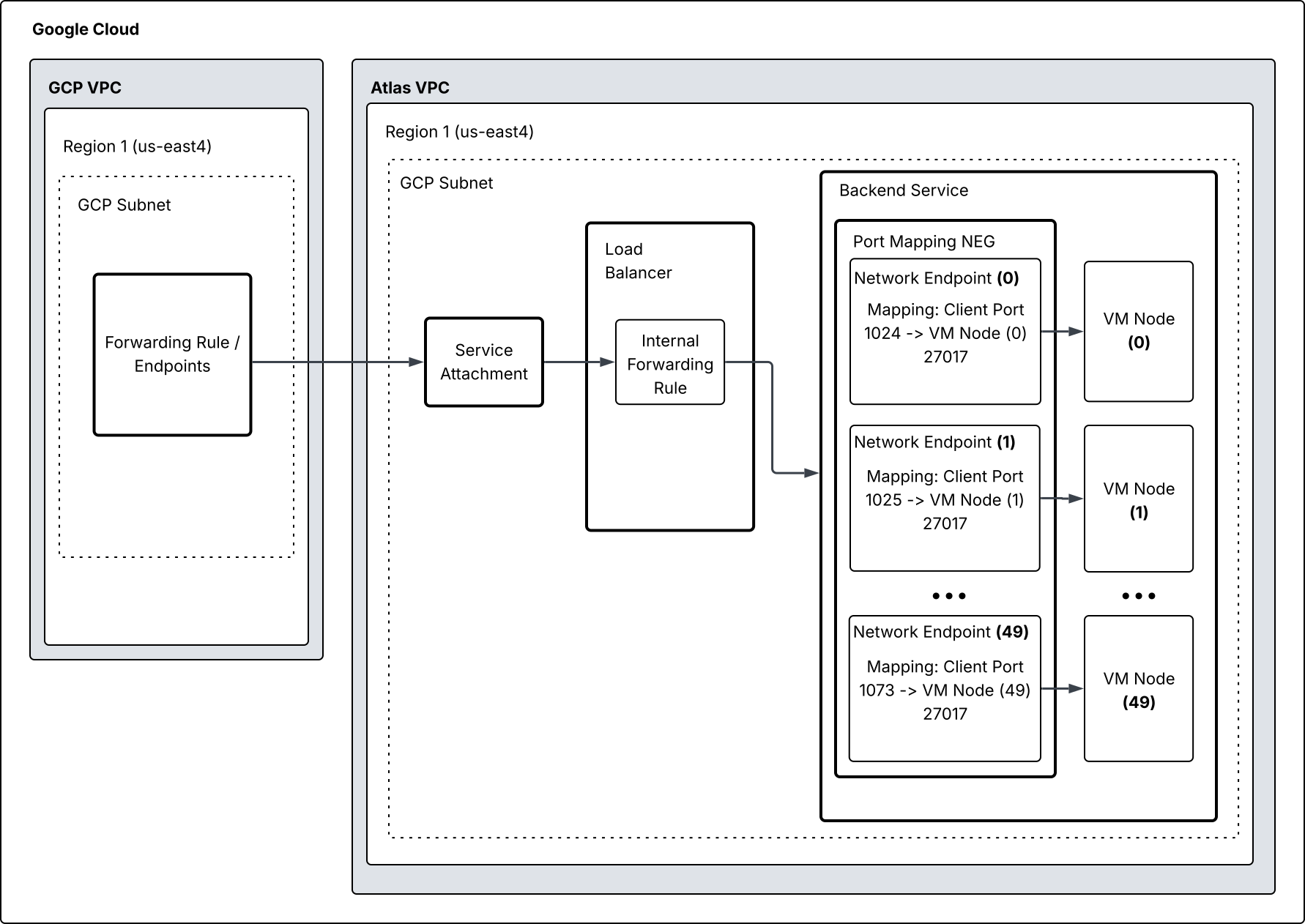
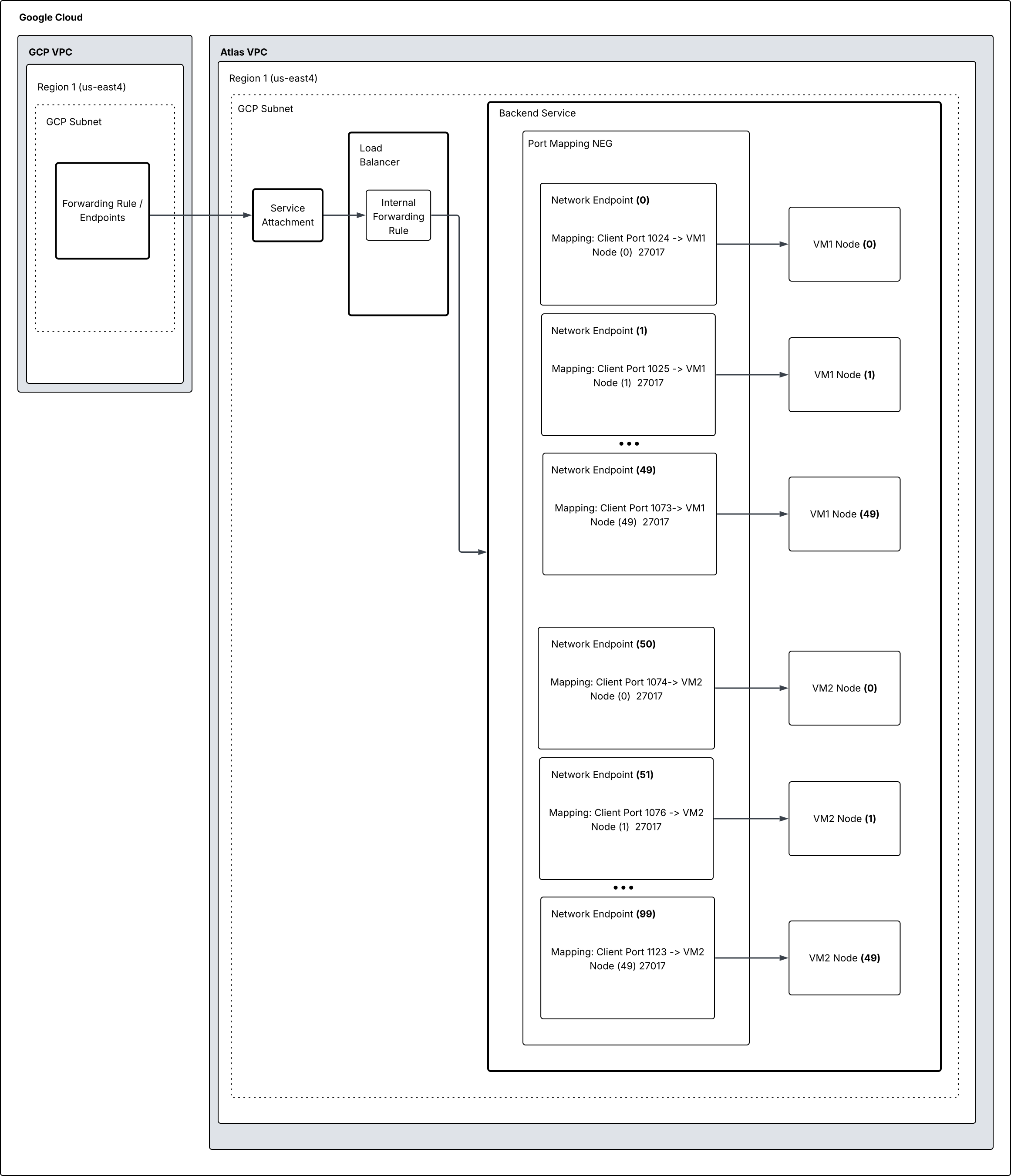
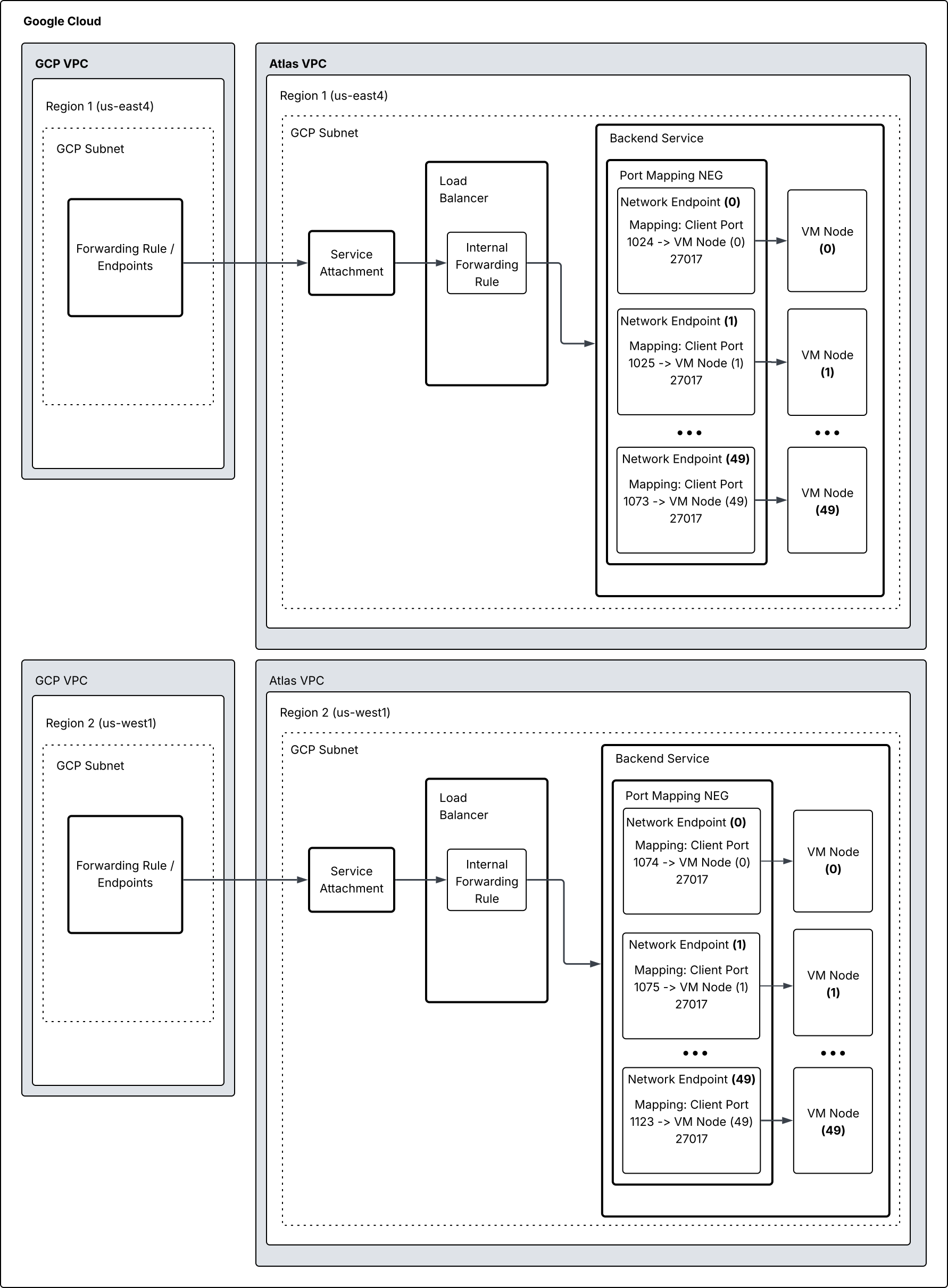
When you enable GCP Private Service Connect in Google Cloud, Atlas creates a private endpoint service using a service attachment and a load balancer.
Next, you create resources that establish a one-way connection from your VPC to the private endpoint service in Atlas using a private endpoint. The private endpoint service routes traffic to the load balancer for the clusters in the Atlas VPC.
The following diagram shows how GCP Private Service Connect establishes connections when you have one cluster in one region.
The following diagram shows how GCP Private Service Connect establishes connections when you have two clusters in one region.
The following diagram shows how GCP Private Service Connect establishes connections when you have one cluster in multiple regions.
Legacy Private Endpoints Support
Note
Port Mapping Architecture is the preferred architecture for new private endpoints in Google Cloud.
Legacy private endpoints without port mapping are still supported for existing Google Cloud clusters with private endpoints created before the release of GCP Private Service Connect port mapping, but you cannot create additional legacy endpoint services. However, you can continue to use existing legacy endpoints with full functionality, including adding and removing IP addresses from the access list, and connecting to clusters using the legacy private endpoint connection string.
Limitations and Considerations
For multi-region deployments, you can combine legacy and port mapped endpoint services, which lets you test port mapped endpoints before you finish migrating off legacy endpoints. Port mapped connection strings work only when a port mapped endpoint service exists in every region where the cluster is deployed. This requirement does not apply if you have a regionalized private endpoint.
For multi-cloud clusters, if both legacy endpoint and port mapped endpoint services exist for a given region, you must delete the legacy endpoint service before you can connect to the port mapped endpoint service.
Converting Legacy Private Endpoints to use Port Mapping Architecture
You can create new private endpoints for a given region using GCP Private Service Connect port mapping before deleting the legacy private endpoints for clusters in that region. After you create a new private endpoint and use the newly generated connection string in your application, confirm that the new private endpoint is working before deleting the legacy private endpoint.
Note
Connection strings for legacy private endpoints differ from port mapping connection strings. Specifically, legacy private endpoint connection strings include a pl-[index] pattern, whereas new connection strings include a psc-[index] pattern.
Multi-Cloud Considerations If you have a multi-cloud cluster, connection strings must use the pl-[index] pattern, even if you have port mapped private endpoints in the Google Cloud region. For example, if you have a GCP-only cluster in Region A with port-mapping uses clusterName-psc-0. However, after adding an AWS node and converting to a multi-cloud architecture, you must update the connection string to use the clusterName-pl-0 pattern.
If you start with an AWS-only cluster and then add a GCP node to create a multi-cloud architecture, you do not have to update the connection string.
Example API Request to Create a GCP Private Service Connect Port Mapping Private Endpoint
Note
This curl command uses a service account access token (OAuth 2.0) to authenticate instead of API keys. To learn more, see Get Started with the Atlas Administration API.
curl -4 -i --header "Authorization: Bearer {ACCESS-TOKEN}" \ --request POST \ --header "Content-Type: application/json" \ --header "Accept: application/vnd.atlas.2025-03-12+json" \ --data '{"providerName": "GCP", "region": "CENTRAL_US", "portMappingEnabled": true}' \ "https://mongodb.com/api/atlas/v2/groups/<group-id>/privateEndpoint/endpointService"
Note
To learn more about recommended configurations for multi-region setups, see Multi-Region Deployment Paradigm.
To ensure the availability of resources for both current and future clusters, Atlas performs the following actions when you enable this feature:
Connections to Atlas clusters using private endpoints offer the following advantages over other network access management options:
Connections using private endpoints are one-way. Atlas VPCs can't initiate connections back to your Google Cloud VPCs. This ensures your perceived network trust boundary is not extended.
You can connect to private endpoints within your VPC transitively from:
Another VPC peered to the private endpoint-connected VPC.
An on-premises data center connected with Google Cloud VPN to the private endpoint-connected VPC. This enables you to connect to Atlas directly from your on-premises data center without adding public IP addresses to the Atlas access list.
To set up a private endpoint, you must have Organization Owner, Project Owner, or Project Network Access Manager access to the project.
Considerations
High Availability
To ensure private endpoint connections to Atlas can withstand an availability zone outage, you should deploy subnets to multiple availability zones in a region.
You don't need to take additional actions to ensure that Azure private endpoint connections to Atlas can withstand an availability zone outage.
You don't need to take additional actions to ensure that Google Cloud private endpoint connections to Atlas can withstand an availability zone outage.
Multi-Region Support
GCP Private Service Connect now provides multi-region support for your Atlas clusters. You can configure global access to connect to private endpoints from a different Google Cloud region. By using global access, you can ensure high availability for your multi-region clusters, single-region deployments hosted in a different region than your own, and Google Cloud nodes in your multi-cloud deployments.
Max Incoming Connections
Atlas sets the limits for concurrent incoming connections based on the cluster tier and class. Atlas connection limits apply per node. For sharded clusters, Atlas connection limits apply per mongos router. The number of mongos routers is equal to the number of replica set nodes across all shards.
Your read preference also contributes to the total number of connections Atlas can allocate for a given query.
Example
Your M10 cluster has three nodes with a 1500 connection limit per node. Atlas reserves 10 connections per node. If you set your read preference to secondary, Atlas can read from the two secondary nodes for a combined 2980 connection limit.
To learn more about connection limits and increasing your limits, see Connection Limits and Cluster Tier.
Max Incoming Connections
Per GCP Private Service Connect, a single VM can accept a maximum concurrent 64,512 TCP connections. Even if you are on a higher cluster tier that has a maxIncomingConnection limit higher than 64,512, you can have only up to 64,512 concurrent connections per private endpoint. Google Cloud quarantines a connection for approximately two minutes after it closes so the achievable limit will be 64512 - (disconnect rate * 120). To learn more, see Max connections in the Google documentation.
For more concurrent connections, you may create multiple private endpoints for the same region.
Port Ranges Used for Private Endpoints
AWS PrivateLink supports 50 addressable targets, Atlas can use port 1024 through port 65535, but typically starts with port 1024. The ports can change under specific circumstances, including (but not limited to) cluster changes.
Important
MongoDB strongly recommends using the DNS seedlist private endpoint-aware connection string, so that DNS automatically updates the ports that AWS PrivateLink uses if they change. For the same reason, MongoDB also strongly recommends allow-listing the entire port range, instead of specific ports.
Azure Private Link supports 150 addressable targets. Atlas can use port 1024 through port 2524, but typically starts with port 1024. The ports can change under specific circumstances, including (but not limited to) cluster changes.
Important
MongoDB strongly recommends that you use the DNS seedlist private endpoint-aware connection string so that DNS automatically updates the ports that Azure Private Link uses if they change. For the same reason, MongoDB also strongly recommends allow-listing the entire port range instead of specific ports.
Atlas services are accessed through GCP Private Service Connect endpoints on ports 1024-65535. The ports can change under specific circumstances, including (but not limited to) cluster changes. You may have to update your firewall rules to allow egress traffic to the new ports.
Important
MongoDB strongly recommends using the DNS seedlist private endpoint-aware connection string, so that DNS automatically updates the ports that GCP Private Service Connect uses if they change. For the same reason, MongoDB also strongly recommends allow-listing the entire port range, instead of specific ports.
Private Endpoint-Aware Connection Strings
When you configure a private endpoint, Atlas generates DNS seedlist and standard private endpoint-aware connection strings:
DNS seedlist connection
mongodb+srv://cluster0-pl-0.k45tj.mongodb.net Standard connection string
mongodb://pl-0-us-east-1.k45tj.mongodb.net:1024,pl-0-us-east-1.k45tj.mongodb.net:1025,pl-0-us-east-1.k45tj.mongodb.net:1026/?ssl=true&authSource=admin&replicaSet=Cluster0-shard-0-shard-0
When a client in your VPC connects to an Atlas cluster using one of these private endpoint-aware connection strings, the client attempts to establish a connection to the load balancer in the Atlas VPC through one of the interface endpoints. Your client's DNS resolution mechanism handles which of the interface endpoints the hostname resolves to. If one interface endpoint is unavailable the next is used. This is opaque to the driver or other connection mechanism. The driver is only aware of the hostname in the SRV record or in the connection string.
SRV Record for DNS Seedlist Private Endpoint-Aware Connection Strings
The following example shows the SRV record for an AWS PrivateLink -enabled single-region cluster, showing three unique ports defined for pl-0-us-east-1.k45tj.mongodb.net:
nslookup -type=SRV _mongodb._tcp.cluster0-pl-0.k45tj.mongodb.net Server: 127.0.0.53 Address: 127.0.0.53#53 Non-authoritative answer: _mongodb._tcp.cluster0-pl-0.k45tj.mongodb.net service = 0 0 1026 pl-0-us-east-1.k45tj.mongodb.net. _mongodb._tcp.cluster0-pl-0.k45tj.mongodb.net service = 0 0 1024 pl-0-us-east-1.k45tj.mongodb.net. _mongodb._tcp.cluster0-pl-0.k45tj.mongodb.net service = 0 0 1025 pl-0-us-east-1.k45tj.mongodb.net.
In the preceding example:
_mongodb._tcp.cluster0-pl-0.k45tj.mongodb.netis the SRV record that themongodb+srv://cluster0-pl-0.k45tj.mongodb.netconnection string references.pl-0-us-east-1.k45tj.mongodb.netis the hostname for each node in one Atlas cluster in one region for which you have configured AWS PrivateLink.1024,1025, and1026are unique ports that Atlas assigns on the load balancer for each Atlas replica set node in the region for which you enabled AWS PrivateLink. All nodes in an Atlas replica set are accessible via the same hostname, with the load balancer resolving individual nodes by their unique port.
Hostname DNS Resolution in Private Endpoint-Aware Connection Strings and SRV Records
The hostname in the SRV record and the standard connection string is a DNS Canonical Name (CNAME) record that resolves to the endpoint-specific regional DNS name that AWS generates for the interface endpoint. A DNS ALIAS record exists for each subnet in your VPC that you deployed the interface endpoint to. Each ALIAS record contains the private IP address of the interface endpoint for that subnet.
The following example shows the DNS lookup for the hostname in the SRV record and in the standard connection string, including the endpoint-specific regional DNS name for the interface endpoint and its DNS ALIAS records:
nslookup pl-0-us-east-1.k45tj.mongodb.net Server: 127.0.0.53 Address: 127.0.0.53#53 Non-authoritative answer: pl-0-us-east-1.k45tj.mongodb.net canonical name = vpce-024f5b57108c8d3ed-ypwbxwll.vpce-svc-02863655456245e5c.us-east-1.vpce.amazonaws.com. Name: vpce-024f5b57108c8d3ed-ypwbxwll.vpce-svc-02863655456245e5c.us-east-1.vpce.amazonaws.com Address: 10.0.30.194 Name: vpce-024f5b57108c8d3ed-ypwbxwll.vpce-svc-02863655456245e5c.us-east-1.vpce.amazonaws.com Address: 10.0.20.54
When you configure a private endpoint, Atlas generates DNS seedlist and standard private endpoint-aware connection strings:
DNS seedlist connection
mongodb+srv://cluster0-pl-0.uzgh6.mongodb.net Standard connection string
mongodb://pl-0-westeurope-azure.gmmteo.mongodb.net:1024,pl-0-westeurope-azure.gmmteo.mongodb.net:1025,pl-0-westeurope-azure.gmmteo.mongodb.net:1026/
When a client in your VNet connects to an Atlas cluster using one of these private endpoint-aware connection strings, the client attempts to establish a connection to the Private Link Service in the Atlas VNet through the private endpoint's network interface. The Private Link service sends traffic through an Azure Standard Load Balancer to the Atlas cluster nodes that you deployed in that region. Your client's DNS resolution mechanism handles resolving the hostname to the network interface's private IP address. The driver is only aware of the hostname in the connection string, listening on one port for each node in the cluster's replica set.
SRV Record for DNS Seedlist Private Endpoint-Aware Connection Strings
The following example shows the SRV record for an Azure Private Link-enabled single-region cluster, showing three unique ports defined for pl-0-eastus2.uzgh6.mongodb.net:
nslookup -type=SRV _mongodb._tcp.cluster0-pl-0.uzgh6.mongodb.net Server: 127.0.0.53 Address: 127.0.0.53#53 Non-authoritative answer: _mongodb._tcp.cluster0-pl-0.uzgh6.mongodb.net service = 0 0 1024 pl-0-eastus2.uzgh6.mongodb.net. _mongodb._tcp.cluster0-pl-0.uzgh6.mongodb.net service = 0 0 1025 pl-0-eastus2.uzgh6.mongodb.net. _mongodb._tcp.cluster0-pl-0.uzgh6.mongodb.net service = 0 0 1026 pl-0-eastus2.uzgh6.mongodb.net.
In the preceding example:
_mongodb._tcp.cluster0-pl-0.uzgh6.mongodb.netis- the SRV record that the connection string references.
pl-0-eastus2.uzgh6.mongodb.netis the hostname for- each node in one Atlas cluster in one region for which you have configured Azure Private Link.
1024,1025, and1026are unique ports that- Atlas assigns on the load balancer for each Atlas replica set node in the region for which you enabled Azure Private Link. All nodes in an Atlas replica set are accessible via the same hostname, with the load balancer resolving individual nodes by their unique port.
Hostname DNS Resolution in Private Endpoint-Aware Connection Strings and SRV Records
The hostname in the SRV record and the standard connection string is an DNS A record that resolves to the private IP address of the private endpoint's network interface.
The following example shows the DNS lookup for the hostname in the SRV record and in the standard connection string:
nslookup pl-0-eastus2.uzgh6.mongodb.net Server: 127.0.0.53 Address: 127.0.0.53#53 Non-authoritative answer: Name: pl-0-eastus2.uzgh6.mongodb.net Address: 10.0.0.4
When you configure a private endpoint, Atlas generates DNS seedlist and standard private endpoint-aware connection strings:
DNS seedlist connection
mongodb+srv://cluster1-psc-0.4uyx2d.mongodb.net Standard connection string
mongodb://pl-0-us-east1-gcp.4uyx2d.mongodb.net:1024,pl-0-us-east1-gcp.4uyx2d.mongodb.net:1025,pl-0-us-east1-gcp.4uyx2d.mongodb.net:1026/?ssl=true&authSource=admin&replicaSet=atlas-uiq444-shard-0
When a client in your network connects to an Atlas cluster using one of these private endpoint-aware connection strings, the client attempts to establish a connection to the service attachments in the Atlas VPC through the private endpoints. The service attachments send traffic through Google Cloud internal load balancers to the Atlas cluster nodes that you deployed in that region. Your client's DNS resolution mechanism handles resolving the hostname to the endpoint's private IP address.
(Optional) Optimize Connection to Sharded Clusters Behind a Private Endpoint for AWS
Atlas can generate an optimized SRV connection string for sharded clusters using the load balancers from your private endpoint service. When you use an optimized connection string, Atlas limits the number of connections per mongos between your application and your sharded cluster. The limited connections per mongos improve performance during spikes in connection counts.
Atlas doesn't support optimized connection strings for clusters that run on Google Cloud or Azure. To learn more about optimized connection strings for sharded clusters behind a private endpoint, see How can I optimize connection performance for sharded clusters using private endpoints?.
IP Access Lists and Network Peering Connections with Private Endpoints
When you enable private endpoints, you can still enable access to your Atlas clusters using other methods, such as adding public IPs to IP access lists and network peering.
Clients connecting to Atlas clusters using other methods use standard connection strings. Your clients might have to identify when to use private endpoint-aware connection strings and standard connection strings.
Multi-Cloud Deployment Connections
When you use a private endpoint to connect to a multi-cloud deployment, you can access only the nodes hosted in the cloud service provider and region that you're connecting from. To access all nodes in your multi-cloud deployment, use alternative connection methods described in the Connections to Multi-Cloud Deployments section in the "Configure High Availability and Workload Isolation" topic.
(Optional) Regionalized Private Endpoints for Multi-Region Sharded Clusters
For global sharded clusters that you deploy in multiple regions, if you need to connect to Atlas using a private endpoint from networks that can't be peered with one another, you can deploy multiple private endpoints to a region.
You can deploy any number of private endpoints to regions that you deployed your cluster to. Each regional private endpoint connects to the mongos instances in that region.
WARNING: Your connection strings to existing multi-region and global sharded clusters change when you enable this setting.
You must update your applications to use the new connection strings. This might cause downtime.
You can enable this setting if your Atlas project contains only sharded clusters.
You can't disable this setting if you have:
More than one private endpoint in more than one region, or
More than one private endpoint in one region and one private endpoint in one or more regions.
You can only create sharded clusters when you enable the regionalized private endpoint setting. You can't create replica sets.
To use this feature, you must enable the regionalized private endpoint setting.
To enable or disable the regionalized private endpoint setting:
Enable Regionalized Private Endpoints
To enable the regionalized private endpoint setting for your project using the Atlas CLI, run the following command:
atlas privateEndpoints regionalModes enable [options]
To learn more about the command syntax and parameters, see the Atlas CLI documentation for atlas privateEndpoints regionalModes enable.
Disable Regionalized Private Endpoints
To disable the regionalized private endpoint setting for your project using the Atlas CLI, run the following command:
atlas privateEndpoints regionalModes disable [options]
To learn more about the command syntax and parameters, see the Atlas CLI documentation for atlas privateEndpoints regionalModes disable.
View Regionalized Private Endpoint Settings
To return the regionalized private endpoint settings for your project using the Atlas CLI, run the following command:
atlas privateEndpoints regionalModes describe [options]
To learn more about the command syntax and parameters, see the Atlas CLI documentation for atlas privateEndpoints regionalModes describe.
Enable Regionalized Private Endpoints
In Atlas, go to the Project Settings page.
If it's not already displayed, select the organization that contains your desired project from the Organizations menu in the navigation bar.
If it's not already displayed, select your desired project from the Projects menu in the navigation bar.
In the sidebar, click the icon next to Project Overview.
The Project Settings page displays.
Disable Regionalized Private Endpoints
In Atlas, go to the Project Settings page.
If it's not already displayed, select the organization that contains your desired project from the Organizations menu in the navigation bar.
If it's not already displayed, select your desired project from the Projects menu in the navigation bar.
In the sidebar, click the icon next to Project Overview.
The Project Settings page displays.
Manage Accepted Endpoint Regions
Warning
Migrating from Multiple Endpoint Services to Single Endpoint Service
To migrate from multiple endpoint services to a single endpoint service that supports multiple endpoints, you must terminate the endpoints and endpoint services in the other regions first. This migration requires downtime.
The migration process includes:
Terminating endpoints in other regions
Terminating endpoint services in other regions
Provisioning new endpoints in your VPCs or VNets to connect to the remaining endpoint service
Updating application connection strings (which might require an application restart)
Downtime occurs between terminating the other endpoints and updating your application to use the correct connection string.
You can configure which AWS regions can connect to your private endpoint service. This enables cross-region private endpoint connectivity, allowing applications in different AWS regions to connect to your Atlas clusters through private endpoints.
To add or remove accepted endpoint regions:
Note
Cross-region private endpoint connectivity allows you to configure which AWS regions can connect to your private endpoint service, enabling applications in different regions to access your Atlas clusters through private endpoints.
In Atlas, go to the Database & Network Access page for your project.
If it's not already displayed, select the organization that contains your project from the Organizations menu in the navigation bar.
If it's not already displayed, select your project from the Projects menu in the navigation bar.
In the sidebar, click Database & Network Access under the Security heading.
The Database & Network Access page displays.
Configure your endpoints in the accepted regions.
After you add accepted endpoint regions, you must create the corresponding interface endpoints in those regions within your AWS account. To learn more about creating interface endpoints, see Set Up a Private Endpoint for a Dedicated Cluster.
Connecting to Multi-Region Clusters Without Regionalized Private Endpoints or Cross-Region Private Link
If you use AWS PrivateLink and have applications that connect to multi-region clusters that have endpoints in different regions but are not using regionalized private endpoints, ensure that those applications can reach endpoints in the other regions. For example, to do this with AWS, you can peer the VPCs that contain the endpoints on their side.
Azure Private Link supports cross-region connectivity natively. To configure it, choose a different region for your private endpoint than the region of the underlying private endpoint service.
Your application and the private endpoint that it connects through must reside in the same Azure region. Your Atlas cluster can reside in any region. To connect from a different region, select that region from the Private Endpoint Region list when you create the private endpoint. To learn more, see Set Up a Private Endpoint for a Dedicated Cluster.
GCP Private Service Connect requires the private endpoint to reside in the same region as the private endpoint service. To connect to a private endpoint from a different Google Cloud region, configure global access. To learn more, see High Availability.
Avoiding Downtime When Removing Private Endpoints
For multi-region clusters, you must create a private endpoint for each region with a node.
If you're performing maintenance on a multi-region cluster, do not alter or remove private endpoints until maintenance is complete to avoid cluster downtime.
If you're moving from a multi-region to a single-region cluster, you can remove old private endpoints only after verifying that your cluster is fully functional in the new single-region setup and you've directed all traffic through the new single-region private endpoint.
Limitations
- Free clusters (formerly known as
M0) and Flex clusters do not support connecting through a private endpoint.
AWS PrivateLink must be active in all regions where you deploy a multi-region cluster. If you configure AWS PrivateLink for only some of the cluster regions, the private endpoint configuration is incomplete for the multi-region deployment. In this state, Atlas might not publish or continue resolving the private endpoint SRV connection string, and DNS resolution for the private endpoint hostname might fail.
If you try to use a previously available private endpoint SRV connection string while AWS PrivateLink isn't active in all required regions, you might receive an error similar to the following:
querySrv ENOTFOUND _mongodb._tcp.abcd-pl-0.ab123c.mongodb.net To resolve this error, configure and activate AWS PrivateLink for each region where you deploy the cluster. After AWS PrivateLink is active for all required regions, Atlas publishes the private endpoint SRV connection string and it resolves successfully.
Cross-region private endpoint connectivity is supported in all AWS regions where AWS supports cross-region PrivateLink and the region is available on Atlas. To learn more about AWS PrivateLink cross-region support, see the AWS PrivateLink documentation.
If you deploy nodes in more than one region and enable an endpoint service for each region, each endpoint service can accept a maximum of one endpoint from any given supported remote region.
Example Scenarios:
Scenario 1: One Endpoint Service per Region Supporting One Endpoint Each
This configuration applies to multi-region clusters where you deploy nodes in more than one region, and you enable a separate endpoint service for each region.
Endpoint Service (EPS)LimitationEndpoint service for
us-east-1Can accept a maximum of one private endpoint from any supported region (for example, one from
us-east-1, one fromus-west-2, or one fromap-southeast-2). This includes endpoints from the endpoint service's own region.Endpoint service for
eu-west-1Can accept a maximum of one private endpoint from any supported region (for example, one from
eu-west-1, one fromus-west-1, or one fromus-west-2). This includes endpoints from the endpoint service's own region.Example: If your cluster has nodes in
us-east-1andeu-west-1, you will have two endpoint services. Theus-east-1endpoint service can accept a single connection from a remote region likeus-west-2. If you need a second connection fromus-west-2, you must use theeu-west-1endpoint service.Scenario 2: One Endpoint Service Supporting Multiple Endpoints
This configuration allows a single endpoint service to accept multiple private endpoints, but only if the Atlas cluster nodes are deployed in only one region and that region is the sole point of access.
Atlas Cluster ConfigurationEndpoint Service (EPS)ConnectivitySingle Region Cluster (for example, nodes only in
us-east-1)Endpoint service for
us-east-1Can connect multiple private endpoints from any supported region to this endpoint service (for example, three separate endpoints from
us-west-2and two endpoints fromus-east-1itself can connect to theus-east-1endpoint service).Example: If your cluster nodes are only in
us-east-1, the singleus-east-1endpoint service can support multiple endpoints (for example, five endpoints) originating from any supported region, including the endpoint service's own region (for example,us-west-2,us-east-1,eu-west-1).Important
This limitation applies across cloud providers. For example, if you create more than one private endpoint in a single region in AWS, you can't create private endpoints in Azure or any other AWS region.
See (Optional) Regionalized Private Endpoints for Multi-Region Sharded Clusters for an exception for multi-region and global sharded clusters.
To connect to Atlas clusters using AWS PrivateLink from regions in which you haven't deployed a private endpoint connection, you must peer VPCs in those regions to VPCs in a region in which you have deployed a private endpoint connection.
To learn about inter-region VPC peering, see the AWS documentation.
You can use AWS PrivateLink in Atlas projects with up to 50 addressable targets per region. If you need more than 50 addressable targets in a region:
Contact MongoDB Support, or
Use additional projects or regions to connect to addressable targets beyond this limit.
Addressable targets include:
Each
mongodinstance in a replica set deployment (sharded clusters excluded).Each sharded cluster deployment that use optimized connection strings.
Each
mongosinstance for sharded cluster deployments that use non-optimized connection strings.Each BI Connector for Atlas instance across all dedicated clusters in the project.
Note
To request a one-time increase to use AWS PrivateLink with up to 90 addressable targets per Atlas project, contact MongoDB Support.
Important
Some Atlas clusters on Azure created before 10/16/2020 use Azure networking hardware that is incompatible with Azure Private Link. You can still configure Azure Private Link for Atlas projects with these clusters to use with supported clusters in the project, but you will not be able to connect to the incompatible ones through Azure Private Link.
All new Atlas clusters are compatible with Azure Private Link. If you must connect to your cluster using only Azure Private Link, you can create a new cluster in the same Atlas project and migrate your data.
Azure Private Link must be active in all regions where you deploy a multi-region cluster. If you configure Azure Private Link for only some of the cluster regions, the private endpoint configuration is incomplete for the multi-region deployment. In this state, Atlas might not publish or continue resolving the private endpoint SRV connection string, and DNS resolution for the private endpoint hostname might fail.
If you try to use a previously available private endpoint SRV connection string while Azure Private Link isn't active in all required regions, you might receive an error similar to the following:
querySrv ENOTFOUND _mongodb._tcp.abcd-pl-0.ab123c.mongodb.net To resolve this error, configure and activate Azure Private Link for each region where you deploy the cluster. After Azure Private Link is active for all required regions, Atlas publishes the private endpoint SRV connection string and it resolves successfully.
You can do only one of the following:
Deploy nodes in more than one region, and have one private endpoint per region.
Have multiple private endpoints in one region, and no other private endpoints.
Important
This limitation applies across cloud providers. For example, if you create more than one private endpoint in a single region in Azure, you can't create private endpoints in AWS or any other Azure region.
See (Optional) Regionalized Private Endpoints for Multi-Region Sharded Clusters for an exception for multi-region and global sharded clusters.
Your application and the private endpoint that it connects through must reside in the same Azure region. Your Atlas cluster can reside in any region. To connect from a different region, select that region from the Private Endpoint Region list when you create the private endpoint. To learn more, see Manage Accepted Endpoint Regions.
You can also connect from a region that has no private endpoint connection. To do so, peer the VNets in that region to VNets in a region that has a private endpoint connection. To learn about Global VNet peering, see the Azure documentation.
You can use Azure Private Link in Atlas projects with up to 150 addressable targets per region. If you need more than 150 addressable targets in a region:
Contact MongoDB Support, or
Use additional projects or regions to connect to addressable targets beyond this limit.
Addressable targets include:
Azure Private Link does not allow more than 64k TCP connections per target, which might be lower than the maximum number of connections that a cluster can sustain.
GCP Private Service Connect must be active in all regions where you deploy a multi-region cluster. If you configure GCP Private Service Connect for only some of the cluster regions, the private endpoint configuration is incomplete for the multi-region deployment. In this state, Atlas might not publish or continue resolving the private endpoint SRV connection string, and DNS resolution for the private endpoint hostname might fail.
If you try to use a previously available private endpoint SRV connection string while GCP Private Service Connect isn't active in all required regions, you might receive an error similar to the following:
querySrv ENOTFOUND _mongodb._tcp.abcd-pl-0.ab123c.mongodb.net To resolve this error, configure and activate GCP Private Service Connect for each region where you deploy the cluster. After GCP Private Service Connect is active for all required regions, Atlas publishes the private endpoint SRV connection string and it resolves successfully.
You can do only one of the following:
Deploy nodes in more than one region, and have one private endpoint per region.
Have multiple private endpoints in one region, and no other private endpoints.
Important
This limitation applies across cloud providers. For example, if you create more than one private endpoint in a single region in Google Cloud, you can't create private endpoints in AWS or any other Google Cloud region.
See (Optional) Regionalized Private Endpoints for Multi-Region Sharded Clusters for an exception for multi-region and global sharded clusters.
You can have up to 150 nodes when you create Atlas projects that use GCP Private Service Connect in a single region. If you need to change the number of nodes, perform one of the following actions:
Contact MongoDB Support.
Use additional projects or regions to connect to nodes beyond this limit.
Note
If you have a legacy endpoint service in the same region that you have a port-mapped endpoint deployed, Atlas enforces the lesser of the two limits. This is either the default port-mapped limit of 150 or whatever you set
privateServiceConnectionsPerRegionGroupto be (a default of 50).If you configure dedicated Search Nodes for
M10+clusters in any Google Cloud region, Atlas doesn't count these nodes in the total count of addressable targets.To request a one-time increase to use GCP Private Service Connect with up to 200 nodes per Atlas project, contact MongoDB Support.
You can have up to 40 nodes when you create Atlas projects that use GCP Private Service Connect across multiple regions. This total excludes the following instances:
Google Cloud regions communicating with each other
Free clusters or Flex clusters
Google Cloud Private Service Connect supports up to 1024 outgoing connections per virtual machine. As a result, you can't have more than 1024 connections from a single Google Cloud virtual machine to an Atlas cluster.
To learn more, see the Google Cloud cloud NAT documentation.
Google Cloud Private Service Connect is region-specific. However, you can configure global access to access private endpoints from a different region.
To learn more, see Multi-Region Support.
Note
You can't use VPC peering to access private endpoints from a different region.
When you use Private Service Connect to connect to multi-region clusters, you can connect only to cluster nodes that are in the same region as the private endpoint. If the endpoint and the primary node are in different regions, you must:
Set your application's read preference to allow connections from a secondary node.
For example, you can set your application's read preference to secondaryPreferred.
Ensure at least one secondary node is in the same region as the endpoint.
When you create a new GCP Private Service Connect endpoint, its name must be unique within the group.
- Before you can deploy a private endpoint to a region, you must first resume any paused clusters in your project.
Prerequisites
To enable connections to Atlas using private endpoints, you must:
- Have a valid payment method already configured for your organization.
Configure the private endpoint in the same region as the Atlas cluster that you want to connect to.
Have either the
Project OwnerorOrganization Ownerrole in Atlas.Have an AWS user account with an IAM user policy that grants permissions to create, modify, describe, and delete endpoints. For more information on controlling the use of interface endpoints, see the AWS Documentation.
(Recommended): Install the AWS CLI.
If you have not already done so, create your VPC and EC2 instances in AWS. See the AWS documentation for guidance.
Have either the
Project OwnerorOrganization Ownerrole in Atlas.Install the Azure CLI.
If you have not already done so, create your VNet and Compute instances in Azure. See the Azure documentation for guidance.
Have either the
Project OwnerorOrganization Ownerrole in Atlas.Have a Google Cloud user account with an IAM user policy and a Compute Network Admin role that grants permissions to create, modify, and delete networking resources. For more information on managing private endpoints and connections, see the GCP documentation.
If you have not already done so, create your VPC and Compute instances in Google Cloud. See the GCP documentation for guidance.
Make sure egress firewall rules permit traffic to the internal IP address of the GCP Private Service Connect endpoint.
(Optional) If you enforce a security perimeter with VPC service controls (VPC-SC), you must create ingress and egress rules to establish the connection between the GCP Private Service Connect endpoint and Atlas clusters. See the GCP documentation for guidance.
Enable global access to use Private Service Connect to connect to Atlas clusters in different regions.