Hybrid deployments refer to architectures where applications and databases span multiple environments. In the context of Atlas, hybrid deployments involve two distinct architectural patterns:
Hybrid Connectivity: Applications run in one environment, for example on-premises or in a customer-managed VPC, while the database runs in Atlas. This is the default enterprise reality and the most common hybrid deployment pattern.
Hybrid Data Topology: MongoDB data exists in multiple environments, such as both Atlas and on-premises. This is a less common and more complex pattern that is typically used during migrations or for specialized use cases.
Hybrid Connectivity
Hybrid connectivity deployments run applications in one environment while the database runs in Atlas. Data lives entirely in Atlas. Hybrid refers to where the application runs, not where the database lives.
Use Cases
Hybrid connectivity is the default reality for most enterprise deployments. Common examples include a combination of the following:
Application servers on-premises that connect to Atlas in AWS, Azure, or GCP.
Applications or Kubernetes workloads in a customer VPC that connect to Atlas through Private Endpoints.
Legacy applications in a data center that connect to Atlas over VPN or Direct Connect.
Key Requirements
When you implement hybrid connectivity, consider the following requirements:
Unified Networking: Establish secure network connectivity using VPN, AWS Direct Connect, Azure ExpressRoute, or similar technologies from other cloud service providers. Secure network connectivity helps to ensure no public Internet exposure.
Private Connectivity: Use private IPs and private DNS to connect to Atlas. Configure Private Endpoints for secure connections that do not traverse the public Internet.
Shared Identity and Access: Implement SSO and IAM integration to maintain consistent authentication and authorization across environments.
Consistent Security and Governance: Apply unified security policies, including IP allowlists, X.509 certificates, and network access controls.
Latency Predictability: Design network paths to minimize and stabilize latency between application servers and Atlas clusters.
Operational Ownership Boundaries: Clearly define which teams manage which components of the infrastructure.
The following diagram illustrates a typical hybrid connectivity architecture:
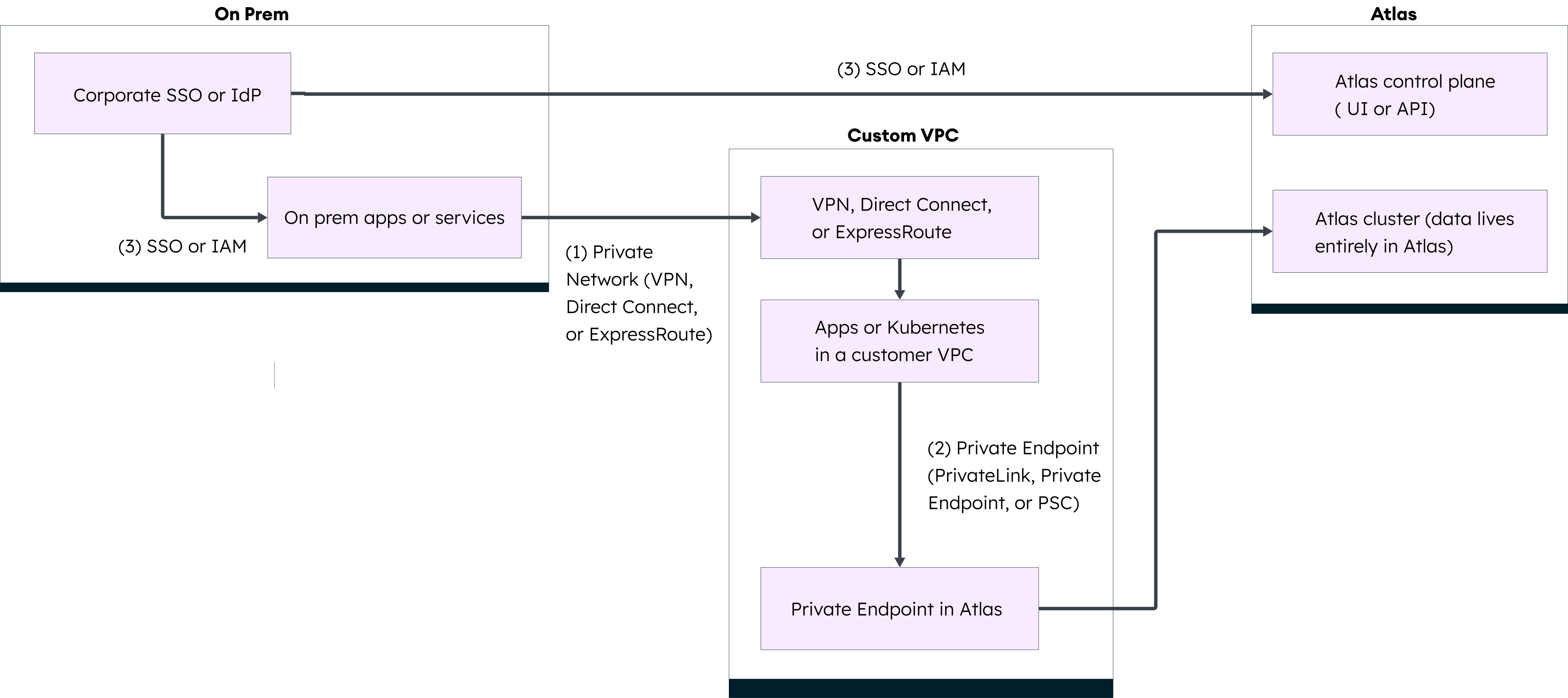
Hybrid connectivity architecture showing on-premises applications, customer VPC, and Atlas cluster connected through secure network paths and Private Endpoints.
Configuration
To configure hybrid connectivity:
Set up network connectivity between your on-premises or customer-managed environment and the cloud provider hosting your Atlas cluster. Use VPN, Direct Connect, ExpressRoute, or similar technologies.
Configure Private Endpoints in Atlas to enable private connectivity from your environment.
Configure authentication and access controls. See Guidance for Atlas Authentication and Guidance for Atlas Authorization.
Test connectivity and latency from your application environment to Atlas.
Hybrid Data Topology
Hybrid data topology deployments involve MongoDB data that exists in multiple environments, such as both Atlas and on-premises. Hybrid data topologies are advanced patterns with significant operational complexity.
Important
Atlas does not support splitting a single cluster to span multiple deployment types. Each cluster must exist entirely within Atlas or entirely on-premises.
Use Cases
Hybrid data topologies are less common than hybrid connectivity deployments. Organizations typically use them for:
Migration: Transitional hybrid states during cloud adoption where data is gradually moved from on-premises to Atlas.
Specialized Requirements: Advanced use cases that require you to maintain separate MongoDB deployments in multiple environments.
Examples include:
An Atlas cluster and a separate on-premises MongoDB cluster, with applications that connect to one or both depending on requirements.
Using MongoDB tools to migrate data from on-premises to Atlas.
Important Considerations
Hybrid data topologies come with significant tradeoffs:
Operational Burden: Separate MongoDB deployments that you manage increase operational complexity and require additional expertise.
Data Consistency: Consistency across separate deployments is challenging to maintain and may require custom solutions.
Temporary Nature: These patterns are often temporary during migration rather than long-term architectures.
Contact the MongoDB's Professional Services team for guidance on implementing hybrid data topology patterns.
Configuration
To configure a hybrid data topology:
Do one of the following steps to configure your self-managed deployments:
Install MongoDB for self-managed deployments.
Create a local Atlas deployment with the Atlas CLI for development and testing.
If you migrate data, see Migrate or Import Data for guidance on how to use MongoDB tools.
Cloud Deployment Options
Atlas supports the following cloud deployment types:
Single-region is typically used when cost is a factor and the low risk of regional failure is acceptable.
Multi-region is typically used to enhance protection in the case of a regional outage and to improve the performance and availability for applications by locating data closer to users.
Multi-cloud is typically used to avoid vendor lock-in and enhance availability across multiple cloud providers.
Configure Cloud Deployments
To learn how to configure cloud deployments and learn about the different types of nodes you can add, see Create a Cluster in the Atlas documentation.
Self-Managed Deployment Options
You can create self-managed deployments using:
MongoDB Enterprise is typically used for production, testing, and development environments that have additional requirements for advanced security, operations, and integrations.
MongoDB Community is typically used for development and testing environments that require additional or bespoke configuration.
MongoDB Atlas Local Deployment is driven using the Atlas CLI, deployed using Docker, and typically used for simple, complete local deployments for development scenarios.
Install MongoDB for Self-Managed Deployments
To learn how to configure an on-premises self-managed deployment, see Install MongoDB for self-managed deployments in MongoDB Enterprise or MongoDB Community.
Create a Local Deployment
To learn how to configure a local deployment with the Atlas CLI for development and testing, see Create a Local Atlas Deployment.