Hello Support,
We have created Serverless Cluster and we can connect to DB using SRV connection string but unable to use the Connection String Scheme “MongoDB” as below:
mongodb://****:*****@cluster.###.mongodb.net:27017/?retryWrites=true&w=majority&tls=true&authMechanism=SCRAM-SHA-1
We have also added 0.0.0.0/0 in Network Access List to connect from anywhere.
We are getting the following error: “The server is being accessed through a load balancer, but this driver does not have load balancing enabled”
Actually, we are trying to connect MongoDB in Gatsby Application using " gatsby-source-mongodb" plugin and we are unable to use SRV connection as Gastby is using mongo driver less that 4.1 so we can only connect using Connection String Scheme = “MongoDB”
Also, the same error we are getting in Mongo Compass as well.
Can you please help us?
Regards,
Raman Kumar
Hi @Raman_Kumar …
This is a community forum, not official Atlas support, though MongoDB employees do participate in these forums.
If you want Atlas support, there’s a dropdown on your Atlas dashboard for that:
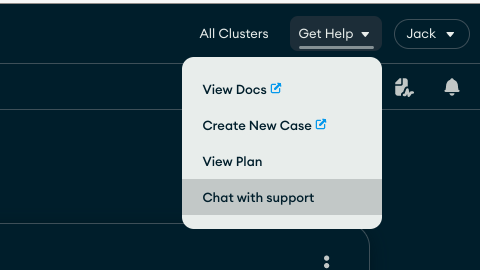
Though I would say that it sounds like the driver you are using is not up to the task.
1 Like
chris
(Chris Dellaway)
3
Hi @Raman_Kumar
A serverless instance is not going to work in this situation. As the error suggest the option loadBalanced=true is needed and this requires a driver version higher than what you have available.
A shared or dedicated instance should work.
https://www.mongodb.com/docs/atlas/reference/serverless-instance-limitations/#minimum-driver-versions-for-serverless-instances