I’m new with mongodb. I’ve tried to add new entry and get this error.
[SSL: CERTIFICATE_VERIFY_FAILED] certificate verify failed: unable to get local issuer certificate (_ssl.c:997)
1 Like
Jack_Woehr
(Jack Woehr)
2
Are you getting this Compass or mongosh or in a program?
If your installation has a self-signed certificate, you have to tell MongoDB tooling where to get a copy of the acceptable certificate.
E.g., in PHP, you’d connect something like
new MongoDB\Client($mongodb_uri, b['tls' => true, 'tlsCAFile' => $mongodb_cert_path]);
1 Like
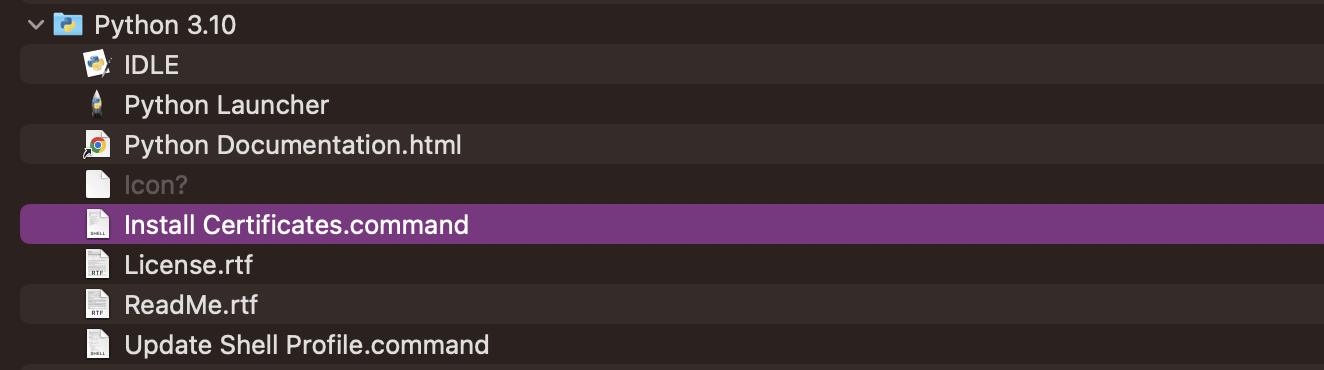
I saw an answer that worked for me, it appears i had not yet installed the python certificates on my mac, so from the following path i went and installed it
/Applications/Python 3.10/Install Certificates.command
Only change the version of your python, after that everything, worked fine for me
PS: I had been trying to solve the problem for half a day, I even asked ChatGPT
5 Likes
Unfortunately that didn’t help
Using pyCharm, macOs Ventura 13.1
Full code:
from pymongo import MongoClient
cluster = MongoClient('mongodb+srv://pystudy:<password>@cluster0.fyglnvy.mongodb.net/?retryWrites=true&w=majority')
db = cluster['test']
collection = db['test']

post = {'_id': 0, 'name': 'Jeff', 'score': 9}
collection.insert_one(post)
open a new terminal and follow these (use “python” and “pip” if “python3” and “pip3” does not work):
- create a test folder and cd into it:
mkdir test && cd test
- create clean environment
python3 -m venv .venv (do MacOS use python or python3 for v3.x? )
- and activate it:
.venv/Scripts/activate
- install pymongo only :
pip3 install pymongo
- you should see this clean list:
pip3 list (versions might change)
Package Version
dnspython 2.3.0
pip 22.2.2
pymongo 4.3.3
setuptools 63.2.0
- and start python repl:
python3
- copy-paste your code above (replace password) and run in the repl.
if your code works this way, then the installation pycharm uses might be broken and need a repair or full reinstllation. (or pycharm is broken)
if not, then either your system has a problem or you messed with some settings in Atlas (I can’t point any).
This worked for me.
Thank you mate!
Jim_Olivi
(Jim Olivi)
8
I had similar problems and it felt like I tried everything. MacOS Ventura 13.2.1, PyCharm 2022.3.3 Professional, Python 3.11.2
The final fix…
I rebooted!!!
So, some of these changes don’t take effect until a complete reboot.
1 Like
For me - After a few hours I found this thread that said that I need to open the client using certifi
Able to use Compass with no problems, Atlas UI all looks good but couldn’t connect using Python.
Using Python 3.11, pymongo==3.11, Mac Monterey, VS Code
As a newbie I am disappointed that I had to spend a lot of time on ChatGPT and Google to resolve this.
Not a fantastic first impression but happy to blame myself for something i missed - maybe others will miss whatever I missed too…
Upgrading from pip3 23.2.1 to 24.0 fixed this issue for me. No clue why!
1 Like
Thank you, I had to do it after upgrading Python to 3.11
wow still working on Sep 2024, looks like Mac does not install certificates by default, but the file is there, just go to the folder applications/ python 12.5 and click on install certificates, everything works after that
The error [[SSL: CERTIFICATE_VERIFY_FAILED](https://cheapsslweb.com/blog/ssl-certificate-verify-failed-error-in-python/)] means your system can’t verify MongoDB’s SSL certificate—usually because it’s missing the root or intermediate certificates. This often happens if you’re using Python (like with pymongo) on macOS or Windows without proper certificates installed. A quick fix is to disable certificate validation (only for testing!) using ssl_cert_reqs=ssl.CERT_NONE in your connection string. For a secure fix, download and install the missing CA certificates or update your system’s certificate store. Avoid skipping SSL checks in production environments.