In case anyone else ends up here. @Alexi_Antonino I did e-mail you, but did not end up getting a reply? In any case, we ended up tracking down the issue to the Federated database being on a rotating IP address. There doesn’t appear to be any documentation related to this. Obviously letting all connections through our firewall is not a long term solution. Is there a way to force the federated database to a static IP?
You can get a list of all possible IP’s with Return All IP Addresses for One Project
Or you could configure the hostname in your firewall instead of a IP.
Or have a look at Set Up a Private Endpoint for a Federated Database Instance
Thank you for the reply @Wernfried_Domscheit . Attempted two of your suggestions to no avail. “Return All IP Addresses for One Project” API endpoint does not include the federated database IP addresses. So whitelisting the IPs returned from this endpoint will result in a connection failure to the federated databases. Whitelisting the hostname also failed because it doesn’t resolve to a static IP address.
Is setting up a private endpoint the only way around this issue? Not particularly keen on that option due to restrictions on cloud resources within our org.
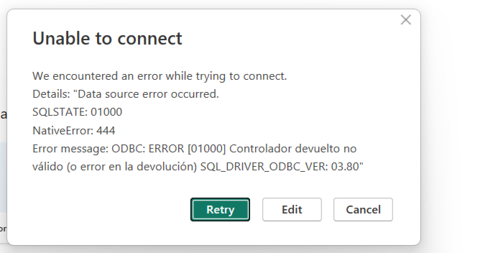
Hi! I have tried everything you have shared and still getting this error:
Welcome to the community. This error results from a failure to connect and is usually from: Incorrect credentials, bad/wrong SQL URI/Connection string, or IP Address is not whitelisted. I have also seen systems that have fire walls in place that block connection too.
@Carolina_Silveira - do you have a private endpoint configured for this Federated DB? A private endpoint can add another layer to this.
Are you able to connect to this federated db instance from Compass? Not connection to the cluster, but to the federated db instance with the same user credentials as used from Power BI.