Hello @Alexi_Antonino ,
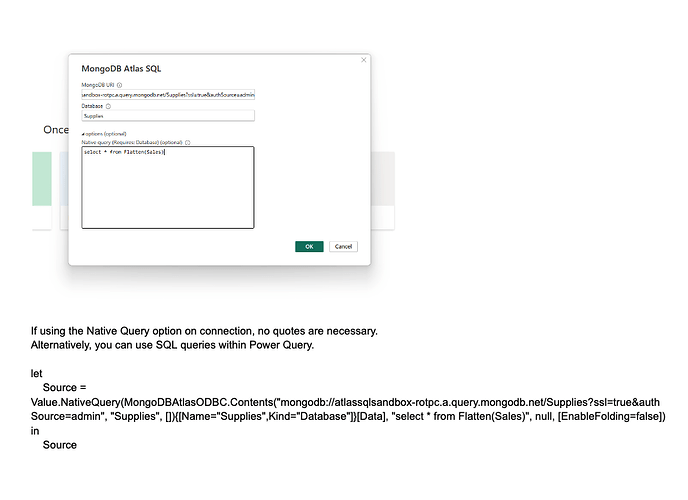
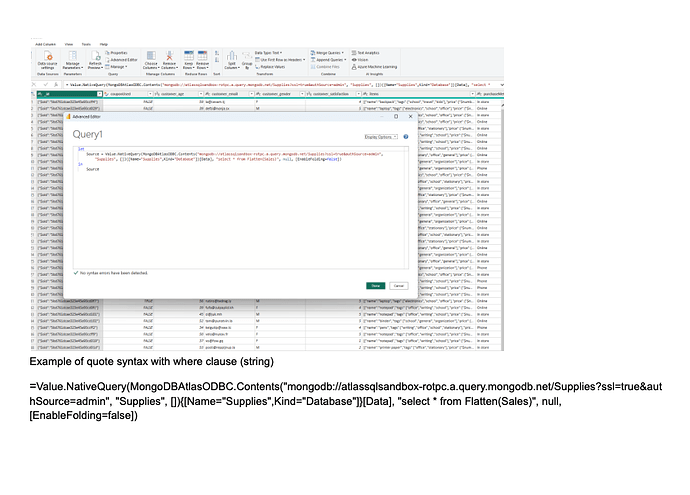
Following the solution you preconize, I manage to make working a Power BI Desktop connexion to MongoDB Atlas using Atlas SQL with Power BI connector installed on my local machine.
Now I would like to deploy to Power BI Service and have data refreshed automaticaly.
I understand that I could do the same kind of connexion using de Power BI Gateway on premise.
So I am wondering if I could use MongoDB Atlas Business Intelligence Connector.
That would avoid the gateway dependency.
Thanks
Vinzce
Hello @Vincent_Quillet - welcome to the community. While you may use the BI Connector, it too requires an on-premise gateway when using Power BI Service. Also, Atlas SQL will eventually replace Atlas BI Connector.
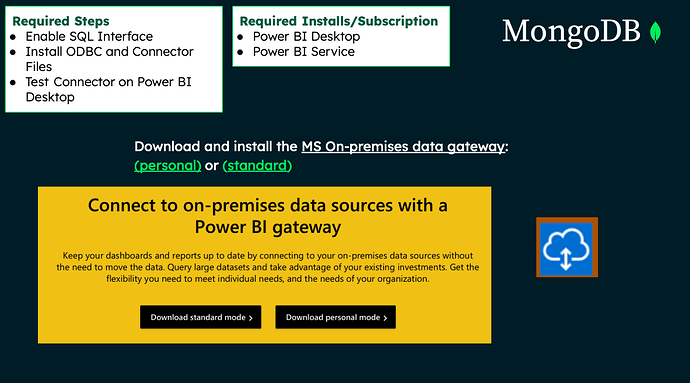
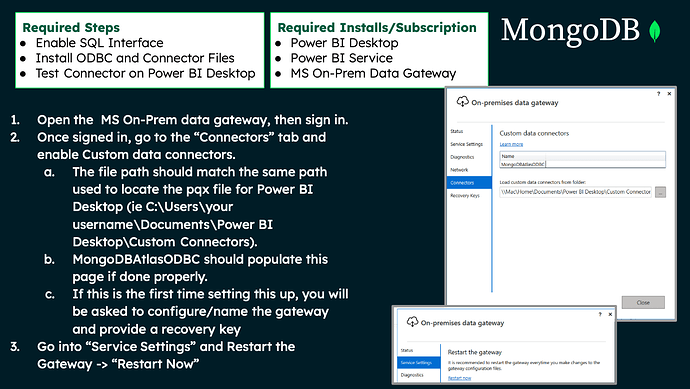
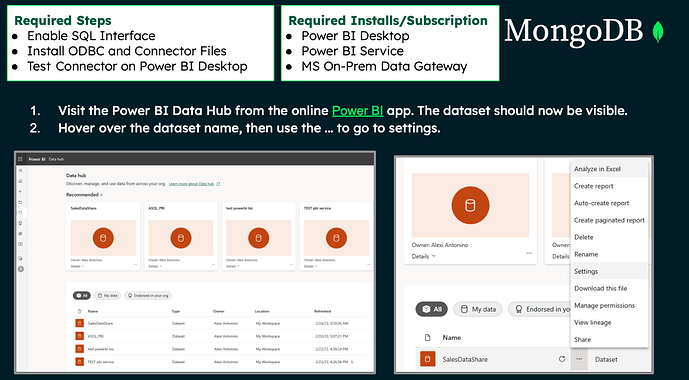
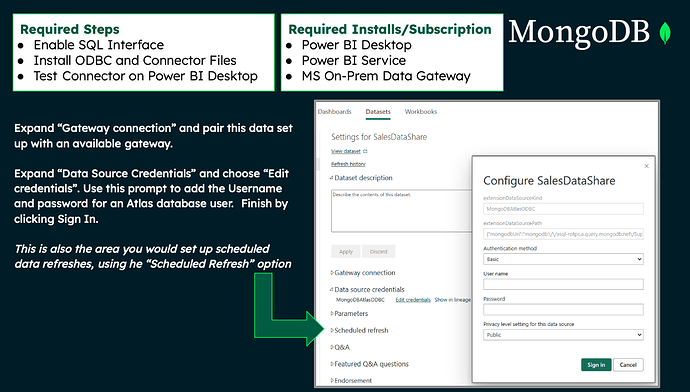
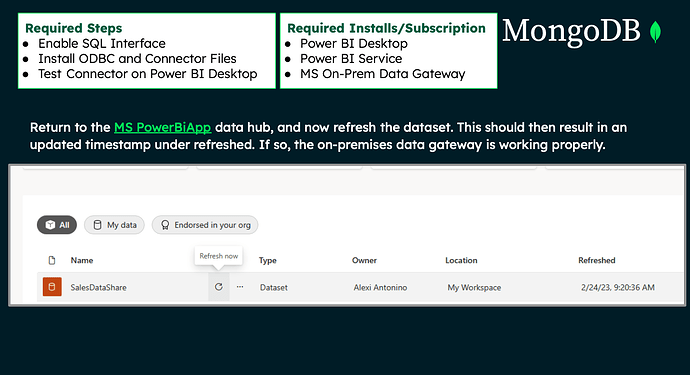
With the Atlas SQL Power BI Connector you can download the Connector and Driver and configure your on-premise gateway with this connector. Download and install the Connector and ODBC Driver here.
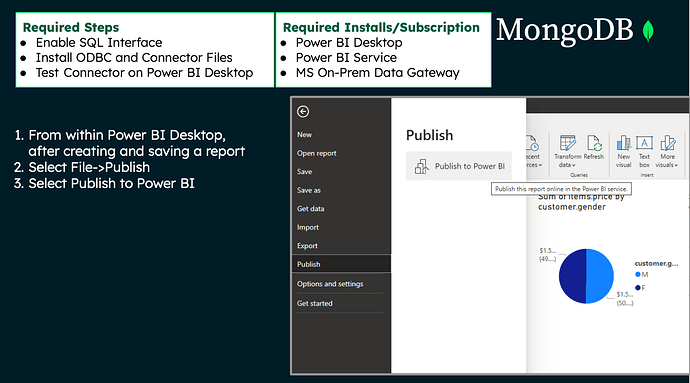
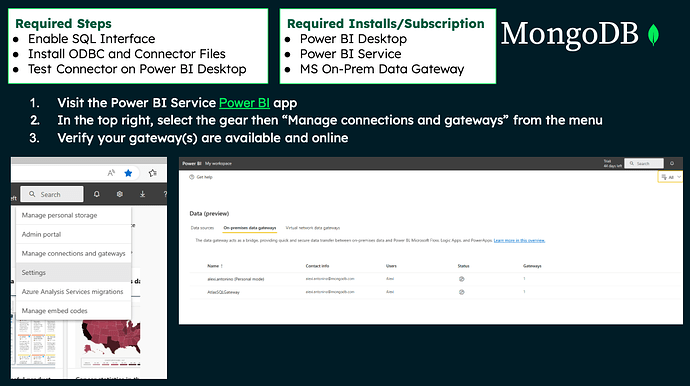
Here are some steps to follow for the Gateway:
Let me know if you need more guidance!
Best,
Alexi
1 Like
hello Alexi
Thanks for the explanation above. However, I followed the instructions on the official documentation pages and had no issues connecting Power BI Desktop to Atlas. But I cant seem to have the same success with Power BI service.
I am having trouble getting to connect using Power Query in the cloud. I am getting the below error message
SQLSTATE: 01000
NativeError: 444
Error message: ODBC: ERROR [01000] The driver returned invalid (or failed to return) SQL_DRIVER_ODBC_VER: 03.80 (Session ID: 8bf13af0-bffe-47ba-b745-fdbc64d2c3c3, Region: europe)
Do you think you can help me with a solution for this?
Thanks and regards
Thanks a lot Alexi.
I will keep you informed
Best
Vincent
YO_FOLO
(Yo Folo)
25
Hey Guys, do you get the solution of that Power BI connector problem ?? If yes, kindly share it, I am facing the same issue.
Andy_M
(Andy M)
26
Hi there, did you find a solution for this? I am at exactly the same point, with the same error message.
Thanks.
Hello @Andy_M!
This error (444) usually gets invoked because of bad user/login credentials or the network IP address has not been whitelisted within Atlas. Because you stated that it worked in Power BI Desktop (you are saying you in the same spot that Royce was?), I am wondering if you need to whitelist the server IP where you have installed the power BI Gateway.
Let me know if you need any guidance on opening up the network access within Atlas. Or if you want some tips on proving out connection. I usually guide users to try to connect to the federated database via Compass or Mongo SH. I can assist you if needed.
Best,
Alexi
Andy_M
(Andy M)
28
Hi Alexi - that would be great. I think I may need guidance on opening the network access within Atlas, but potentially some tips on proving connection would be ideal too.
Thanks,
Hello Andy! Here is a doc to help with whitelisting the IP address: https://www.mongodb.com/docs/atlas/security/ip-access-list/#std-label-access-list
Here is also my Calendly link so you may schedule some time with me. We can do a screen share and I can get you closer to connection if needed.
And if you email me, I can email you a doc (I can’t attach docs here) that contains a ton of tips and troubleshooting for Power BI. alexi.antonino@mongodb.com
1 Like
Can this error be due to the fact that my cluster is M0 and in the docs it states a higher cluster is required?
If you are using an M0, this is supported by Atlas SQL, but not the BI Connector. The BI Connector requires M10 or greater. Please verify you are using the Atlas SQL Power BI Connector with our Atlas SQL ODBC driver. Here are the docs to assist you: https://www.mongodb.com/docs/atlas/data-federation/query/sql/powerbi/connect/
1 Like
I’m using the Atlas SQL ODBC driver, thanks.
Hi guys!
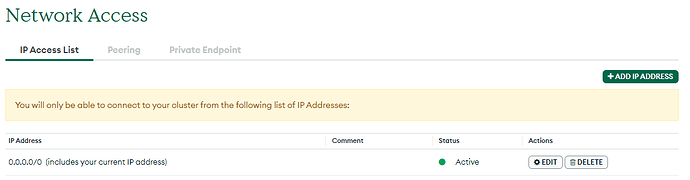
I fixed that issue in Power BI Service by creating an IP Address 0.0.0.0/0, as you can see in the image
Now my cluster can be connected by any IP Addresses…
I hope it helps you!
@Flavia_Santos_de_Almeida thanks for letting other users know of this. I also want others to know that IP Address 0.0.0.0/0 is great to test connections, but then you can isolate the IP Address (say from your computer or the computer running the BI Tool - like Power BI Desktop) and add that instead of all zeros.
while using direct query form mongo db bi connector in power bi desktop, unable to get data in tabular format, some column level information is missing and also some columns are showing in Json format, can you assist me to over come from this. Thanks in advance.
Hello @Kuppili_Kishore I will answer here, but this isn’t really a “connection” problem as the first post was. It sounds like you connected without a problem, but missing fields or Json fields. If there are fields not showing up, you should manage the SQL Schema within Atlas. You can do this within the the Atlas UI, within the Data Federation tab.
If you want to know how to transform the nested objects and arrays, you can do this using the passthrough SQL on connection or within PowerQuery. Here are some instructions of the mongosql dialect: https://www.mongodb.com/docs/atlas/data-federation/query/sql/query-with-asql-statements/
You will want to use the “Flatten” command or dot notation to split out fields nested within an object into their own columns. Then you will want to use the “Unwind” command to unwind arrays.
Here is some sample mongosql for example:
Select Cast(_id as string) as _id,
couponUsed, customer_age, customer_gender, customer_satisfaction, items_name, items_price as price, items_quantity,
(items_quantity * items_price) as totalPrice,
storeLocation, saleDate, purchaseMethod ,
cast(saleDate as Timestamp)as testDateTimestamp,
SUBSTRING (Cast(DATETRUNC(DAY,saleDate)as string),0,10) as DateOnly
from Flatten(Unwind(Supplies.Sales with Path=>Sales.items))
where items_quantity = 2
limit 100
1 Like
Hi there,
I am having the same error. I tried your solution to this issue but it did not work. Is it possible to do a zoom call for help. Please advise. Many thanks.
Hello @Elhadji_M_Ba1 Thanks for reaching out to me via email. I will update this thread once we understand what your particular issue is.
@Alexi_Antonino I am also encountering a similar issue and have not been able to resolve. I have followed the official docs and troubleshooting steps and am at a loss. Here is what I know:
-
Credentials are correct, and IP is whitelisted. I can connect an Atlas database through compass just fine.
-
When I attempt to connect to a federated database through compass (same credentials (URL encoded password), same computer), with the connection string from the AtlasUI, I get a timeout error.
-
When connecting PowerBI I get the error shown at the top of this post.
-
I have even tried tethering my computer to a wifi hotspot, whitelisting that IP, and trying to connect (to get outside my company network) and it still fails to connect.
-
No idea what else to try…
Hello @Allan_Brett I will try to assist you. If you are receiving the error as the original poster was, this is indicative of a timeout which stems from an issue with one or more of the following: 1. Login Credentials are incorrect or lacking in permissions, 2. IP Whitelisting/access or Network traffic blocks (firewall or VPN rules on your end), or a malformed/incorrect connection string.
Since the Atlas SQL interface needs connection to Atlas Data Federation, we need the make sure the Compass connection to the Federated DB Instance works as that will remove all of the added variables that the Power BI connection imposes. In most cases (I think 95%), when a user gets this error in Power BI, it becomes resolved, once we can successfully connect from Compass (of course as you mentioned, from the same machine, using the same log in credentials, and the URI for the Federated DB Instance). If you’d like to email me a screen shot of your compass connections (removing the password from view) - I might be able to direct you further.
here is my email address: Alexi.antonino@mongodb.com
Best,
Alexi