Niclas_T
(Niclas T)
1
Hallo,
I have tried to install the mongodb php driver over apt install php-mongodb and the installation has worked without any problems. Under phpinfo(); i can see that the driver is installed.
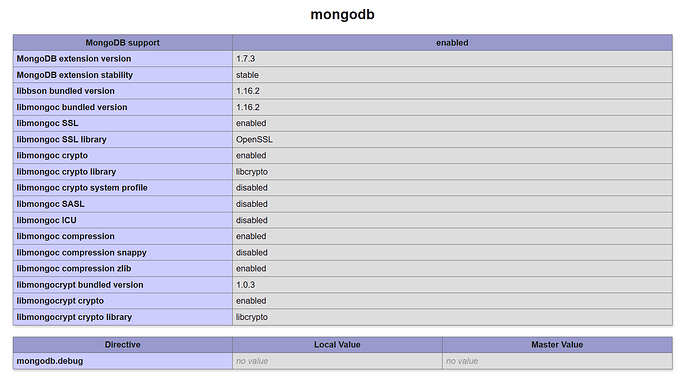
But after trying to make a database connection with
$connection = new mongodb( “mongodb://${username}:${password}@db.n-tp.de/web_data”);
i have recieved the following error
Fatal error: Uncaught Error: Class ‘MongoClient’ not found in /var/www/html/projekte/g-data/index.php:5 Stack trace: #0 {main} thrown in /var/www/html/projekte/g-data/index.php on line 5
Why the php driver not work ?
Hi!
What library are you using to access MongoDB? The MongoDB class is not part of the driver or the extension, you’d normally use MongoDB\Client (from the mongodb/mongodb library) or MongoDB\Driver\Manager if using the extension directly.
It looks like you are using a library that still uses the legacy API, as the error message contains MongoClient, which was provided by the legacy driver.
Niclas_T
(Niclas T)
3
I have installed the MongoDB libary with apt and after this has not worket i have tried to install the libery over pecl install mongodb but this has not helped.
How i can find a tutorial / example for the new libery i think i have used a legacy tutorial what not work with the new one.
https://www.php.net/manual/de/mongo.tutorial.connecting.php
https://www.php.net/manual/de/mongo.tutorial.selectdb.php
Yes, that is the legacy documentation that you’ve linked. The driver is split into two parts: the extension (installed using pecl install mongodb) and the library (typically installed using composer). You can find the extension docs on php.net: PHP: MongoDB - Manual. The documentation for the library contains a bunch of tutorials that should help you get started using MongoDB: MongoDB PHP Library — PHP Library Manual upcoming.
2 Likes
Niclas_T
(Niclas T)
6
I have this find command
$cursor = $collection->find([‘key’ => $_POST[‘token’]]);
Is it possible to get the result count of matching documents.
I have finded this MongoDB\Collection::count() — PHP Library Manual 1.6 but i don’t know how i can use this.
I have tried to use $cursor.count() but this has not worked.
The new Cursor class no longer provides a count method. Instead, you should call $collection->countDocuments() with the same filter you’re using on the find call to get the number of results:
$numberOfDocuments = $collection->countDocuments($filter);
$cursor = $collection->find($filter);
1 Like
Niclas_T
(Niclas T)
8
Ok that has worked.
I try to insert a document
$insertOneResult = collection->insertOne([
'at' => date(DATE_ATOM),
'data' => intval(_POST[‘data’])
]);
But the date will not inserted as a date although it is the right format
2020-03-11T17:13:19+01:00
To insert a date, please use the MongoDB\Driver\BSON\UTCDateTime type. You can create that from a unix timestamp, a date string, or DateTimeInterface object.
Niclas_T
(Niclas T)
10
But when i try to create a date with
$test = new MongoDB\BSON\UTCDateTime(date(DateTime::ATOM));
I get the following error
`Fatal error: Uncaught MongoDB\Driver\Exception\InvalidArgumentException: Error parsing "2020-03-11T20:55:17+01:00" as 64-bit integer for MongoDB\BSON\UTCDateTime initialization in /var/www/html/projekte/g-data/test.php:8 Stack trace: #0 /var/www/html/projekte/g-data/test.php(8): MongoDB\BSON\UTCDateTime->__construct('2020-03-11T20:5...') #1 {main} thrown in /var/www/html/projekte/g-data/test.php on line 8`
And date(DateTime::ATOM) is a string with DateTimeInterface informations.
Sorry for the delay. If you want to create a UTCDateTime instance with the current time, you don’t need to pass a parameter at all. If you want to create it for a specific time, please pass a unix timestamp in milliseconds. For more details, see the documentation.
Niclas_T
(Niclas T)
12
Ok only new MongoDB\BSON\UTCDateTime() has worked. But how i can change the Timezone of the date. I have set the date_default_timezone_set('Europe/Berlin'); but the Object ignores this parameter on the object creation.
As the name already says, UTCDateTime always assumes UTC as timezone. If you want to display the time in a specific timezone, grab a DateTime object using $utcDateTime->toDateTime(), then modify the timezone using setTimeZone().
Niclas_T
(Niclas T)
14
Ok i have now this code
$utcDateTime = new MongoDB\BSON\UTCDateTime();
$utcDateTime->toDateTime();
$date = $utcDateTime->toDateTime();
$date->setTimezone(new DateTimeZone('Europe/Berlin'));
And then i can use the $date object to insert it as a Date Type on the PHP driver ?
Stennie_X
(Stennie)
Split this topic
15
A post was split to a new topic: Errors using PHP extension