Following up from my previous post.

I’m still stuck with the occasional ReplicaSetNoPrimary errors. Quite rare but it does happen.

ERROR Unhandled Promise Rejection {"errorType":"Runtime.UnhandledPromiseRejection","errorMessage":"MongoServerSelectionError: Server selection timed out after 30000 ms","reason":{"errorType":"MongoServerSelectionError","errorMessage":"Server selection timed out after 30000 ms","reason":{"type":"ReplicaSetNoPrimary","servers":{},"stale":false,"compatible":true,"heartbeatFrequencyMS":10000,"localThresholdMS":15,".

This is despite upgrading to a dedicated M10 cluster. My application barely has any traffic so I’m confused why it sometimes can’t seem to connect?

My setup is still the same:

  • My connection string is valid.
  • The network connection is stable.
  • retryWrites=true
  • w=majority
  • Allowed all IPs
  • All errors are caught.
  • I use the Mongo Node Driver version 5.7.0
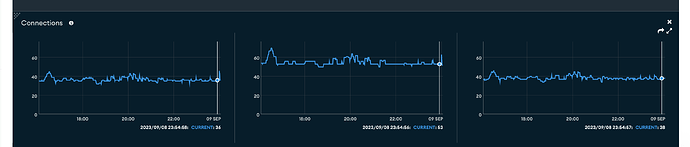
  • My stable connections have been stably hovering around a relatively low number (see scree

    nshot).

It’s frustrating not knowing why this is happening despite setting everything up correctly, and it’s connecting properly most of the time.

Random, unpredictable errors of unknown cause are unsettling so if someone has insight, please share.

1 Like

Hey @Pyra_Metrik,

There could be various reasons behind it, a few of them could be:

  • Intermittent network outages that cause the driver to lose connectivity.
  • Re-election of the PRIMARY node in your cluster, which leads to lost connections as the topology changes.

Please refer to Test Primary Failover and Test Resilience to read more about it.

In case you need further assistance, please share the org name of your cluster, so we can look into it or you can reach out to Atlas in-app chat support.

The in-app chat support does not require any payment to use and can be found at the bottom right corner of the Atlas UI:

image

Best,
Kushagra

Hi @Kushagra_Kesav

Thanks for the reply. I conducted a Primary Failover Test in the Atlas UI, and my app worked fine during and after the test.

So, this leaves us with intermittent network failures.
Is there any way we can verify that the ReplicaSetNoPrimary errors are indeed from network failures, by checking logs somewhere (or something else)?

And how exactly do I get the org name of my cluster?

Hey @Pyra_Metrik,

  1. Just to clarify, have you reached the Atlas in-app chat support team for any notable cluster issues during the time these errors occurred?
  2. May I ask if you notice any patterns in the timing of these errors?
  3. Also, could you please provide specific information like the connection string (with sensitive credentials redacted) and details about the client-side environment (e.g., containerized, Lambda, etc.).

The above details will help us to assist you better.

Regards,
Kushagra

@Kushagra_Kesav

  1. Yes, I’ve contact supported just now. Awaiting a response.
  2. The pattern is quite random, but I think it happens more often after longer periods of not connecting to the app (i.e opening my app URL in the browser).
  • My connection string: mongodb+srv://${process.env.DB_USERNAME}:${process.env.DB_PASSWORD}@cluster0.nkmq1cz.mongodb.net/?retryWrites=true&w=majority;
  • The client-side environment is a Next.js app. The Mongo client is to connected to from a serverless Next.js API function.

Hey @Pyra_Metrik,

Thanks for sharing the details! :star2:

Just out of curiosity, I’m wondering if you are using Vercel. Could you please confirm it?

Thanks,
Kushagra

1 Like

@Kushagra_Kesav yes, I am

Hi @Pyra_Metrik,

If you’ve checked with the Atlas in-app chat support and they’ve advised no issues were identified on the Atlas cluster side at the time of the error messages, I would also recommend checking with Vercel support. There was another mention of this previously on this post as well.

Depending on your cluster tier, you might be able to check the mongod logs to see the client metadata as well to determine if connection was ended from the application side possibly.

You can perform the same troubleshooting step mentioned in my comment by connecting from a different client perhaps outside of Vercel for trying to narrow down what the issue could be.

Regards,
Jason

Hi @Jason_Tran thanks for sharing the tips + the other post. I’m in contact with Vercel community/support as well to solve the problem.

I did check the logs for my cluster however, and I see this:

Automation Agent v13.4.2.8420 (git: <id>)"}}}}
{"t":{"$date":"2023-09-28T16:25:39.414+00:00"},"s":"I",  "c":"ACCESS",   "id":20250,   "ctx":"conn115096","msg":"Authentication succeeded","attr":{"mechanism":"SCRAM-SHA-256","speculative":true,"principalName":"__system","authenticationDatabase":"local","remote":"192.168.254.146:43258","extraInfo":{}}}
{"t":{"$date":"2023-09-28T16:25:39.415+00:00"},"s":"I",  "c":"-",        "id":20883,   "ctx":"conn115094","msg":"Interrupted operation as its client disconnected","attr":{"opId":31692522}}
{"t":{"$date":"2023-09-28T16:25:39.415+00:00"},"s":"I",  "c":"NETWORK",  "id":22944,   "ctx":"conn115095","msg":"Connection ended","attr":{"remote":"192.168.254.146:43252","uuid":"ea3b6fab-f503-49f9-8af1-b71110d04158","connectionId":115095,"connectionCount":40}}

Basically, it looks the authentication succeeded, then client disconnect immediately after, then it logged a “Connection ended” message.

I don’t think this is expected behavior, that is, for a client to disconnect immediately after authenticated. Please confirm, and in the mean time, I’m debugging the problem on Vercel’s end.
Hi @Pyra_Metrik,

Based off those logs, it doesn’t look like this is the vercel client. The logs seem to indicate that this is possibly from an internal mongodb / atlas agent. Are you able to find any regarding the vercel client? I believe the remote value should be the IP of the vercel application connecting.

Regards,
Jason

Running into same error on Vercel!

1 Like

Also hitting the same issue on Vercel. Really driving me nuts. Anyone ever figure this out?

Hi, I have the same problem, which is reproduced “randomly” when the lambda function tries to connect to MongoDB. Are there any updates?

Same here, I’m using MongoDB, Prisma, NextJS and hosted on Vercel and this bug appears at random causing 500 errors that can’t be controlled / mitigated.

This is really bad, wondering if this is not due to mongo driver itself?

Thanks for your help!

We are also running on Vercel with the mongodb driver and are receiving these errors randomly.

Just for comparison, we are running:

  • Vercel Pro plan

These packages:
“next-auth”: “^4.24.4”,
“mongodb”: “^4.13.0”,
“next”: “^14.1.0”

Does everyone also have next-auth running?
This is my mongodb connection implementation:

import { MongoClient } from "mongodb";

const uri = process.env.MONGODB_URI;
const options = {
    useUnifiedTopology: true,
    useNewUrlParser: true,
};

let mongoClient = null;
let database = null;

if (!process.env.MONGODB_URI) {
  throw new Error('Invalid/Missing environment variable: "MONGODB_URI"')
}

export async function connectToDatabase() {
    try {
        if (mongoClient && database) {
            return { mongoClient, database };
        }
        if (process.env.NODE_ENV === "development") {
            if (!global._mongoClient) {
                mongoClient = await (new MongoClient(uri, options)).connect();
                global._mongoClient = mongoClient;
            } else {
                mongoClient = global._mongoClient;
            }
        } else {
            mongoClient = await (new MongoClient(uri, options)).connect();
        }
        database = await mongoClient.db(process.env.NEXT_ATLAS_DATABASE);
        return { mongoClient, database };
    } catch (e) {
        console.error(e);
    }
}

i have a similar issue.
I’ve built an app with React for the frontend and Node.js for the backend, linked to a MongoDB cluster using Mongoose. I’m working with two branches: main and dev. I’ve noticed that when I do a new deploy (prod or dev), the app stops working and shows a server error. To fix this, I have to redeploy the branch. Each branch has its own environment variables (preview and prod) and main is linked to a mongodb prod database, dev to another mongodb dev database so apparently each branch has the right configuration. I get these kind of messages:

Failed to connect to MongoDB MongooseServerSelectionError: Could not connect to any servers in your MongoDB Atlas cluster. One common reason is that you’re trying to access the database from an IP that isn’t whitelisted. Make sure your current IP address is on your Atlas cluster’s IP whitelist: ht/docs/atlas/security-whitelist/
at _handleConnectionErrors (/var/task/backend/node_modules/mongo09:11)
at NativeConnection.openUri (/var/task/backend/node_modules/mongoose/lis:860:11) {
reason: TopologyDescription {
type: ‘ReplicaSetNoPrimary’,
servers: Map(3) {
cluster0-shard-00-01.xxx.mongodb.net:27017’ => [ServerDescription],
cluster0-shard-00-02.xxx.mongodb.net:27017’ => [ServerDescription],
},
stale: false,
compatible: true,
heartbeatFrequencyMS: 10000,
localThresholdMS: 15,
setName: ‘atlas-xxxx-shard-0’,
maxElectionId: null,
maxSetVersion: null,
commonWireVersion: 0,
logicalSessionTimeoutMinutes: null
},
code: undefined
}

have you found any solution? I have the same problem and i’m struggling A LOT to solve it.

I’ve tried EVERYTHING.

From the information I see provided here I only see one mention of the Node driver used here, which is from the 4.x branch which is EOL. I would first recommend upgrading to the latest driver (6.9.0) to ensure all of the improvements we have made for running in FaaS environments are present.

Secondly in the code example the object getting “cached” is the promise returned by MongoClient.connect(). If this promise for some reason rejects, then every subsequent use of this promise will reject and our reconnection logic will never get called. It’s our recommendation to never cache the connect() promise but rather the instance of the MongoClient itself.

@itsSteve, just to build off of what Durran wrote, our nextjs-with-mongodb sample was updated to address an issue with caching the promise vs. caching client instance.

Have a look at nextjs-with-mongodb/lib/mongodb.ts at main · mongodb-developer/nextjs-with-mongodb · GitHub for the updated logic (Cache mongo client, not client promise by baileympearson · Pull Request #1 · mongodb-developer/nextjs-with-mongodb · GitHub shows where else you may need to change your logic to work with this update)

I was getting ReplicaSetNoPrimary on every connection. I’m using MongoDb v7.0 on Atlas Free Tier, Node.js v18.15, and had installed mongodb 6.10 driver with npm.
Despite previous suggestions, what worked for me was downgrade mongodb driver with npm install mongodb@6.8