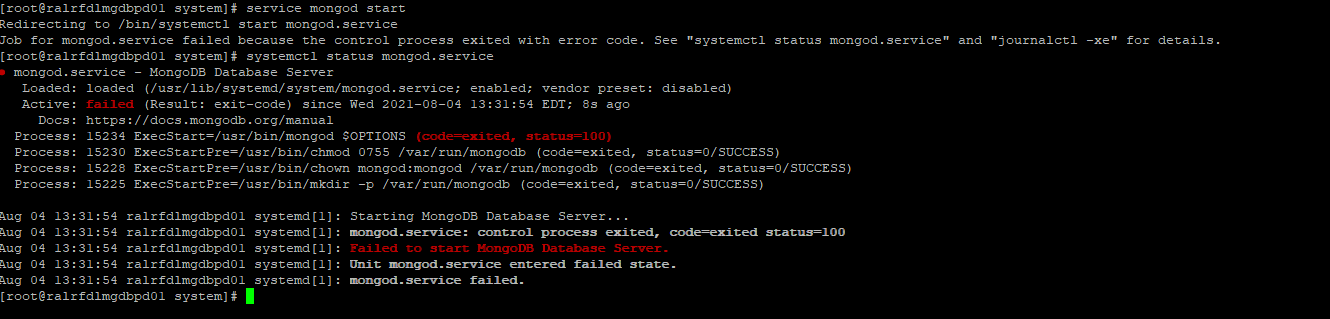
We are installing mongo DB 4.0 on RHEL and facing the below issue when trying to change the default data and log directory in config file.
Aug 03 16:18:28 ralrfdlmgdbpd01 mongod[3219]: 2021-08-03T16:18:28.220-0400 F CONTROL [main] Failed global initialization: FileNotOpen: Failed probe for “/u01/mongodata/log/mongod.log”: Permission denied
Config File
# mongod.conf

# for documentation of all options, see:
#   http://docs.mongodb.org/manual/reference/configuration-options/

# where to write logging data.
systemLog:
  destination: file
  logAppend: true
  path: /u01/mongodata/log/mongod.log

# Where and how to store data.
storage:
  dbPath: /u01/mongodata/lib
  journal:
    enabled: true
#  engine:
#  mmapv1:
#  wiredTiger:

# how the process runs
processManagement:
#  fork: true  # fork and run in background
  pidFilePath: /u01/mongodata/mongod.pid  # location of pidfile
  timeZoneInfo: /usr/share/zoneinfo

# network interfaces
net:
  port: 27017
  bindIp: 127.0.0.1  # Enter 0.0.0.0,:: to bind to all IPv4 and IPv6 addresses or, alternatively, use the net.bindIpAll setting.


#security:

#operationProfiling:

#replication:

#sharding:

## Enterprise-Only Options

#auditLog:
steevej
(Steeve Juneau)
2
You have to make sure that all directories specified in your configuration file are writable by the user with which you run mongod.
1 Like
yes, we have granted privileges.
[sysadmin@XXXXXXXX mongodata]$ ls -ltr
total 0
drwxr-xr-x. 2 mongod mongod 6 Aug 3 16:23 lib
drwxr-xr-x. 2 mongod mongod 31 Aug 4 12:20 log
[sysadmin@XXXXXXXX mongodata]$
1 Like
DB is starting when we run the command.
mongod --dbpath /u01/mongodata/lib --logpath /u01/mongodata/log/mongod.log
we are hitting issue only when starting using service.
service mongod start
1 Like
It is working when I change the log and data location to /var file system.
steevej
(Steeve Juneau)
6
Because the user with which you start has write access to the specified directories.
Because the user specified in the service configuration does not have write access to all directories specified in the the mongod configuration file.
We see that the directories are owned by mongod and that they are writable. However your prompt seems to indicate that you are trying to start with the user named sysadmin, whom does not have write access to the posted directories. Having the output of pwd would have be interesting because the directories shown in your post could be anywhere in the file hierarchy. We have no way to make sure they are located in /u01/mongodata/.
Since you are specifying pidFilePath as /u01/mongodata/mongod.pid, the user mongod also need to have write access into /u01/mongodata/. The posted ls output does not show the directory details of /u01/mongodata.
I am using root to start the service, not SYSADMIN.
[root@ralrfdlmgdbpd01 lib]# ls -ltr /u01/mongodata
total 0
drwxr-xr-x. 2 mongod mongod 6 Aug 3 16:23 lib
drwxr-xr-x. 2 mongod mongod 31 Aug 4 12:20 log
drwxr-xr-x. 3 mongod mongod 23 Aug 3 16:23 u01
[root@ralrfdlmgdbpd01 /]#
[root@ralrfdlmgdbpd01 u01]# ls -ltr
total 0
drwxr-xr-x. 4 mongod mongod 28 Aug 3 16:23 mongodata
[root@ralrfdlmgdbpd01 mongodata]# ls -ltr
total 0
drwxr-xr-x. 2 mongod mongod 6 Aug 3 16:23 lib
drwxr-xr-x. 2 mongod mongod 31 Aug 4 12:20 log
steevej
(Steeve Juneau)
8
Post a screenshot that shows how you start mongod service.
steevej
(Steeve Juneau)
12
Please share the mongod service file and the mongod configuration file.
From what I see you do not use the directory for which you shared the permissions.
Hi Steeve,
Sorry for the confusion…
we have been trying with 2 different file systems . /u01 and /data.
right now it is configured with /data.
Here is the config file and service file.
[Unit]
Description=MongoDB Database Server
Documentation=https://docs.mongodb.org/manual
After=network.target

[Service]
User=mongod
Group=mongod
Environment="OPTIONS=-f /etc/mongod.conf"
EnvironmentFile=-/etc/sysconfig/mongod
ExecStart=/usr/bin/mongod $OPTIONS
ExecStartPre=/usr/bin/mkdir -p /var/run/mongodb
ExecStartPre=/usr/bin/chown mongod:mongod /var/run/mongodb
ExecStartPre=/usr/bin/chmod 0755 /var/run/mongodb
PermissionsStartOnly=true
PIDFile=/var/run/mongodb/mongod.pid
Type=forking
# file size
LimitFSIZE=infinity
# cpu time
LimitCPU=infinity
# virtual memory size
LimitAS=infinity
# open files
LimitNOFILE=64000
# processes/threads
LimitNPROC=64000
# locked memory
LimitMEMLOCK=infinity
# total threads (user+kernel)
TasksMax=infinity
TasksAccounting=false
# Recommended limits for for mongod as specified in
# http://docs.mongodb.org/manual/reference/ulimit/#recommended-settings
Config File
# mongod.conf

# for documentation of all options, see:
#   http://docs.mongodb.org/manual/reference/configuration-options/

# where to write logging data.
systemLog:
  destination: file
  logAppend: true
  path: /var/lib/mongo/mongod.log

# Where and how to store data.
storage:
  dbPath: /data/mongodb/lib
  journal:
    enabled: true
#  engine:
#  mmapv1:
#  wiredTiger:

# how the process runs
processManagement:
#  fork: true  # fork and run in background
  pidFilePath: /var/lib/mongo/mongod.pid  # location of pidfile
  timeZoneInfo: /usr/share/zoneinfo

# network interfaces
net:
  port: XXXXX
  bindIp: 127.0.0.1  # Enter 0.0.0.0,:: to bind to all IPv4 and IPv6 addresses or, alternatively, use the net.bindIpAll setting.


#security:

#operationProfiling:

#replication:

#sharding:

## Enterprise-Only Options

#auditLog:

#snmp:
steevej
(Steeve Juneau)
15
There is more
Can we concentrate on one? I feel like chasing a running target.
It is not.
You have systemLog.path set to /var/lib/mongo/mongod.log
You have pidFilePath set /var/lib/mongo/mongod.pid
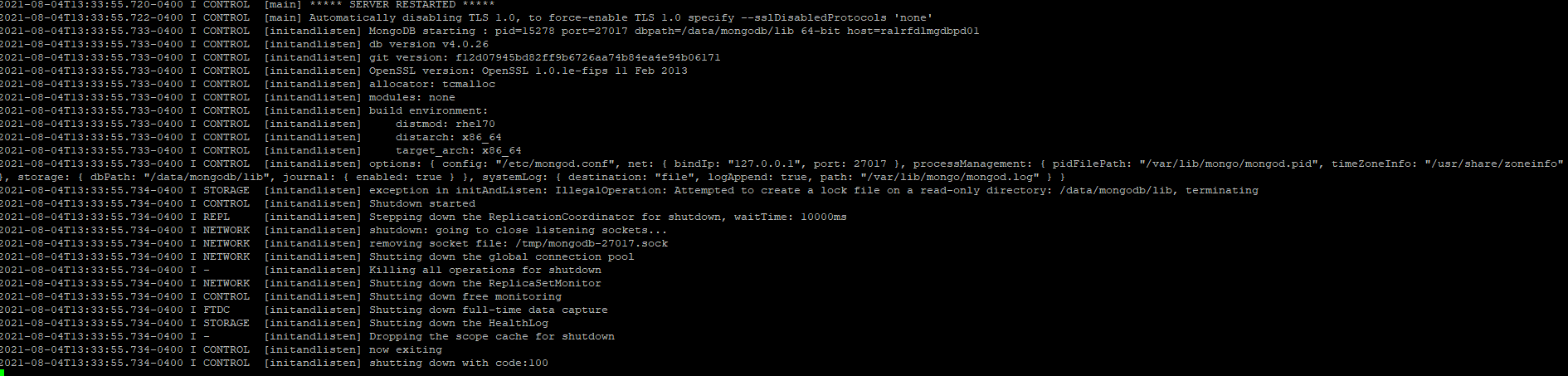
In the log we see that if fails to write into /data/mongodb/lib but from the ls output we see it is writable.
Humm …
Is /data/ NFS mounted?
I would not recommend a non-local or non-SAN disk.
Does the local mongod user has the same UID as the NFS host mongod user?
It is local file system.
when we change log file and pid file location to /data it is complaining about these two file permissions.
It works when we start DB in command line…
mongod --dbpath /data/mongodb/lib --logpath /var/lib/mongo/mongod.log
steevej
(Steeve Juneau)
17
If you did that as root sometimes in the past then the lock file and the log file are probably now own by root and cannot be written by mongod user.
1 Like