Hi there,
I followed the steps mentioned at this page: https://docs.mongodb.com/manual/tutorial/install-mongodb-on-red-hat/#install-mongodb-community-edition
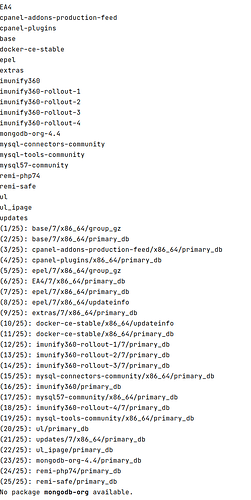
but it didn’t work (please, see the below picture):
It’s a CentOS 7.
Warmest regards.
1 Like
Hi there!
What command was this the output of?
Can you show me the output of:
ls -l /etc/yum.repos.d/mongodb*
and
cat /etc/yum.repos.d/mongodb*
??
Also is the machine behind a proxy that tunnels port 443? a web proxy? A VPN? On a campus or corporate network?
Hi @Abelardo_Leon_Gonzal and welcome in the MongoDB Community  !
!
I just followed the steps from your link in a fresh CentOS 7 docker container and I was able to install the latest version of MongoDB (v4.4.3 currently) without any major issue.
I just had to install vim with yum install vim because my container was just out of the box and I couldn’t start mongod using systemd or System V Init because this just doesn’t work in a docker container (needs more permissions) - but I was able to start a mongod manually with mkdir /tmp/db && mongod --dbpath /tmp/db and then connect to it from my host using docker exec -it <container-name> mongo.
Just FYI, I started my CentOS 7 container with docker run --rm -it centos:7 bash.
So I couldn’t reproduce your issue really here. I’m not sure what step is causing this issue. Could you please be more specific?
Thanks,
Maxime.
Hi @Sheeri_Cabral,
-rw-r–r-- 1 root root 200 Jan 5 09:56 /etc/yum.repos.d/mongodb-org-4.4.repo
- The output of the command: cat …
is:
[mongodb-org-4.4]
name=MongoDB Repository
baseurl=https://repo.mongodb.org/yum/centos/$releasever/mongodb-org/4.4/x86_64/
gpgcheck=1
enabled=1
gpgkey=https://www.mongodb.org/static/pgp/server-4.4.asc
It’s a VPS hosting.
Thanks for your help! Best regards.
1 Like
Hi there,
I have a VPS account which runs CentOS 7.
When I run the
sudo yum install -y mongodb-org
in order to install MongoDB to be used with my NodeJS app, it outputs the following lines:
Loaded plugins: fastestmirror, langpacks, universal-hooks
Loading mirror speeds from cached hostfile
EA4 | 2.9 kB 00:00:00
cpanel-addons-production-feed | 2.9 kB 00:00:00
cpanel-plugins | 2.9 kB 00:00:00
base | 3.6 kB 00:00:00
docker-ce-stable | 3.5 kB 00:00:00
epel | 4.7 kB 00:00:00
extras | 2.9 kB 00:00:00
imunify360 | 2.7 kB 00:00:00
imunify360-rollout-1 | 3.0 kB 00:00:00
imunify360-rollout-2 | 3.0 kB 00:00:00
imunify360-rollout-3 | 3.0 kB 00:00:00
imunify360-rollout-4 | 3.0 kB 00:00:00
h ttps://repo.mongodb.org/yum/centos/7/mongodb-org/4.4/x86_64/repodata/repomd.xml: [Errno 14] HTTPS Error 404 - Not Found
Trying other mirror.
To address this issue please refer to the below wiki article
h ttps://wiki.centos.org/yum-errors
If above article doesn’t help to resolve this issue please use h ttps://bugs.centos.org/.
mysql-connectors-community | 2.6 kB 00:00:00
mysql-tools-community | 2.6 kB 00:00:00
mysql57-community | 2.6 kB 00:00:00
remi-php74 | 3.0 kB 00:00:00
remi-safe | 3.0 kB 00:00:00
ul | 2.9 kB 00:00:00
ul_ipage | 2.9 kB 00:00:00
updates | 2.9 kB 00:00:00
No package mongodb-org available.
Error: Nothing to do
root@server.abelardolg.com [~]# ls -l /etc/yum.repos.d/mongodb*:
-rw-r–r-- 1 root root 200 Jan 5 09:56 /etc/yum.repos.d/mongodb-org-4.4.repo
cat /etc/yum.repos.d/mongodb*:
[mongodb-org-4.4]
name=MongoDB Repository
baseurl=https://repo.mongodb.org/yum/centos/$releasever/mongodb-org/4.4/x86_64/
gpgcheck=1
enabled=1
gpgkey=https://www.mongodb.org/static/pgp/server-4.4.asc
Thanks for your help and best regards.
1 Like
Looks like an Internet connection issue? Some firewall misconfiguration maybe? Looks like you can’t reach the repo.
Hi @Abelardo_Leon_Gonzal,
The baseurl looks different to me - in the docs, it’s:
baseurl=https://repo.mongodb.org/yum/redhat/$releasever/mongodb-org/4.4/x86_64/
your file has ‘centos’ instead of ‘redhat’ - when I go to MongoDB Repositories I’m not seeing a centos option, but I do see a redhat one.
Further, if I go to https://repo.mongodb.org/yum/centos/7/mongodb-org/4.4/x86_64/repodata/repomd.xml I get a 404 Not Found but if I change ‘centos’ to ‘redhat’ and go to:
https://repo.mongodb.org/yum/redhat/7/mongodb-org/4.4/x86_64/repodata/repomd.xml
I see XML data.
can you try changing your baseurl?
1 Like
Hi there,
Thanks for replying.
After I replacing “centos” by “redhat”, “$releaseever” by “7” and to run the above command, I got this message:
Loaded plugins: fastestmirror, langpacks, universal-hooks
Loading mirror speeds from cached hostfile
…
No package mongodb-org available.
Error: Nothing to do
My mongodb-org-4.4.repo file:
[mongodb-org-4.4]
name=MongoDB Repository
baseurl=MongoDB Repositories
gpgcheck=1
enabled=1
gpgkey=https://www.mongodb.org/static/pgp/server-4.4.asc
Best regards.
1 Like
Hi there,
Thanks for replying.
It’s not related to an Internet connection issue. It’s my fault because I made some typos in the url. I fixed them but it still continues with no be installed.
Best regards.
1 Like
Hi there!
Did you clear the yum cache after making that change?
yum clean all
Hopefully that will have the installation working!
1 Like
Hi there!
I executed that command but a strange thing happens.
When I re-run the following command:
sudo yum install -y mongodb-org
its output was:
Loaded plugins: fastestmirror, langpacks, universal-hooks
Determining fastest mirrors
…
EA4 | 2.9 kB 00:00:00
cpanel-addons-production-feed | 2.9 kB 00:00:00
cpanel-plugins | 2.9 kB 00:00:00
I don’t understand why in this line appears centos again when I wrote redhat in my mongodb-org-4.4.repo file:
http://mirrors.unifiedlayer.com/centos/7/os/x86_64/repodata/repomd.xml: [Errno 14] HTTP Error 403 -
Forbidden
In fact, if I click on this link a xml appears. It seems valid.
Trying other mirror.
To address this issue please refer to the below wiki article

1 Like
I re-runned twice this command and the second time the following output was showed:
The package #23/25 clearly states
mongodb-org-4.4/primary_db
but the last message says:
No package mongodb-org available.

1 Like
Hi! I’m assuming that this also didn’t work? If I try to find mongo-org in the packages there, it doesn’t exist at
http://mirrors.unifiedlayer.com/centos/7/os/x86_64/Packages/
What does this command result in?
cat /etc/issue
1 Like
Right, sorry, try these too?
cat /proc/version
and
cat /etc/redhat-release
Hi!
Yes, you correctly assumed that that also didn’t work.
1 Like
cat /proc/version outputs:
Linux version 3.10.0-1127.19.1.el7.x86_64 (mockbuild@kbuilder.bsys.centos.org) (gcc version 4.8.5 20150623 (Red Hat 4.8.5-39) (GCC) ) #1 SMP Tue Aug 25 17:23:54 UTC 2020
cat /etc/redhat-release:
CentOS Linux release 7.9.2009 (Core)
1 Like
chris
(Chris Dellaway)
19
@Sheeri_Cabral
I just ran through on a centos:7 container, all looks good to me following the install instructions.
@Abelardo_Leon_Gonzal
Also try the yum with the --noplugins flag in case there is a yum-plugin messing with things.
1 Like
Yes, I mentioned it in my first post.
The first solution didn’t work. 
I will try to manually download those packages in order to be installed via yum install rpm by rpm.
Best regards.