Day 50: Structuring a MERN Project for Scalability
The MERN stack (MongoDB, Express.js, React, Node.js) is great for building full-stack apps, but if your project is poorly structured, it will lead to bugs, messy code, and maintenance nightmares.
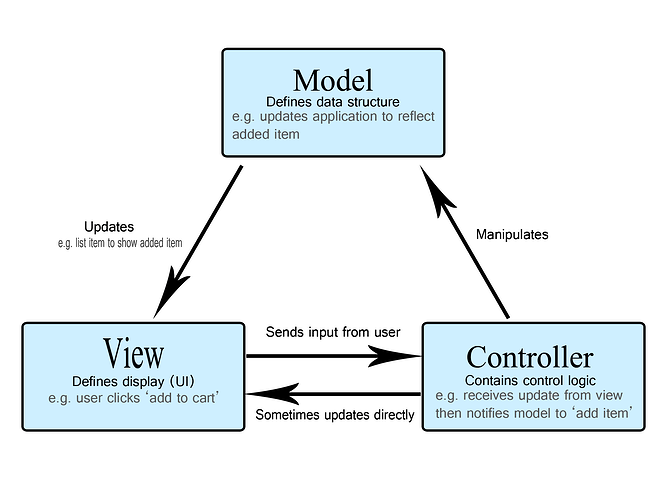
A well-structured backend makes your code more scalable, readable, and secure. This post will guide you through structuring your MERN backend properly using the MVC (Model-View-Controller) pattern.
 Why Structure Your Backend Properly?
 Separation of concerns → Business logic is separate from database & routes
Scalability → Adding features is easy
Better collaboration → Multiple developers can work efficiently
Recommended Folder Structure
/server
├── controllers/ → Handles logic
├── models/ → Defines data structure
├── routes/ → API endpoints
├── middleware/ → Security & validation
├── config/ → Database & environment variables
├── utils/ → Reusable helper functions
├── index.js → Main server file
 Models: Defining Data Structure
Models define how data is stored in MongoDB.
Example: User Model (models/User.js)
Defines user schema
Encrypts passwords
Adds timestamps automatically

const mongoose = require(‘mongoose’);
const UserSchema = new mongoose.Schema({
name: { type: String, required: true },
email: { type: String, required: true, unique: true },
password: { type: String, required: true },
role: { type: String, enum: [“user”, “admin”], default: “user” }
}, { timestamps: true });
module.exports = mongoose.model(“User”, UserSchema);

 Controllers: Handling Business Logic
Controllers process requests and interact with models.
Example: User Controller (controllers/userController.js)
Registers a user
Hashes passwords
Handles login authentication
const User = require(‘…/models/User’);
const bcrypt = require(‘bcrypt’);
const jwt = require(‘jsonwebtoken’);
exports.registerUser = async (req, res) => {
try {
//Code Logic Here
} catch (error) { res.status(500).json({ error: error.message }); }
};
 Routes: Managing API Endpoints
Routes define API paths and call controllers.
Example: User Routes (routes/userRoutes.js)
Links API endpoints to controllers
Keeps routing separate from business logic
const express = require(‘express’);
const { registerUser, loginUser } = require(‘…/controllers/userController’);
const router = express.Router();
router.post(‘/register’, registerUser);
router.post(‘/login’, loginUser);
module.exports = router;
 Bringing It All Together: The Main Server File (index.js)
Loads environment variables
Connects to MongoDB
Sets up routes
100daysofcode lebanon-mug