Overview
This tutorial shows you how to create a serverless function by using the Go driver that connects to and queries MongoDB Atlas, and how to manage database connections efficiently in a serverless environment.
Serverless Functions and Database Connections
Serverless functions, also called functions as a service (FaaS), scale automatically with demand. Because you cannot control the uptime or scaling of your function, you must manage concurrent database connections carefully. Database connections are limited, so you must connect to your database efficiently.
Tutorial
This tutorial shows you how to perform the following actions:
Verify the prerequisites
Create a Go project for AWS Lambda
Add the MongoDB connection code
Build and package the Lambda function
Deploy and test the function
Verify the prerequisites
Before you begin, ensure you have the following:
A MongoDB Atlas cluster with network access and user roles configured. If you have an AWS account, you can sign up for MongoDB Atlas by using the AWS Marketplace to pay for usage without upfront commitment.
The sample MongoDB Atlas dataset loaded into your cluster. To learn how to load this sample data, see the MongoDB Get Started guide.
An Amazon Web Services (AWS) account.
Your MongoDB Atlas cluster must allow access from AWS through a VPC or global IP allow list. Your database user must have read access to the sample databases.
Create a Go project for AWS Lambda
Create a new Go project on your computer by running the following commands:
mkdir lambdaexample cd lambdaexample go mod init lambdaexample
These commands create a project directory and initialize Go Modules for your AWS Lambda and MongoDB dependencies.
Install the MongoDB Go driver and the AWS Lambda SDK by running the following commands:
go get go.mongodb.org/mongo-driver/v2/mongo go get github.com/aws/aws-lambda-go/lambda
Create a file named main.go in your project directory. This
file will contain your Lambda function code.
Add the MongoDB connection code
Add the following code to your main.go file:
package main import ( "context" "os" "github.com/aws/aws-lambda-go/lambda" "go.mongodb.org/mongo-driver/v2/bson" "go.mongodb.org/mongo-driver/v2/bson/primitive" "go.mongodb.org/mongo-driver/v2/mongo" "go.mongodb.org/mongo-driver/v2/mongo/options" ) type EventInput struct { Limit int64 `json:"limit"` } type Movie struct { ID primitive.ObjectID `bson:"_id" json:"_id"` Title string `bson:"title" json:"title"` Year int32 `bson:"year" json:"year"` } func HandleRequest(ctx context.Context, input EventInput) ([]Movie, error) { if err != nil { return nil, err } collection := client.Database("sample_mflix").Collection("movies") opts := options.Find() if input.Limit != 0 { opts = opts.SetLimit(input.Limit) } cursor, err := collection.Find(ctx, struct{}{}, opts) if err != nil { return nil, err } var movies []Movie if err = cursor.All(ctx, &movies); err != nil { return nil, err } return movies, nil } func main() { client, err = mongo.Connect(options.Client().ApplyURI(os.Getenv("ATLAS_URI"))) if err != nil { return error } defer func() { _ = client.Disconnect(context.Background) }() lambda.Start(func(ctx context.Context, input EventInput) ([]Movie, error) { return HandleRequest(ctx context.Context, client, input EventInput) }) }
The preceding code defines the EventInput and Movie data
structures.
The EventInput structure represents input sent to your AWS Lambda
function. The Limit field specifies how many documents to return.
The Movie structure represents the documents in the movies collection
of the sample_mflix database.
It has BSON and JSON annotations on each field. The BSON
annotation maps MongoDB document fields to the local variable.
The JSON annotation maps the local field to data that AWS Lambda
can process. You can include as many or as few fields as
needed. Only the included fields are returned.
Tip
ATLAS_URI Environment Variable
You can store the ATLAS_URI value as an environment variable in your
AWS Lambda configuration.
The code connects to the database outside of the
HandleRequest and main functions to ensure the
function establishes a database connection only when it starts,
not every time it runs.
The HandleRequest function queries the sample_mflix.movies
collection and returns documents up to the specified limit. If no
limit is provided, it returns all documents. The function returns
the results as JSON.
Build and package the Lambda function
Build your project for the operating system and architecture that AWS Lambda requires by running the following command:
env GOOS=linux GOARCH=amd64 go build
Add your binary file to a ZIP archive. The binary file has the
name lambdaexample unless specified otherwise.
Deploy and test the function
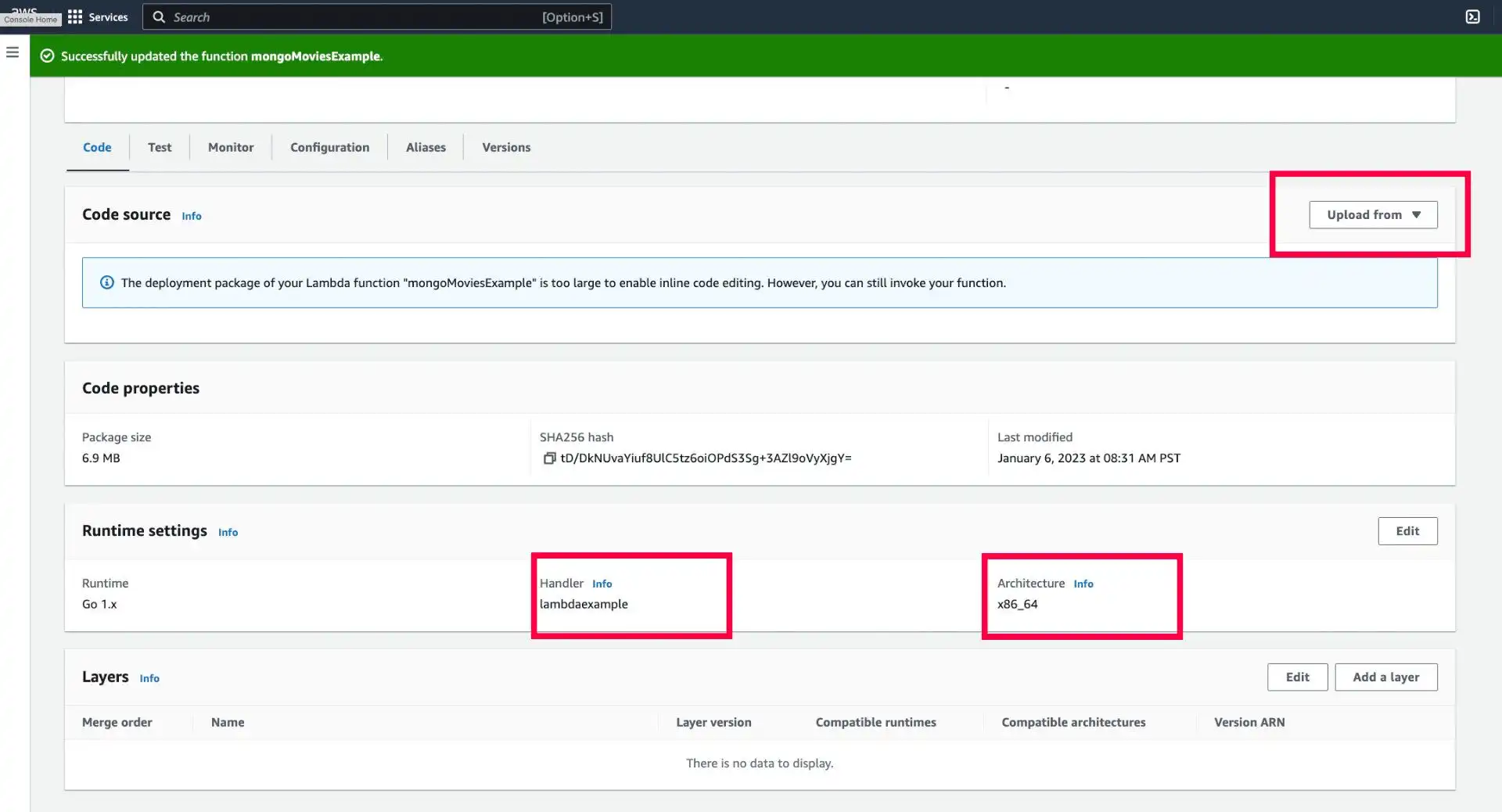
Upload your project by using the AWS Lambda dashboard. Confirm that
the handler value is set to lambdaexample and the architecture
value is set to x86_64, as shown in the following image:

Set your environment variables in AWS Lambda. Add an
ATLAS_URI variable, and then set the value to your MongoDB Atlas
connection string.

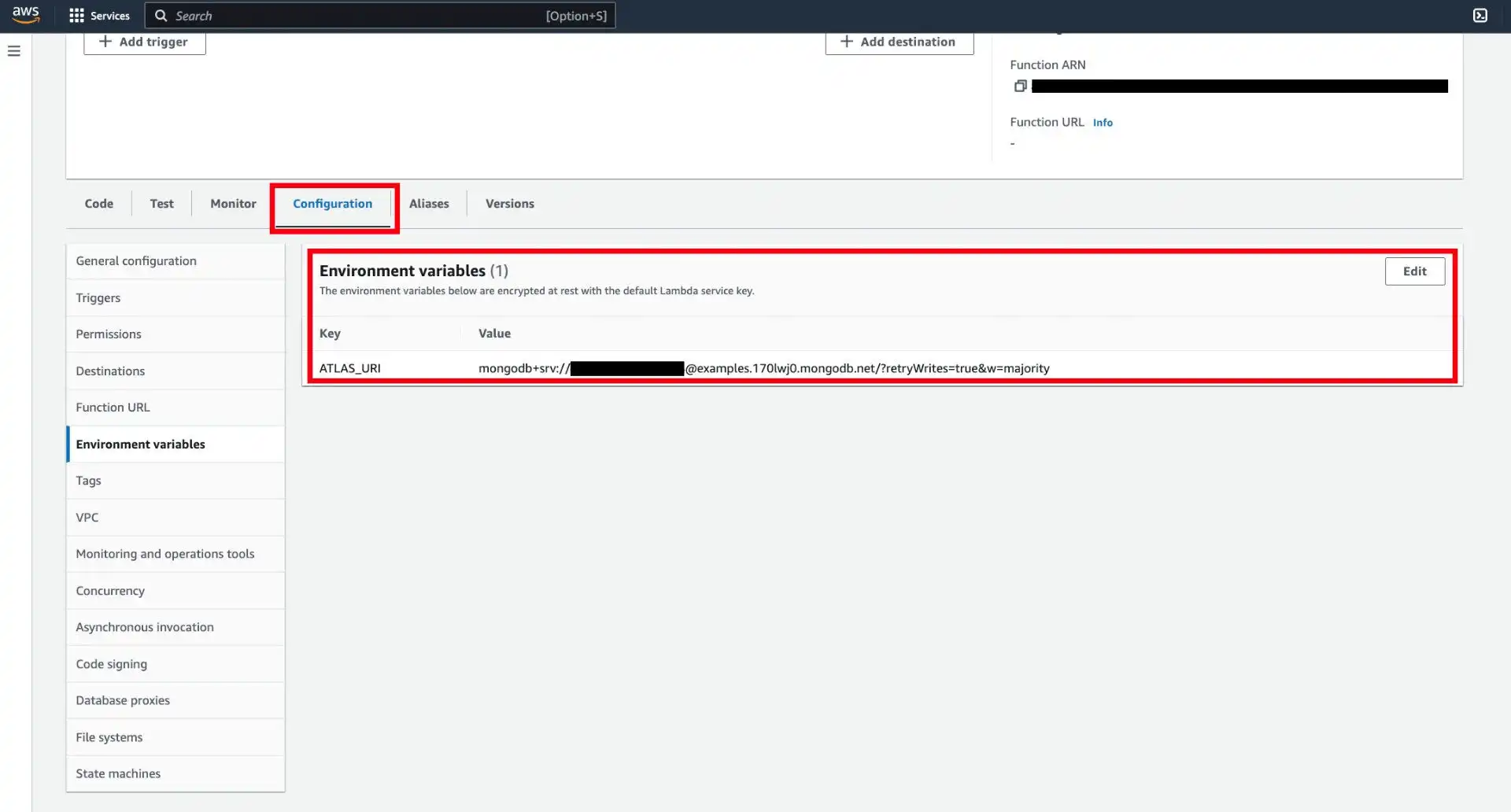
You can obtain your connection string from the MongoDB Atlas dashboard. To learn more, see the Getting Started with Go guide.
Test your function by using the Test tab in the AWS Lambda
dashboard. Provide an optional limit value for the Event JSON and
confirm that the function returns a list of movies from the
sample_mflix.movies collection. A returned Movie document
looks similar to the following:
{ "ID": ..., "Title": "The Truman Show", "Year": 1998 }
Additional Resources
To learn more about best practices when using AWS Lambda with MongoDB, see the Manage Connections with AWS Lambda guide in the Atlas documentation.