Atlas Data Federation adheres to the following principles:
Secure Connections: When using Atlas Data Federation, federated database instances reside in regional VPCs. All data traffic to Atlas clusters or cloud storage use TLS encryption, which is the primary form of network security available with Atlas Data Federation. If your federated database instance and data source (Atlas cluster, S3, Blob, or Google Cloud Storage) share the same cloud provider, data traffic uses the cloud provider's network infrastructure or the public internet, depending on the cloud provider's capabilities. If they are on different cloud providers, data traffic uses the public internet.
Query Routing: Atlas Data Federation and federated database instances use a unified interface that abstracts the underlying data sources to route queries across multiple data sources. Federated database instances enable access to external data sources by creating virtual collections to represent external data in a MongoDB-like format. Logical databases group virtual collections and connected cluster collections into unified namespaces for seamless querying across diverse data sources.
Query Parsing: When you run a query, Atlas Data Federation parses it and plans efficient execution paths across the data sources mapped in the virtual collections. Atlas pushes down operations, such as filtering and aggregation, to the source when possible. For other operations, such as joins or aggregations across multiple sources, the federated database instance retrieves and processes data internally, and then combines the results within the logical database to deliver a nified result set. This allows you to query diverse data sources as if they were a single database.
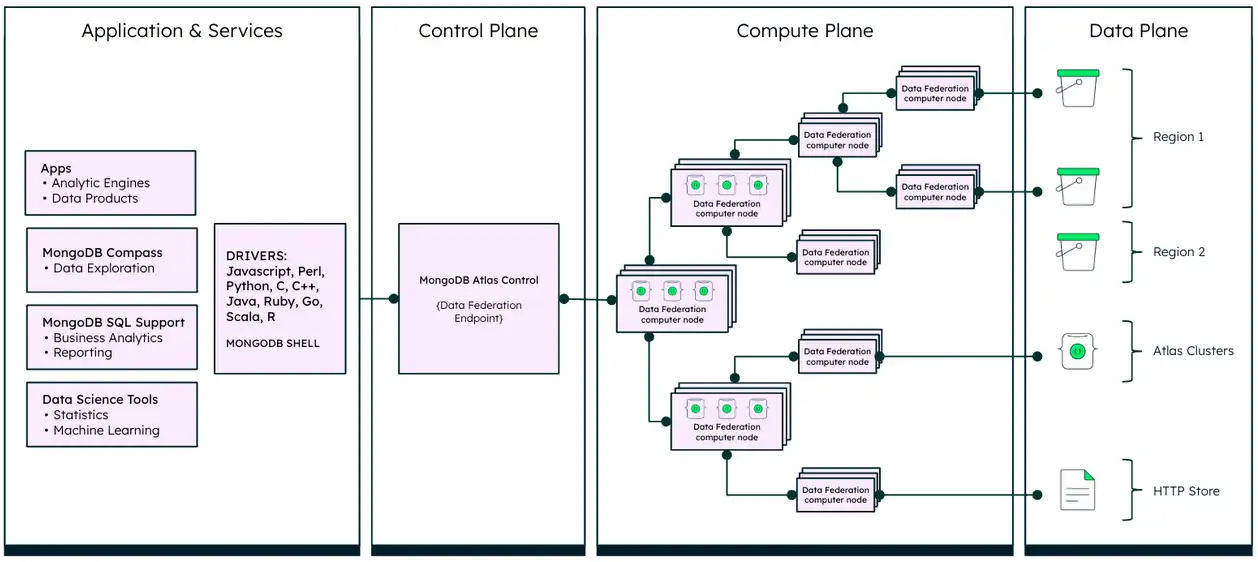
The following diagram illustrates these principles:
Data Plane
The Data Plane in the preceding diagram is where your data resides. You can configure Atlas Data Federation to access data in a variety of storage services. Specifically, you can configure Atlas Data Federation to access data in your AWS S3 buckets, Azure Blob Storage containers, Google Cloud Storage buckets, Atlas clusters, Atlas Online Archives, and HTTP and HTTPS URLs. To learn more about configuring Atlas Data Federation to access your data stores, see Configure Data Stores for a Federated Database Instance.
Compute Plane
Atlas Data Federation preserves data locality and maximizes local computation, where possible, to minimize data transfer and optimize performance. The Compute Plane in the preceding diagram shows where Atlas Data Federation processes all requests. Atlas Data Federation uses an elastic pool of agents in the region nearest to your data store to process the data for your queries. To learn more about supported regions, see Atlas Data Federation Regions.
Atlas Data Federation doesn't persist underlying data but does temporarily persist cursor data in the frontend region of the connection. Any necessary metadata for query execution is stored in the global backend. Using a frontend region that is the same as your data region can help comply with data sovereignty regulations.
Control Plane
The Control Plane in the preceding diagram handles key functions such as TLS termination, managing cursors, and temporarily storing cursor data during query execution. It also coordinates with the compute plane, which processes user queries and aggregates final results.
When you execute a query, it is first processed by the Control Plane, which determines the most efficient execution strategy. This planned query is then distributed to the Compute Plane, which executes the query logic directly against your data stores and returns the results back to the Control Plane. If your only data source is a single Atlas cluster, the Control Plane issues the query directly to the cluster, bypassing the Compute Plane and simplifying the operation. To learn more, see Query a Federated Database Instance.
You can then set up role-based access control for your federated database instances. You can control how your client connects to your federated database instance, either through a global connection option or by pinning it to a specific region. To learn more, see Configure Connection for Your Federated Database Instance.