Build fast, reliable omnichannel ordering by leveraging real-time updates using MongoDB Change Streams and Atlas Triggers.
Use cases: Catalog, Omnichannel Ordering
Industries: Retail
Products: MongoDB Atlas, MongoDB Change Streams, MongoDB Atlas Triggers
Solution Overview
Customers today expect seamless shopping experiences that use online and offline channels, such as buying online for pickup or delivery. However, retailers struggle to implement technical solutions that support omnichannel shopping experiences. Retailers need a flexible system that provides real-time visibility, handles dynamic traffic patterns, and enables modern integrations across all customer touchpoints.
This solution demonstrates how to build an omnichannel e-commerce website using MongoDB Atlas. The demo lets users choose their preferred shipping method (BOPIS or home delivery) and track their order progress in real time until delivery. By leveraging key MongoDB features including Change Streams, Atlas Triggers, and the flexible document model, you'll learn how to create a robust, scalable omnichannel ordering system.
Reference Architectures
This solution uses MongoDB Change Streams and Atlas Triggers to enable real-time data operations across multiple applications. The architecture consists of two main components: Real-Time Apps and MongoDB Atlas.
Real-Time Apps include any application that responds to database changes, such as e-commerce, distribution center, warehouse, and inventory apps.
This solution has the following workflow:
An action from an application produces a data modification, such as an order status update.
The event is registered in the
orderscollection in MongoDB Atlas.These changes are recorded in the oplog, which uses the
oplog.rscollection.The Change Streams API monitors these changes. You can monitor changes at the collection, database, or cluster-wide levels and filter specific changes using the MongoDB Aggregation Framework.
Based on your architecture needs, you can:
Perform an update on the application side.
Trigger an automated task through Atlas Functions.
This architecture provides a foundation for various real-world applications, such as:
Real-time notifications: Automatic customer alerts for order pickup readiness.
Reactive systems: Smart inventory management with automatic restocking.
Event-driven architecture: Real-time microservices synchronization with optional Kafka integration.
Change data capture: Immediate system-wide product price updates.
Real-time analytics: Instant fraud risk recalculation using ML models.
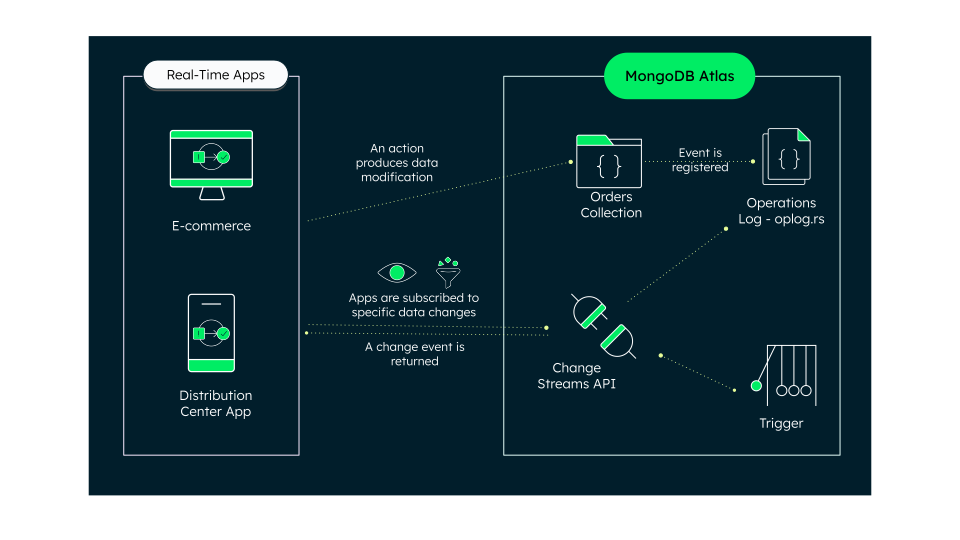
Figure 1. Omnichannel ordering solution architecture
Data Model Approach
This solution's data model uses two primary collections, named products
and orders. Each collection uses a field: value format to provide an
organized representation of the stored data.
Products Collection
The products collection stores comprehensive product information such
as the following:
ID, name, and a unique product identifier (such as SKUs).
Categorization fields, such as
masterCategory,subCategory, andarticleType.Nested objects for pricing with
amountandcurrencyfields.Product-specific attributes such as autoreplenishment status and base color.
Inventory-related fields and product metadata.
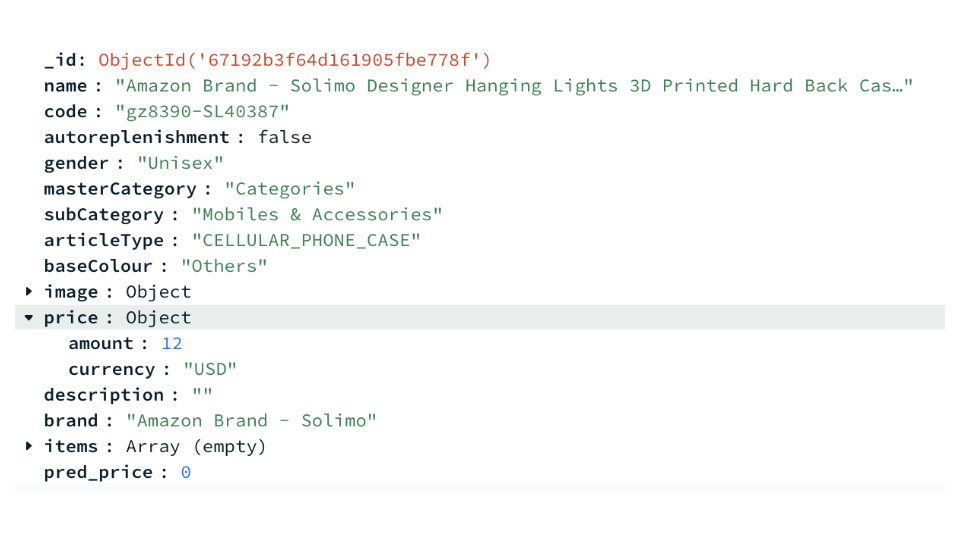
Figure 2. Example document in products collection
Orders Collection
The orders collection tracks order details, including the following:
Unique identifiers for orders and users.
An array of products for each order.
status_historyarray, which captures the progression of order states with timestamps.Differentiation between order types (Buy Online, Pick up in Store vs Buy Online, Get Delivery at Home).
Order-specific shipping addresses.
Status workflows based on delivery type:
BOPIS orders show statuses, such as "In process" or "Ready for pickup."
Home delivery orders progress through the following states: "In process," "Ready for delivered," "Picked up from warehouse," "In Transit," and "Delivered."
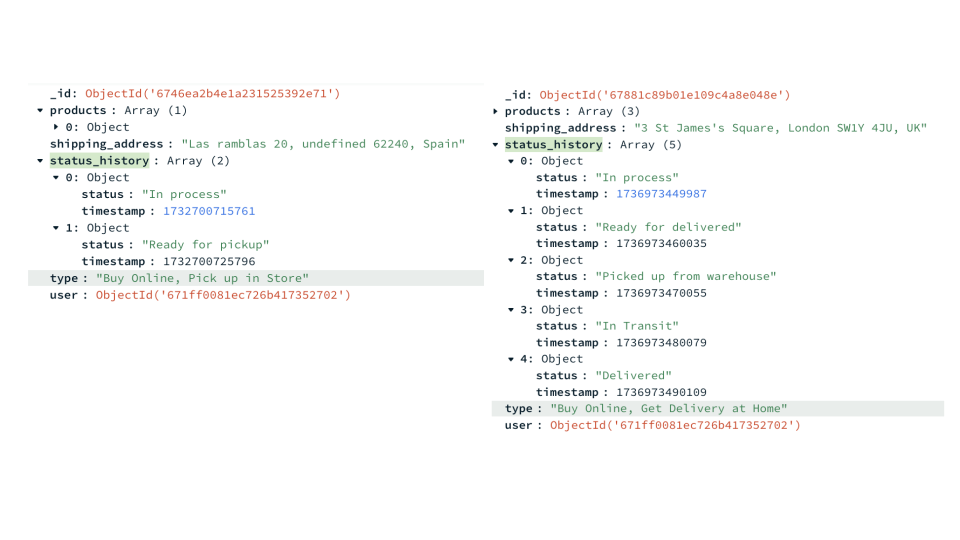
Figure 3. Example documents in the orders collection
Build the Solution
This solution uses this GitHub repository.
The following procedure outlines how to set up the demo. For a complete guideline and
implementation details, see the repository's README.
Populate the demo database
Provision a cluster within your Atlas account and populate your
database with the data required for the demo. You can use mongorestore
to quickly populate the database with the necessary dump data, stored
in the /dump/leafy_popup_store folder in the GitHub repository.
Add the order status trigger
Create a database trigger that listens
to the orders collection for insert and update events. This runs
a function
that you can copy from the GitHub repository.
Because this demo involves a customer ordering from an e-commerce website, the trigger mimics the processes that are needed to update the order status every 10 seconds, progressing through order stages until the order is marked as delivered. Simulated processes include warehouse employees managing an order, postal services delivering packages, or store employees packing an order.
Configure your app frontend
Clone the GitHub repository to your local machine, configure your environment variables, and install dependencies. Finally, run the app locally and access the frontend at http://localhost:8080/cart.
Key Learnings
Flexibility and speed: MongoDB's flexibility allows you to adapt your data structures with ease, leading to faster time to market and a consistent omnichannel experience.
Real-time capabilities: Features like Change Streams and Atlas Triggers enable real-time data processing, which is essential for tasks like order tracking and inventory updates.
Smart architecture: MongoDB's scalable and flexible architecture makes it simple to integrate tools such as Change Streams and Atlas Triggers without extra application layers.
Author
Angie Guemes, MongoDB
Florencia Arin, MongoDB