Learn how to create real-time, voice-driven automotive experiences using MongoDB Atlas and the Google Cloud tool suite. Combine vehicle data, user context, and car manual embeddings into a smart, scalable in-car assistant that adapts to driver needs.
Use cases: Gen AI, Personalization
Industries: Manufacturing & Mobility
Products: MongoDB Atlas, MongoDB Atlas Vector Search
Partners: Google Cloud, PowerSync
Solution Overview
Automakers face increased pressure to differentiate their vehicles through intelligent, user-friendly digital systems. In-car voice assistants are a key way to do this, but most are limited to basic commands such as controlling navigation or music. Generative AI enables you to move beyond these limitations and deliver personalized, dynamic interactions when driving.
This solution demonstrates how to build a real-time voice assistant powered by Gen AI and MongoDB Atlas. The architecture integrates vehicle telemetry, user preferences, and car manuals to create an in-car assistant that adapts to each driver's needs. By using MongoDB Atlas's flexible document model and built-in Vector Search, developers can streamline data complexity and deliver features faster for a better in-car experience.
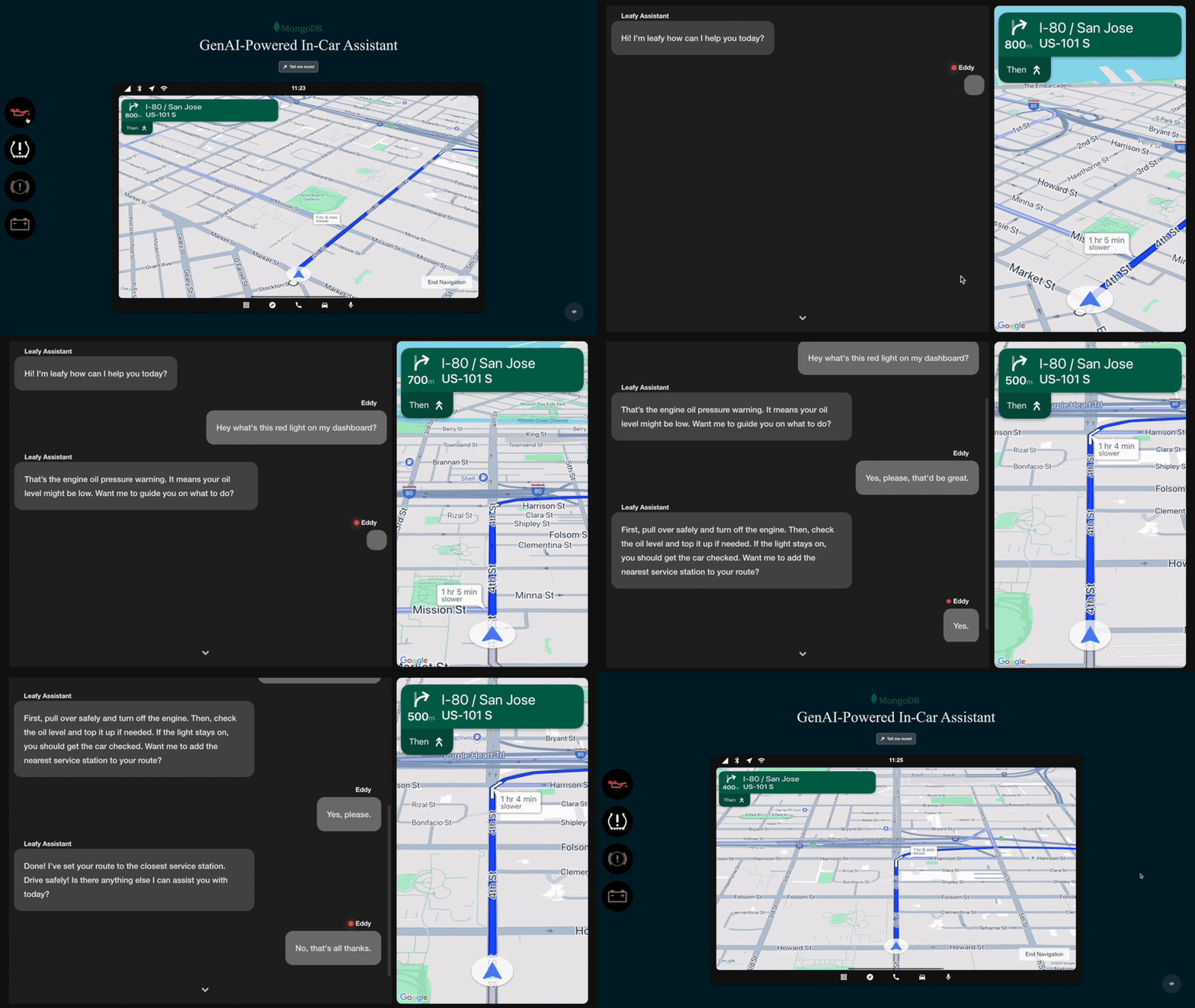
Figure 1. Gen AI in-car assistant in action
With this solution, you can:
Unify structured and unstructured data to augment the context of AI systems.
Enable real-time interactions with a scalable, cloud-native architecture.
Deliver personalized experiences with semantic search powered by Atlas Vector Search.
While this solution focuses on the automotive industry, it can be applied to industries like transportation, healthcare, hospitality, and consumer electronics, to enhance customer engagement, reduce friction, and streamline support. This architecture provides a foundation for voice-forward, data-driven experiences such as smart home assistants, digital concierges, and AI-enabled medical triage systems. Companies across industries are harnessing the power of voice with generative AI and MongoDB to transform user experiences.
Reference Architectures
This architecture uses MongoDB Atlas as the data layer, along with Google Cloud's AI capabilities, ensuring fast, personalized, and reliable interactions.

Figure 2. A reference architecture of a Gen AI In-Car Assistant
This solution uses components hosted in the vehicle and in the cloud.
On-board Components
These run in the vehicle, close to the driver, and enable real-time voice interaction.
Car console: The in-car interface where users speak to the assistant and get responses. This demo uses a web application which represents the embedded system in a real vehicle.
Local data storage: Vehicles store key signals locally using PowerSync SDK, a lightweight edge database built on SQLite. This ensures fast access to diagnostic data and keeps data synced with MongoDB Atlas.
Assistant backend: This component manages the conversation. It handles voice transcription using Google Cloud Speech-to-Text. Depending on the query, it either responds directly or calls tools to fetch more data or take action. This demo includes four sample actions:
Consult manual: Uses Atlas Vector Search to retrieve relevant info from the car manual.
Run diagnostics: Fetches current diagnostic codes from local vehicle data.
Recalculate route: Adjusts the trip if the driver adds a stop.
Close chat: Ends the conversation gracefully.
This solution uses the following object to define tools for the assistant backend. The solution passes the object to Google Cloud when it starts the chat functionality.
const functionDeclarations = [ { functionDeclarations: [ { name: "closeChat", description: "Closes the chat window when the conversation is finished. By default it always returns to the navigation view. Ask the user to confirm this action before executing.", parameters: { type: FunctionDeclarationSchemaType.OBJECT, properties: { view: { type: FunctionDeclarationSchemaType.STRING, enum: ["navigation"], description: "The next view to display after closing the chat.", }, }, required: ["view"], }, }, { name: "recalculateRoute", description: "Recalculates the route when a new stop is added. By default this function will find the nearest service station. Ask the user to confirm this action before executing.", parameters: { type: FunctionDeclarationSchemaType.OBJECT, properties: {}, }, }, { name: "consultManual", description: "Retrieves relevant information from the car manual.", parameters: { type: FunctionDeclarationSchemaType.OBJECT, properties: { query: { type: FunctionDeclarationSchemaType.STRING, description: "A question that represents an enriched version of what the user wants to retrieve from the manual. It must be in the form of a question.", }, }, required: ["query"], }, }, { name: "runDiagnostic", description: "Fetches active Diagnostic Trouble Codes (DTCs) in the format OBD II (SAE-J2012DA_201812) from the vehicle to assist with troubleshooting.", parameters: { type: FunctionDeclarationSchemaType.OBJECT, properties: {}, }, }, ], }, ];
Cloud Components
These components are stored in Google Cloud or MongoDB Atlas and provide AI intelligence, scalable storage, and data processing capabilities.
Data ingestion: Unstructured content like car manuals is uploaded to Google Cloud Storage. This triggers a pipeline using Pub/Sub, Cloud Run, and Document AI to split the PDFs into chunks. Vertex AI generates embeddings for these chunks, which are then stored in MongoDB Atlas for semantic search.
Serving speech APIs: Google Cloud's Text-to-Speech and Speech-to-Text handle natural voice interaction. Vertex AI provides text embeddings for search queries and powers Gemini, which is the LLM used by the assistant.
Data storage and retrieval: MongoDB Atlas stores:
Manual chunk embeddings for retrieval via Atlas Vector Search.
User preferences and session data.
Vehicle signals—both latest values and full time series telemetry.
Atlas Vector Search is used to match user questions with the most relevant manual sections, enabling a Retrieval-Augmented Generation (RAG) flow. MongoDB's native support for structured, semi-structured, and vector data in one place simplifies the assistant logic and speeds up development.
Data sync: This solution uses PowerSync for two-way sync between the vehicle and cloud:
Vehicle to cloud: Vehicle sends telemetry data like diagnostic codes, speed, or acceleration. A cloud run function processes and stores this in Atlas.
Cloud to vehicle: Enables updates or actions sent remotely to the car—like OTA updates or remote locking.
MongoDB in Conversational AI
MongoDB Atlas improves this solutions architecture in the following ways:
Unifies operational and vector data: Vehicle signals, vector embeddings, and user sessions are stored together in a single platform.
Enables more relevant responses: Atlas Vector Search retrieves the correct chunks from large documents instantly, fueling accurate and context-rich responses.
Built for the enterprise scale: Whether it's one model or a global fleet, MongoDB Atlas offers built-in horizontal scalability, high-availability and enterprise-grade security.
Simplifies edge and cloud sync: PowerSync and MongoDB work together to bridge in-car and cloud environments without friction.
This architecture is designed to scale, evolve, and adapt, just like the vehicles it supports. With MongoDB at the core, automakers can focus less on data plumbing and more on delivering smart, helpful in-car experiences that truly make a difference on the road.
Data Model Approach
The quality, structure, and accessibility of your data are extremely important in an AI-powered experience. In this solution, MongoDB's document model enables flexibility, speed, and scale for developers building intelligent in-car assistants.
Unlike traditional relational databases that rely on rigid tables and complex joins, MongoDB stores data as flexible documents. This makes it easier to represent real-world data structures, such as vehicle telemetry or embedded knowledge chunks, exactly as they are used in code. It also means you can iterate faster, adapt your model without downtime, and build new capabilities as your application evolves.
Built for Innovation and Speed
The document model is designed for developers. MongoDB's flexible schema enables you to easily change and update your data model. As new vehicle features roll out or user expectations shift, teams can evolve the data model on the fly without expensive migrations or app downtime. Additionally, because each document is self-contained, queries are faster and simpler.
The Natural Choice for AI Workloads
Generative AI thrives on rich, diverse, and unstructured data. Embeddings, contextual metadata, structured references all contribute to improving AI systems. You can perform the following actions with MongoDB:
Store vector embeddings, metadata, and source content in a single document.
Combine structured and vector data without jumping between systems.
Query vector and non-vector fields together for contextual, accurate results.
Example 1: Car Manual Embeddings
When using a retrieval-augmented generation (RAG) approach, the quality of the chunking and embeddings directly impacts the quality of the AI's responses. Poorly segmented content or missing context can lead to vague or inaccurate answers. Technical manuals often contain dense text, diagrams, and domain-specific terminology, making it challenging to retrieve the right information.
This solution represents each chunk of the manual as a document. The document includes not just the text and its vector embedding, but also metadata such as content type (e.g. safety and diagnostics), page numbers, chunk length, and links to related chunks. This additional context helps the system understand how pieces of information relate to one another, which is especially important in highly technical or interdependent topics.
MongoDB's flexible document model makes it straightforward to capture this complexity. As the manual evolves or as new needs emerge, you can incrementally add fields or adjust structure without requiring a full schema migration. This enables more precise retrieval and more helpful AI responses.
The following example document represents a manual chunk:
{ "_id": { "$oid": "67cc4b09c128338a8133b59a" }, "text": "Oil Pressure Warning Lamp. If it illuminates when the engine is running this indicates a malfunction. Stop your vehicle as soon as it is safe to do so and switch the engine off. Check the engine oil level. If the oil level is sufficient, this indicates a system malfunction.", "page_numbers": [ 23 ], "content_type": [ "safety", "diagnostic" ], "metadata": { "page_count": 1, "chunk_length": 1045 }, "id": "chunk_0053", "prev_chunk_id": "chunk_0052", "next_chunk_id": "chunk_0054", "related_chunks": [ { "id": "chunk_0048", "content_type": [ "safety" ], "relation_type": "same_context" }, { "id": "chunk_0049", "content_type": [ "safety" ], "relation_type": "same_context" }, ... ], "embedding": [ -0.002636542310938239, -0.005587903782725334, ... ], "embedding_timestamp": "2025-03-08T13:50:00.887107" }
Example 2: Vehicle Signal Data
For vehicle signals, this solution models data by using the COVESA Vehicle Signal Specification (VSS). VSS provides a standardized, hierarchical structure to describe real-time signals like speed, acceleration, or diagnostic trouble codes (DTCs). It's an open, extensible format that enables easier collaboration, system integration, and data reuse across vehicle platforms.
Because MongoDB's document model natively handles nested structures, representing the VSS hierarchy is straightforward. Signals can be grouped logically, just like they appear in the VSS model, which aligns with the tree-based structure of the spec.
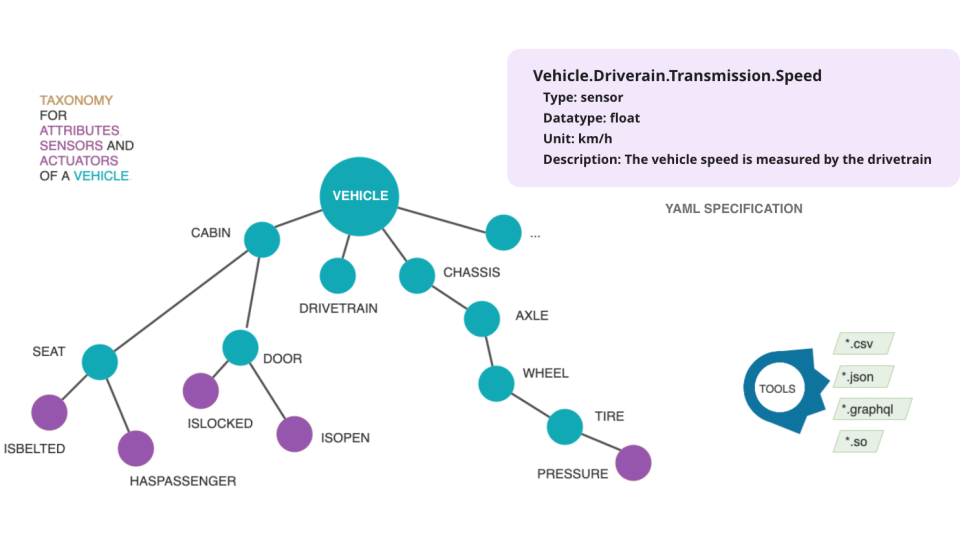
Figure 3. The VSS data model is a hierarchical tree structure built with modules that can be flexibly combined. Source: https://covesa.global/vehicle-signal-specification/
This structure accelerates development and ensures that AI tools and workflows have consistent access to clean, structured, and meaningful data.
The following document is an example representation of a vehicle signal that conforms to VSS.
{ "_id": { "$oid": "67e58d5f672b23090e57d478" }, "VehicleIdentification": { "VIN": "1HGCM82633A004352" }, "Speed": 0, "TraveledDistance": 0, "CurrentLocation": { "Timestamp": "2020-01-01T00:00:00Z", "Latitude": 0, "Longitude": 0, "Altitude": 0 }, "Acceleration": { "Lateral": 0, "Longitudinal": 0, "Vertical": 0 }, "Diagnostics": { "DTCCount": 0, "DTCList": [] } }
MongoDB's document model doesn't just store your data. It mirrors the complexity of the real world, making it easier to build smarter systems that respond in real time, adapt to user needs, and grow with your platform. Whether you're storing vehicle diagnostics or vector-encoded manuals, MongoDB gives you the tools to build intelligent experiences faster.
Build the Solution
Building this solution can be broken down into the steps described below. You
use MongoDB Atlas to host your data, Google Cloud for AI services,
PowerSync to stream vehicle data, and a full-stack app to tie everything
together. You can find all required assets and resources in the
GitHub repository.
For more detailed instructions, see the repository's README.
Replicate the demo database
Provision a cluster within your Atlas account and populate
your database with the data required for the demo. A data dump can
be found inside the repository to quickly replicate the database
with all the necessary data and metadata with one quick
mongorestore command.
Configure your Google Cloud environment
Create a Google Cloud project and enable the required APIs: Speech-to-Text, Text-to-Speech, Document AI, and Vertex AI. For local development, configure Application Default Credentials so the app can authenticate seamlessly with Google services. Detailed instructions are provided in the Google Cloud documentation.
(Optional) Create your own document embeddings
The demo includes a precomputed set of embeddings for the car manual. However, you can generate your own embeddings by parsing PDF files using Document AI and embedding them with Vertex AI. This gives you flexibility to extend the assistant with custom documents or additional manuals as needed.
Run the application
Clone the repository locally and create a .env file using the template
provided. Once your environment is configured, run npm install to
install dependencies and then start the development server with npm run
dev. The app is available at http://localhost:3000.
Key Learnings
Conversational AI starts with the right data foundation: Rich, contextual, and accessible data is what powers intelligent voice assistants. MongoDB Atlas unifies structured telemetry, unstructured manuals, and vector embeddings in a single developer-friendly platform, eliminating data silos and making it easier to serve relevant, real-time responses.
MongoDB accelerates innovation from the factory to the finish line: Modern automotive applications demand flexibility and speed, from predictive maintenance and diagnostics to digital cockpit systems. MongoDB's flexible schema, real-time sync capabilities, and horizontal scalability help teams move faster, collaborate more effectively, and deliver features that set their vehicles apart.
Drivers are ready for the next generation of voice assistants: With electric vehicles, autonomy, and smart safety systems, customers have high expectations of in-car systems. Generative AI enables assistants to deliver nuanced, interactive conversations, and MongoDB gives developers the tools to build these experiences at scale.
Authors
Dr. Humza Akhtar, MongoDB
Rami Pinto, MongoDB