Deliver personalized, real-time alignment between product discovery brand and strategy with MongoDB’s data foundation and advanced search capabilities.
Use cases: Intelligent Search, Single View, Catalog
Industries: Retail
Products and tools: MongoDB Atlas, MongoDB Atlas Search, MongoDB Atlas Vector Search, MongoDB Node.js Driver, MongoDB Python Driver, MongoDB Voyage AI
Solution Overview
In a world flooded with products, promotions, and constant change, you face a core challenge: how do you connect each customer’s unique need to a constantly evolving catalog with brands serving different purposes and campaign goals?
To solve this, go beyond static promotions and embrace brand amplification, a strategic approach that raises visibility, engagement, and emotional connection, with the right brands, at the right time, and in the right context.
In this solution, you learn how to implement a brand amplification strategy by using data and technology to align customer intent with your retail goals.
With the Leafy Associate app—powered by MongoDB and advanced search—store associates can respond instantly to any customer request, whether specific, preference-based, or a general recommendation.
Each search becomes a single, personalized query. Results stay relevant to the shopper and align with store-specific brand priorities that managers update in real time.
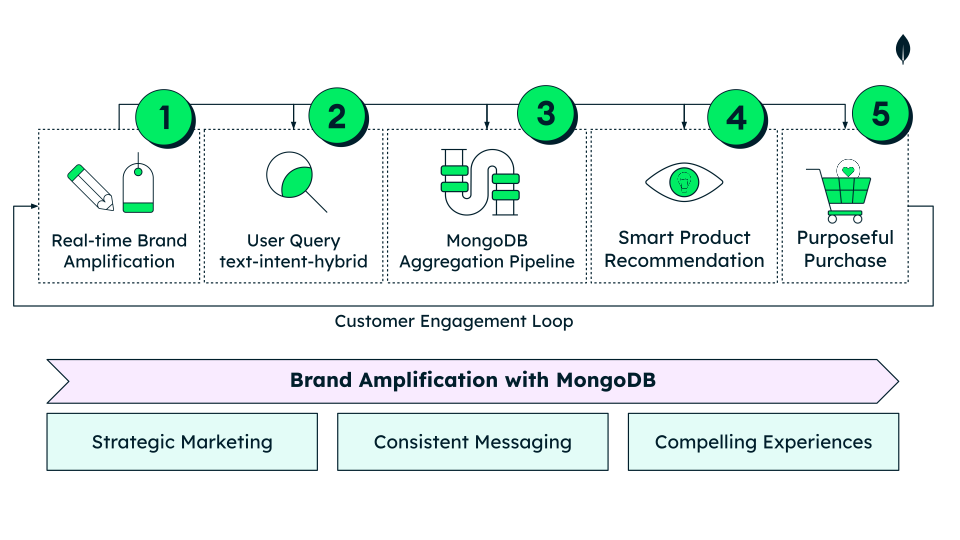
Figure 1. Real-time brand amplification and user queries feed into the MongoDB Aggregation Pipeline, generating smart recommendations through MongoDB’s advanced search capabilities that drive purposeful purchases and reinforce consistent brand experiences.
All of this runs on MongoDB, delivering consistent, secure, and high-performance results.
Let’s explore how it works.
Data Model Approach
Schema Design Process
To prevent schema and performance issues as your app grows, start with sound data modeling.
In this solution, you model a unified data layer around four core collections:
products: Product catalog (names, descriptions, categories, identifiers).inventory: Stock levels, restock data, predictive metrics.stores: Store metadata (name, location, operational details).brandAmplification: Per-store brand/category boost rules.
Follow this process to implement brand amplification and scale reliably.
Identify Your Application Workload
Identify your most frequent operations.
Use your top queries to choose effective indexes and reduce database calls.
Assume both e-commerce and stores consume the same operational data.
Connect customer intent with brand strategy in real time and keep inventory consistent across channels.
Use the following table to estimate Leafy Associate workloads and treat this estimation as your baseline for read/write priorities:
ActionQuery TypeTarget CollectionFrequencyPriorityNotesIn-store product discovery. Find products that match what the customer asks for (text / intent / hybrid search), showing if it’s in stock in this store right now. (50 stores)
Read
Products,inventory~500K/day
Critical
Main associate flow. Embed per-store inventory summary flags in each product to avoid $lookup
E-commerce search. Search by specification, intent, or hybrid (6K products)
Read
Products~1M/day
Critical
Drives online discovery and must remain low latency. Consider dedicated or read-isolated search nodes
Apply brand boosts for ranking
Read
brandAmplification~300k/day
High
Store-level brand boosts applied at ranking time; no product updates required
Update live inventory and predictive metrics (ingest)
Write
inventory~700k/day
Critical
Single view from inventory systems of record (stores and warehouses). Small, frequent writes
Find nearest alternative store with stock
Read
inventory,stores~100k/day
Low
Geospatial rank by distance
Configure brand amplification (update boost strategy)
Write
brandAmplification>500/day
Low
Per-store brand boosts with optional category scope; runtime adjustable, no product rewrites.
Map Your Schema Relationships
The workloads you identify influence how you design your schema.
In brand amplification, your relationship model determines read latency in the Leafy Associate and e-commerce apps, and affects the cost of write operations in inventory systems.
Optimize Queries
To improve in-store product discovery, embed
inventorySummary[]within products using the embedding pattern. This approach returns product details and availability in a single read operation and avoids expensive $lookup operations. The code snippet shows an example document in theproductscollection.{ "_id": "685bfe2b3d832cf7e1614577", "productName": "Onion", "brand": "Fresho", "price": { "amount": 31.02, "currency": "USD" }, "category": "Fruits & Vegetables", "subCategory": "Potato, Onion & Tomato", "aboutTheProduct": "Onion is a versatile vegetable used in salads and curries.", "embeddingText": "Onion | Fresho | 5 kg | Fruits & Vegetables | ...", "multimodalEmbeddingVector": [0.03, 0.12, 0.07, "..."], "inventorySummary": [ { "storeId": "store-019", "sectionId": "S01", "aisleId": "I11", "shelfId": "SH111", "inStock": true, "nearToReplenishmentInShelf": false }, { "storeId": "store-027", "sectionId": "S02", "aisleId": "I21", "shelfId": "SH213", "inStock": true, "nearToReplenishmentInShelf": true } ] } For optimized operational inventory single view queries, keep detailed inventory data in a separate collection and reference the product. Store one document per product to maintain a single view across channels and stores, and update stock in one place. The following code snippet shows an example document in the
inventorycollection.{ "_id": "6863fc8057105b3a8ccb57cd", "productId": "685bfe2b3d832cf7e1614577", "storeInventory": [ { "storeId": "store-015", "storeName": "Trikasemmart - Chiang Mai", "coordinates": [98.985583, 18.7929], "shelfQuantity": 22, "backroomQuantity": 0, "inStock": true, "predictedStockDepletion": "2025-10-23", "nextRestock": "2025-10-19" }, { "storeId": "store-006", "storeName": "Vinyuvanichkul - Nakhon Ratchasima", "coordinates": [102.104829, 14.964336], "shelfQuantity": 27, "backroomQuantity": 49, "inStock": true, "nextRestock": "2025-10-21" } ], "updatedAt": "2025-10-17T00:00:01Z" } To find nearby stores with available stock, save store coordinates in a GeoJSON Point to run geospatial queries. The following code snippet shows an example document in the
storescollection.{ "_id": "684aa28064ff7c785a568aca", "storeId": "store-001", "storeName": "Chaihirankarn, Bunlupong and Chomsri - Surat Thani", "location": { "type": "Point", "coordinates": [ 99.317989, 9.133786 ], "address": "3597 Methavorakul Tunnel Suite 886", "city": "Surat Thani" }, … } Data Consistency
Use Atlas Triggers to sync the needed fields from
inventoryand keepproducts.inventorySummary[]consistent.Optimize Brand Ranking Rules In Each Search
Apply brand boosts at ranking time and store rules in
brandAmplification. Promote strategic brands without rewriting product data.{ "_id": "68e43c6865c4a374ea78b4b0", "storeId": "store-015", "brandName": "Teamonk", "categories": ["Beverages", "Gourmet & World Food"], "boostLevel": 1, "effectiveFrom": "2025-10-01", "effectiveTo": "2025-10-31" } Indexing
Create indexes on your most common query fields. View the ‘Build the Solution’ section for details. Monitor and adjust index usage as you scale.
Reference Architectures
Build brand amplification with four core components:
Leafy Associate main application: The main application, built with Next.js, handles UI and user interactions. It connects to MongoDB with official client libraries and calls the Advanced Search microservice.
Advanced Search microservice: A dedicated Python backend for handling search. It uses MongoDB Aggregation pipelines for text, vector, and hybrid search, and uses Voyage AI for embeddings.
Voyage AI embeddings service: An external API that generates vector embeddings for semantic search queries in real time.
MongoDB: Use MongoDB Atlas as your Operational Data Layer (ODL) to host your collections.
Architecture Flow
View the architecture diagram to understand how the brand amplification solution operates.
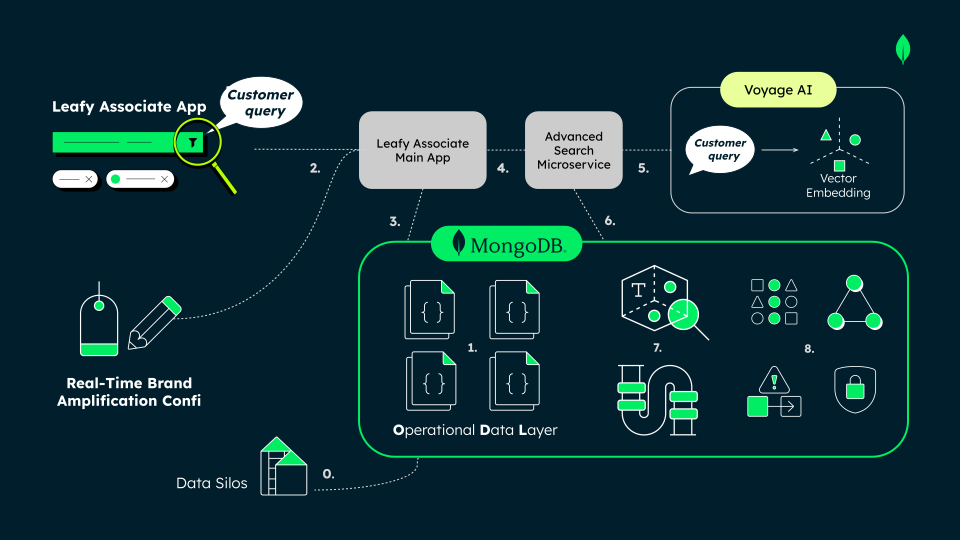
Figure 2. The architecture illustrates how MongoDB’s ODL integrates the Leafy Associate application, Advanced Search Microservice, and Voyage AI embeddings. It runs full-text, vector, and hybrid searches within a single Aggregation Pipeline, combining real-time brand configuration and customer intent in a unified, modern data platform.
0. Siloed data
Operational data often lives in silos such as Point of Sale (POS), Enterprise Resource Planning (ERP), and marketing. Unify it to deliver consistent, real-time experiences.
1. Store unified data in MongoDB’s Operational Data Layer (ODL)
The ODL uses the full power of MongoDB’s flexible document model, to store structured, semi-structured, and unstructured data together in one place.
The modern data platform delivers performance, horizontal scalability, and advanced capabilities. It enables fast integration, low-latency queries, and real-time operations at scale.
This unified approach keeps every system—from e-commerce to in-store apps—running on the same trusted, up-to-date information.
2. Store associate enters a search query
The store associate uses the Leafy Associate application to enter a query. They select full-text (MongoDB Atlas Search), intent (Vector Search), or hybrid (rank fusion or score fusion).
In parallel: Real-Time brand amplification configuration
Store managers and authorized personnel use the Leafy Associate
application to create per-store boost rules in the
brandAmplification collection, for back end use.
As they configure brand amplification, they can observe in real time the metadata that shows the number of products and how many of them are in each category. This information comes from the $searchMeta pipeline stage.
3. and 4. Leafy Associate builds the API request
The Leafy Associate application composes a search request with full context. It builds runtime parameters directly in the front end and retrieves the active brand configuration for that store from MongoDB. Send the request to the Advanced Search microservice.
POST /api/v2/search { "query": "green tea skin care", "storeObjectId": "684aa28064ff7c785a568aca", "option": 4, "page": 1, "page_size": 20, "weightVector": 0.5, "weightText": 0.5, "fusionMode": "rrf",// you can also use "scoreFusion" "brandAmplification": [ { "name": "Innisfree", "boostLevel": 1 }, { "name": "Olay", "boostLevel": 2, "categories": ["Face Care", "Skincare"] }, { "name": "The Body Shop", "boostLevel": 3 } ] }
5. Embeddings service with Voyage AI
When the search type is vector or hybrid search, the microservice generates customer query embeddings with Voyage AI.
6. and 7. Advanced Search microservice builds the aggregation pipeline
The Advanced Search microservice builds the aggregation pipeline at runtime and executes it within MongoDB. The microservice uses a single pipeline and a single round trip to improve performance and efficiency.
For text relevance using $search,
the pipeline applies a compound structure that
combines must, should, and filter clauses with fuzzy matching and
field boosts to refine results.
For semantic intent using $vectorSearch, the pipeline compares the customer query against precomputed embeddings of product data.
In hybrid search, the microservice fuses text and vector results using either $rankFusion, which applies rank-based reciprocal rank fusion (RRF), or $scoreFusion, which blends normalized scores with tunable weights at runtime.
Brand Amplification improves result relevance through two complementary paths:
Pre-fusion text boost (inside $search)
Inject rules as compound.
shouldclauses withscore. boost for each brand and (optional) category.
The microservice preserves store context without merging other
collections using $lookup by filtering
directly on top Products.inventorySummary[] with $filter.
Finally, it produces a UI-ready response with $facet,
and returns both the resulting documents and the total count.
8. Reliability, Scalability, Security and Real-Time Consistency
MongoDB maintains high availability with replica sets and scales horizontally with sharding. Use dedicated Search Nodes for low-latency reads. Keep data consistent in real time with Change Streams and Atlas Triggers. MongoDB provides comprehensive, end-to-end security through built-in access control, network isolation, and encryption across data at rest, in transit, and in use.
Build the Solution
To reproduce this demo in your own environment, follow these steps:
Create a database in MongoDB Atlas
Sign in to MongoDB Atlas and
deploy a Free Tier cluster. Create your database named
retail-unified-commerce, or update your .env file if you use a
different name.
Clone the solution repository
Clone the GitHub repository using the following command.
git clone https://github.com/mongodb-industry-solutions/retail-unified-commerce.git
Import demo collections
After cloning the repository, navigate to the folder with the sample data.
cd retail-unified-commerce/docs/setup/collections
The folder contains the JSON files to import into MongoDB Atlas—a sample dataset of 500 grocery products with store-level inventory and vectors embeddings from Voyage AI:
inventory.json
products.json
stores.json
brandAmplification.json
In Atlas, go to Browse Collections. Create each collection, and then click Add Data to insert your documents from the JSON files.
Configure your indexes
On the products collection, create:
On the stores collection, create a geospatial index. Leafy Associate uses this index to display nearby stores. The index does not affect brand amplification.
Set up real-time inventory synchronization (Optional)
Add the inventory_sync and the daily_inventory_simulation Atlas Triggers to integrate real-time updates in your inventory collection. These features simulate live transactions and keep the data synchronized with the products collection.
Add environment variables
Copy each .env.example file to .env in both the frontend
and advanced-search-ms
directories.
Paste your Atlas connection string and add your Voyage AI API key
in the advanced-search-ms/.env file to enable embedding-based
search.
VOYAGE_API_KEY=your_voyage_api_key
To ensure accurate and meaningful vector comparisons, use the same embedding provider for both your data and user queries. If you switch providers, you must re-generate vectors, create a new index, update the .env file with the new API key, and adjust the implementation of the embedding port in the infrastructure layer.
Build and run everything with Docker Compose
Verify that you have Docker and Docker Compose installed, and that
you are in the root of the project folder
retail-unified-commerce. From there, start the app using the
following command.
make build
After the app is running:
Open your browser and go to http://localhost:3000 to use the demo app. View the README for a step-by-step guide on navigating the Leafy Associate application.
View the microservice API documentation at http://localhost:8000/docs or read the README.
View the microservice health at http://localhost:8000/health.
You can use these commands to control your Docker deployment:
Stop your app: Stop all containers and remove images using the following command:
make clean View logs: Track your app deployment and data movement using the following command:
make logs
Key Learnings
Use MongoDB as your Operational Data Layer (ODL): Unify product, store, and inventory data to enable a consistent, measurable, and adaptable brand amplification strategy across every channel.
Build dynamic queries at runtime: Use the MongoDB Aggregation Pipeline to align search results with each customer’s intent and store’s business objectives.
Implement advanced search capabilities: Use MongoDB Atlas Search and MongoDB Atlas Vector Search to combine full-text, vector, and hybrid search to deliver context-aware, brand-aligned recommendations in real time.
Authors
Florencia Arin, MongoDB
Angie Guemes Estrada, MongoDB
Prashant Juttukonda, MongoDB
Daniel Jamir, MongoDB
Learn More
Personalized Retail Media Platforms—Powered by MongoDB.
Visit MongoDB for Retail to discover how MongoDB shapes the industry through innovative solutions.
Learn how to use MongoDB to build a unified view that enables smart search and empowers store associates in this Solution Library.
To learn more about ODL with MongoDB Atlas, read The Operational Data Layer white paper.