Build a YouTube transcription and summarization service with a large language model (LLM) and semantic search.
Use cases: Gen AI
Industries: Media
Products: MongoDB Atlas, MongoDB Atlas Vector Search
Partners: LangChain
Solution Overview
With the amount and variation of informational content on platforms such as YouTube, being able to quickly find relevant videos and transcribe and summarize them is important for knowledge gathering.
This solution builds a Generative AI-powered video summarization app for transcribing and summarizing YouTube videos. The application uses an LLM and vector embeddings with Atlas Vector Search for video-to-text generation and semantic searches. This approach can assist industries such as software development, where professionals can learn technologies faster with Gen AI video summarization.
Reference Architectures
Without MongoDB, a video summarization tool uses the following workflow:
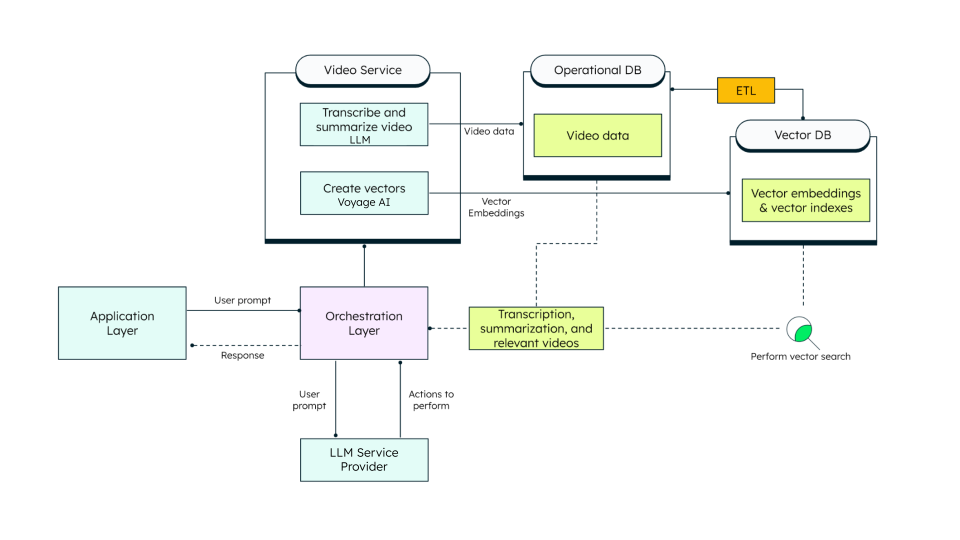
Figure 1. Reference architecture without MongoDB
This solution uses the following architecture with MongoDB:
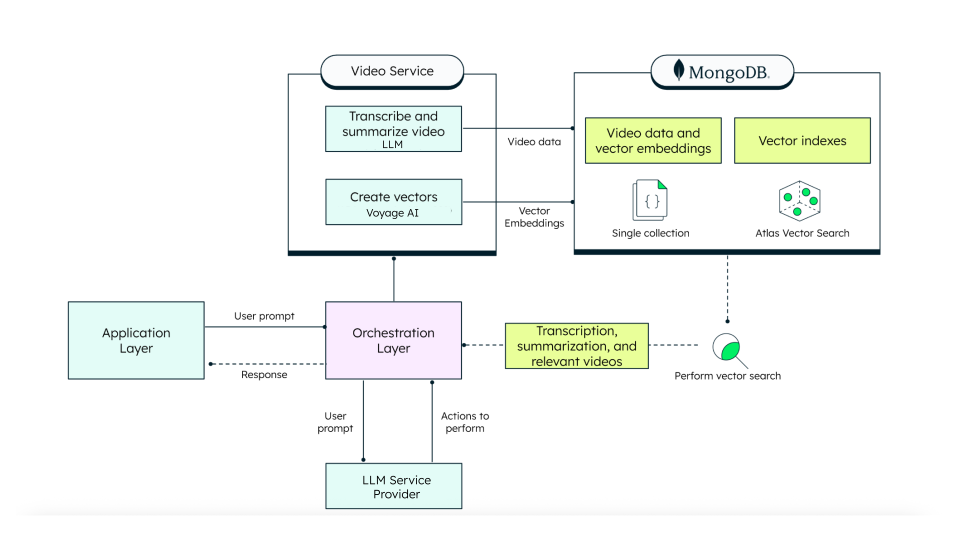
Figure 1. Reference architecture with MongoDB
First, the solution uses YouTubeLoader to process YouTube links and get video metadata and transcripts. Then, a Python script fetches and summarizes the video transcript using an LLM.
Voyage AI embeddings models then convert the summarized transcripts into embeddings that are stored in MongoDB Atlas. Additionally, Optical Character Recognition (OCR) and AI perform real-time code analysis directly from video frames, generating a searchable, text-based version of the video information, along with an AI-powered explanation.
The solution stores this processed data in documents in MongoDB Atlas that include the video metadata, its transcript, and AI-generated summary. The user can then search these documents by using MongoDB Atlas Vector Search.
Data Model Approach
The following code block is an example of the documents generated by this solution:
{ "videoURL": "https://youtu.be/exampleID", "metadata":{ "title": "How to use GO with MongoDB", "author": "MongoDB", "publishDate": "2023-01-24", "viewCount": 1449, "length": "1533s", "thumbnail": "https://exmpl.com/thumb.jpg" }, "transcript": "Full transcript…", "summary": "Tutorial on using Go with MongoDB.", "codeAnalysis": [ "Main function in Go initializes the MongoDB client.", "Imports AWS Lambda package for serverless architecture." ] }
The data extracted from each YouTube video consists of the following:
videoURL: A direct link to the YouTube video.metadata: Video details such as title, uploader and date.transcript: A textual representation of the spoken content in the video.summary: A concise, AI-generated version of the transcript.codeAnalysis: A list of AI-analyzed code examples.
Build the Solution
The code for this solution is available in the GitHub repository.
Follow the README for more specific instructions that walk you
through the following procedure:
Create a MongoDB Atlas Vector Search index
Convert the summarized transcript into embeddings for Vector Search and store these in MongoDB Atlas.
To learn how to use Atlas Vector Search and create an index, see MongoDB Vector Search Quick Start.
The following figure shows parameter values you can use when creating your Vector Search index.

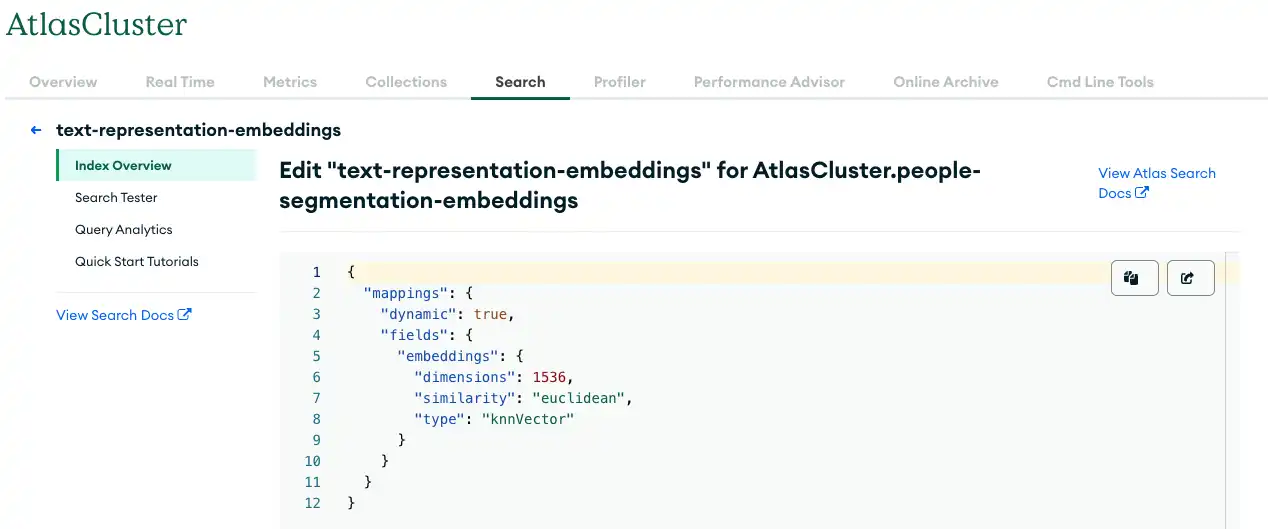
Figure 3. Storing data in MongoDB Atlas with Vector Search
Create an orchestration layer
The solution uses an orchestration layer to coordinate the solution's various services and manage complex workflows. The orchestration layer is composed of the following classes, which you can find in the solution's GitHub repository:
VideoServiceFacade: Acts as the coordinator for theVideoService,SearchService, andVideoProcessResultclasses. This system handles user prompts and requests for transcript generation and summarization.VideoService: Performs transcript summarization.VideoProcessResult: Encapsulates the processed video results, including metadata, possible actions, and optimal search query terms.SearchService: Performs a search in MongoDB Atlas.
Key Learnings
Atlas Vector Search enables natural language search: This solution creates and stores vector indexes in Atlas Vector Search, and stores LLM-generated embeddings and outputs in MongoDB Atlas. This enables users to search one platform for relevant, previously-unstructured information that may not have exact keyword matches.
LangChain facilitates Gen AI-powered applications: LangChain seamlessly integrates with MongoDB to create a powerful AI-driven platform.
Authors
Fabio Falavinha, MongoDB
David Macias, MongoDB