Nisrine_bg
(Nisrine Bou Ghannam)
21
Day 18: Working with CSS
I understand how working with CSS can be frustrating, especially for developers who prefer backend and logic-focused tasks. However, here’s a trick to help you become more comfortable with CSS:
- Start by identifying the HTML tags and requirements needed in the provided design.
- When writing CSS, think broadly:
- Begin with the body, then move on to forms, and finally handle inputs, buttons, etc.
- Always follow a hierarchical approach to ensure you cover the entire screen.
- Don’t worry about memorizing CSS selectors, as most designs share basic and common CSS patterns.
lebanon-mug 100daysofcode
2 Likes
Nisrine_bg
(Nisrine Bou Ghannam)
22
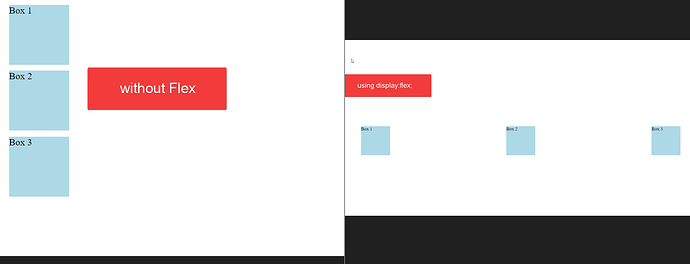
Day 19: Mastering Flexbox: Align and Distribute Elements with Ease
Flexbox, or “flex,” is a CSS layout module that allows you to design complex layouts with ease and precision.
Flex is used to align and distribute space among items in a container, even when their size is unknown or dynamic.
The key feature of flexbox is its ability to alter the width, height, and order of items to best fill the available space.
lebanon-mug 100daysofcode
2 Likes
Nisrine_bg
(Nisrine Bou Ghannam)
23
Day 20: Key CSS Principles
- Box Model: Understand how elements are structured in CSS with properties like
width, height, padding, border, and margin, which collectively define the space an element occupies on the page.
- Selectors and Specificity: Master CSS selectors to efficiently target elements based on their attributes, classes, IDs, and relationships. Understand specificity to resolve conflicts when multiple styles apply to the same element.
- Responsive Design: Learn techniques like media queries, flexbox, and grid layout to create responsive designs that adapt to different screen sizes and devices, ensuring a consistent user experience across platforms.
Middle East - Africa lebanon-mug 100daysofcode
3 Likes
Nisrine_bg
(Nisrine Bou Ghannam)
24
𝗗𝗮𝘆 21 - Anonymous Functions in JavaScript
Sharing @Amir_BouGhanem post on Anonymous Functions:
Anonymous functions are functions that are not identified by a variable name, or in other words, of unknown name. They offer concise, easy to read code, and are recommended over regular functions for short term-use. Anonymous functions are wonderful when paired with functions that are executed upon declaration, such as with put, patch, post and all server-side requests in addition to timeout functions, and much more!
3 Likes
Nisrine_bg
(Nisrine Bou Ghannam)
25
Day 22: Implementing CSS Animations
CSS animations allow you to add smooth, interactive effects to your web elements. You can define animations using @keyframes and apply them with the animation property. Transitions offer another way to animate changes to properties smoothly.
Example: Bouncing Ball Animation
Here’s a short example of creating a bouncing ball animation using CSS.
CSS Animation Example
    .ball {
        width: 50px;
        height: 50px;
        background-color: #3498db;
        border-radius: 50%;
        position: absolute;
        top: 0;
        left: 50%;
        transform: translateX(-50%);
        animation: bounce 2s infinite;
    }

    @keyframes bounce {
        0% {
            top: 0;
        }
        50% {
            top: 200px;
        }
        100% {
            top: 0;
        }
    }
</style>
3 Likes
Nisrine_bg
(Nisrine Bou Ghannam)
26
Day 23: Implementing CSS Transitions
CSS transitions allow you to smoothly change the style of an element from one state to another over a specified duration. This creates a more interactive and visually appealing experience.
Example: Button Hover Effect
Here’s a short example of creating a smooth color and size transition on a button when hovered over.
CSS Transition Example
<style>
    .button {
        background-color: #0000ff ;
        color: white;
        padding: 10px 20px;
        border: none;
        border-radius: 5px;
        font-size: 16px;
        cursor: pointer;
        transition: background-color 0.3s ease, transform 0.3s ease;
    }

    .button:hover {
        background-color: #2980b9;
        transform: scale(1.1);
    }
</style>
Hover Me!
3 Likes
Nisrine_bg
(Nisrine Bou Ghannam)
27
Day 24: Implementing CSS Preprocessors
CSS preprocessors like Sass, LESS, and Stylus extend the capabilities of CSS by introducing variables, nesting, functions, and more. This helps create more maintainable, scalable, and reusable CSS code.
Example: Using Sass to Create a Themed Button
Below is an example of how to implement a button style using Sass:
// Variables
$primary-color: #3498db;
$secondary-color: #2980b9;
$font-color: white;
$padding: 10px 20px;
$border-radius: 5px;
// Mixin for button styles
@mixin button-styles($bg-color, $hover-color) {
background-color: $bg-color;
color: $font-color;
padding: $padding;
border: none;
border-radius: $border-radius;
font-size: 16px;
cursor: pointer;
transition: background-color 0.3s ease;
&:hover {
    background-color: $hover-color;
}
}
// Button class using the mixin
.button {
@include button-styles($primary-color, $secondary-color);
}
2 Likes
Nisrine_bg
(Nisrine Bou Ghannam)
28
Day 25: Implementing Cross-Browser Compatibility
Cross-browser compatibility ensures that your website or web application looks and functions consistently across different web browsers. Given the variations in how browsers interpret CSS, following best practices and using specific techniques can help maintain compatibility.
Best Practices for Cross-Browser Compatibility
- Use a CSS Reset or Normalize.css:
- Browsers have different default styles, so using a CSS reset or Normalize.css can help standardize the styling across all browsers.
- Vendor Prefixes:
- Some CSS properties may require vendor prefixes (like
-webkit-, -moz-, -ms-, -o-) for compatibility with different browsers.
- Feature Detection with Modernizr:
- Use tools like Modernizr to detect whether the user’s browser supports certain CSS features and apply fallbacks accordingly.
- Graceful Degradation and Progressive Enhancement:
- Design your site to work in older browsers first (graceful degradation) and then add enhanced features for modern browsers (progressive enhancement).
- Use Autoprefixer:
- Automatically add necessary vendor prefixes to your CSS by using tools like Autoprefixer, which integrates with many build systems and preprocessors.
- Test on Multiple Browsers and Devices:
- Regularly test your site on different browsers and devices to identify and fix compatibility issues early.
- Avoid Browser-Specific Hacks:
- Instead of relying on CSS hacks to target specific browsers, use feature detection and progressive enhancement techniques.
Example: Implementing Vendor Prefixes for Flexbox
Here’s an example of using vendor prefixes to ensure cross-browser compatibility for a flexbox layout.
/* CSS Reset */
- {
margin: 0;
padding: 0;
box-sizing: border-box;
}
/* Flexbox Layout with Vendor Prefixes /
.container {
display: -webkit-box; / Old Safari, iOS /
display: -moz-box; / Old Firefox /
display: -ms-flexbox; / IE 10 /
display: -webkit-flex; / Newer Safari /
display: flex; / Standard */
justify-content: space-around;
}
.item {
background-color: #3498db;
color: white;
padding: 20px;
margin: 10px;
border-radius: 5px;
text-align: center;
}
3 Likes
Nisrine_bg
(Nisrine Bou Ghannam)
30
Day 27: DOM Manipulation
DOM Manipulation in JavaScript allows you to interact with and modify HTML elements dynamically. You can select elements using methods like getElementById, querySelector, and getElementsByClassName, then change their content, style, or attributes. This is essential for creating interactive web pages.
document.getElementById(“myButton”).addEventListener(“click”, function() {
document.getElementById(“myText”).innerText = “Hello, World!”;
});
3 Likes
Nisrine_bg
(Nisrine Bou Ghannam)
31
Day 28: Event Handling in JS
Event handling in JavaScript involves capturing and responding to user interactions such as clicks, keyboard inputs, and mouse movements. By attaching event listeners to elements, you can define functions that execute when specific events occur, enhancing interactivity.
document.addEventListener(“keydown”, function(event) {
if (event.key === “Enter”) {
alert(“Enter key pressed!”);
}
});
In this example, an event listener is added to the entire document, triggering an alert when the Enter key is pressed. Event handling is crucial for making web pages responsive to user actions.
3 Likes
Nisrine_bg
(Nisrine Bou Ghannam)
32
Day 29: Asynchronous JavaScript
Asynchronous JavaScript allows you to handle operations like data fetching, file loading, or timers without blocking the main execution thread. You can manage asynchronous tasks using callbacks, promises, or the more modern async/await syntax, making your code cleaner and easier to understand. Here’s an example using async/await:
async function fetchData() {
let response = await fetch(‘https://api.example.com/data’);
let data = await response.json();
console.log(data);
}
fetchData();
In this example, the fetchData function asynchronously fetches data from an API and logs it to the console once the data is available, ensuring smooth and responsive user experiences.
2 Likes
Nisrine_bg
(Nisrine Bou Ghannam)
33
Day 30: Functions in JS
Functions in JavaScript are reusable blocks of code that can accept inputs, perform actions, and return outputs. Understanding scope—global, local, and block—is crucial, as it determines where variables are accessible within your code. Closures occur when a function retains access to its outer scope, even after the outer function has finished executing.
function outerFunction() {
let outerVar = “Hello”;
function innerFunction() {
console.log(outerVar); // Accesses outerVar from outer scope
}
return innerFunction;
}
const closure = outerFunction();
closure(); // Outputs: Hello
2 Likes
Nisrine_bg
(Nisrine Bou Ghannam)
34
Day 31: Array Methods
JavaScript provides powerful array methods like map, filter, and reduce to manipulate and transform data efficiently. map creates a new array by applying a function to each element, filter returns a new array with elements that meet a specific condition, and reduce combines all elements into a single value based on a function.
const numbers = [1, 2, 3, 4];
const doubled = numbers.map(num => num * 2); // [2, 4, 6, 8]
const even = numbers.filter(num => num % 2 === 0); // [2, 4]
const sum = numbers.reduce((total, num) => total + num, 0); // 10
These methods help you perform common tasks like transforming, filtering, and aggregating data in a clean and concise way.
2 Likes
Nisrine_bg
(Nisrine Bou Ghannam)
35
Day 32: Object-Oriented Programming (OOP) in JavaScript
Object-Oriented Programming (OOP) in JavaScript leverages prototype-based inheritance, allowing you to create reusable and organized code structures. By defining classes, you can create objects with shared properties and methods, and use inheritance to extend these classes with additional functionality.
class Animal {
constructor(name) {
this.name = name;
}
speak() {
console.log(${this.name} makes a sound.);
}
}
class Dog extends Animal {
speak() {
console.log(${this.name} barks.);
}
}
const myDog = new Dog(“Rex”);
myDog.speak(); // Outputs: Rex barks.
In this example, Dog inherits from Animal, showcasing how OOP in JavaScript enables code reuse and logical structure through classes and inheritance.
3 Likes
system
(system)
Closed
36
This topic was automatically closed after 180 days. New replies are no longer allowed.