100daysofcode - Day22
Hello friends  , the new 22/100 day is already here
  . A lot of new things are done and the journey is so amazing
  . In today post we continue our dive in the flexbox to resume the process and learn more how to use it to write a maintainable CSS code
  .
.
The flex-wrap Property 
The flex-wrap property specifies whether the flex items should wrap or not.
The wrap value specifies that the flex items will wrap if necessary:
  .flex-container {
  display: flex;
  flex-wrap: wrap;
  }
The nowrap value specifies that the flex items will not wrap (this is default):
  .flex-container {
  display: flex;
  flex-wrap: nowrap;
  }
The wrap-reverse value specifies that the flexible items will wrap if necessary, in reverse order:
  .flex-container {
  display: flex;
  flex-wrap: wrap-reverse;
  }
The flex-flow Property 
The flex-flow property is a shorthand property for setting both the flex-direction and flex-wrap properties.
  .flex-container {
  display: flex;
  flex-flow: row wrap;
  }
The justify-content Property 
The justify-content property is used to align the flex items.
The center value aligns the flex items at the center of the container:
  .flex-container {
  display: flex;
  justify-content: center;
  }
The flex-start value aligns the flex items at the beginning of the container (this is default):
  .flex-container {
  display: flex;
  justify-content: flex-start;
  }
The flex-end value aligns the flex items at the end of the container:
  .flex-container {
  display: flex;
  justify-content: flex-end;
  }
The space-around value displays the flex items with space before, between, and after the lines:
  .flex-container {
  display: flex;
  justify-content: space-around;
  }
The space-between value displays the flex items with space between the lines:
  .flex-container {
  display: flex;
  justify-content: space-between;
  }
The align-items Property 
The align-items property is used to align the flex items.
The center value aligns the flex items in the middle of the container:
  .flex-container {
  display: flex;
  height: 200px;
  align-items: center;
  }
The flex-start value aligns the flex items at the top of the container:
  .flex-container {
  display: flex;
  height: 200px;
  align-items: flex-start;
  }
The flex-end value aligns the flex items at the bottom of the container:
  .flex-container {
  display: flex;
  height: 200px;
  align-items: flex-end;
  }
The stretch value stretches the flex items to fill the container (this is default):
  .flex-container {
  display: flex;
  height: 200px;
  align-items: stretch;
  }
The baseline value aligns the flex items such as their baselines aligns:
  .flex-container {
  display: flex;
  height: 200px;
  align-items: baseline;
  }
The align-content Property 
The align-content property is used to align the flex lines.
The space-between value displays the flex lines with equal space between them:
  .flex-container {
  display: flex;
  height: 600px;
  flex-wrap: wrap;
  align-content: space-between;
  }
The space-around value displays the flex lines with space before, between, and after them:
  .flex-container {
  display: flex;
  height: 600px;
  flex-wrap: wrap;
  align-content: space-around;
  }
The stretch value stretches the flex lines to take up the remaining space (this is default):
  .flex-container {
  display: flex;
  height: 600px;
  flex-wrap: wrap;
  align-content: stretch;
  }
The center value displays display the flex lines in the middle of the container:
 .flex-container {
 display: flex;
 height: 600px;
 flex-wrap: wrap;
 align-content: center;
 }
The flex-start value displays the flex lines at the start of the container:
  .flex-container {
  display: flex;
  height: 600px;
  flex-wrap: wrap;
  align-content: flex-start;
  }
The flex-end value displays the flex lines at the end of the container:
  .flex-container {
  display: flex;
  height: 600px;
  flex-wrap: wrap;
  align-content: flex-end;
  }
At the end of this amazing post, we learned a lot regarding the flexbox concept  , and now its time to sleep
  and think for some amazing
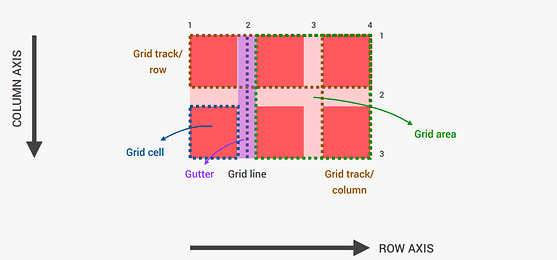
  content for tomorrow. Where we will expand our knowledge and learn the CSS Grids. STAY TUNED