Hello community!

I’ve been challenged to start the #100DayCodeChallenge, and guess what?! Challenge Accepted!! :grin: So, for the next 100 days, I’ll be sharing my knowledge, learning, and experiences.

Below is my progress from previous days, and I’ll now be updating regularly from today. If you’re up for it, join me on this adventure! :sparkles:

7e886ab87e66a70d1ba74283be9d2ce98a0fdabe_2_690x388

3 Likes

𝐃𝐚𝐲 𝟐: Introducing 𝐁𝐥𝐨𝐛𝐬

no, not the slimes… although quite similar in not having a defined form or structure

A Blob (short for Binary Large Object) is an object that represents immutable raw binary data and can take many forms. It’s commonly used to handle File uploading, Image processing, and large data operations. Blobs can be read as text or binary data or converted into a ReadableStream for further processing.

→ 𝘽𝙡𝙤𝙗 𝙘𝙧𝙚𝙖𝙩𝙞𝙤𝙣:
Blobs are created using the Blob() constructor, which takes an array of parts (data that is stored in the blob), and mainly the type of the blob’s data. For example, text/plain, image/jpeg, application/json, audio/mp3, …

→ 𝘾𝙧𝙚𝙖𝙩𝙞𝙣𝙜 𝘽𝙡𝙤𝙗 𝙐𝙍𝙇:
Blob URLs allow you to reference Blob objects in your applications as if they were regular URLs. This is particularly useful for creating downloadable links or embedding multimedia content.

→ 𝙍𝙚𝙫𝙤𝙠𝙞𝙣𝙜 𝘽𝙡𝙤𝙗 𝙐𝙍𝙇:
Of course, after you are done with the URL, you need to free up the memory used by the blob URL by revoking it. :broom:

3 Likes

𝐃𝐚𝐲 𝟏 : 𝐏𝐫𝐨𝐦𝐢𝐬𝐞𝐬 𝐢𝐧 𝐉𝐒
A Promise in JavaScript is a way to handle asynchronous operations like downloading a file and sending/receiving a package from the backend. They make the user able to continue in the page and/or doing something else without waiting for the operation to finish. Promises also are used for better error handling, better flow of control definition in asynchronous logic, and improving Code readability.

And always resolve your promises, don’t keep them pending :smile: :computer:

2 Likes

𝐃𝐚𝐲 𝟑 of 100DaysOfCode

  • 𝘾𝙖𝙡𝙡𝘽𝙖𝙘𝙠𝙨 -

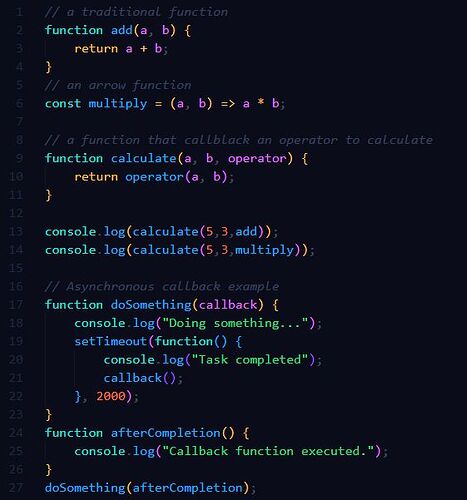
A callback is a function that is passed to another function as an argument and is intended to be executed after some event or task has been completed. They can be used to refactor code even more by refactoring functions, a simple example of this would be a simple calculate function that takes two variables and an operator.

Callbacks are also used to handle asynchronous operations, such as fetching data from a server, reading files, or waiting for user input.

  • 𝐁𝐞𝐰𝐚𝐫𝐞 𝐨𝐟 𝐭𝐡𝐞 “𝘾𝙖𝙡𝙡𝙗𝙖𝙘𝙠 𝙃𝙚𝙡𝙡”
    When dealing with multiple asynchronous operations that depend on each other, you might encounter “callback hell,” where callbacks are nested within other callbacks, making the code difficult to read and maintain.

And so, to avoid callback hell, one can use 𝐩𝐫𝐨𝐦𝐢𝐬𝐞𝐬 using then/catch blocks, or using 𝐚𝐬𝐲𝐧𝐜/𝐚𝐰𝐚𝐢𝐭.

For more clarification, please refer to the attached code.

2 Likes

𝐃𝐚𝐲 𝟒 of 100DaysOfCode

  • 𝙍𝙚𝙨𝙩 𝙋𝙖𝙧𝙖𝙢𝙚𝙩𝙚𝙧𝙨 -

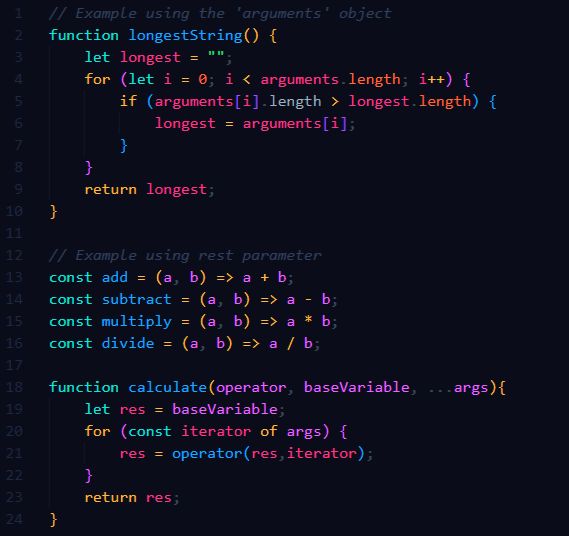
Before knowing what rest parameters are, I would like to talk first about the ‘arguments’ object in JS.

The ‘arguments’ object is an 𝘢𝘳𝘳𝘢𝘺-𝘭𝘪𝘬𝘦 object that is found as a local variable within all 𝘯𝘰𝘯-𝘢𝘳𝘳𝘰𝘸 functions. You can refer to a function’s arguments inside that function by using its ‘arguments’ object.
I said it is an array-like object; since, like arrays, they have entries for each argument the function was called with, with the first entry’s index at 0(ex. arguments[0]), and the function length is also included within. However, they don’t have other array functions like forEach and map functions.

The ‘arguments’ object can access any argument of a function even when not specified in the declaration of the said function, which means that the function would have access for infinite arguments.

Now back to rest parameters :sweat_smile:
much like ‘arguments’, they allow the function to have access to indefinite number of arguments as an 𝒂𝒓𝒓𝒂𝒚.

A function definition’s last parameter can be prefixed with " … " which will cause all remaining (user supplied) parameters to be placed within an Array object.

Rest Parameters are not limited to only the length function, they can perform what any array can do like using slice, forEach, map, sort, etc…
As they are used as the last parameter, it leaves space for other parameters to be specified.

3 Likes

𝐃𝐚𝐲 𝟓 of 100DaysOfCode

  • 𝘿𝙚𝙛𝙖𝙪𝙡𝙩 𝙋𝙖𝙧𝙖𝙢𝙚𝙩𝙚𝙧𝙨 -

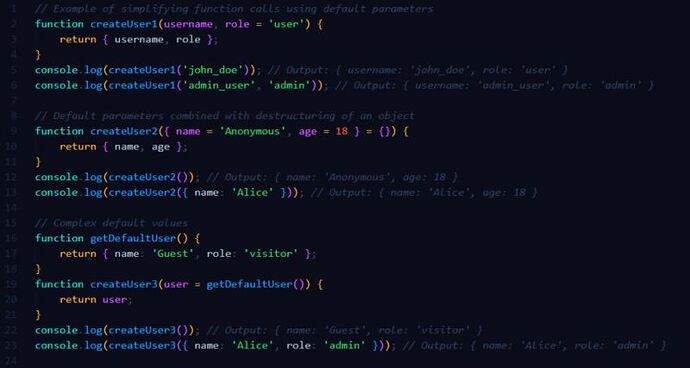
Default parameters in JavaScript allow you to initialize a function with default values if no arguments are provided or if ‘𝘶𝘯𝘥𝘦𝘧𝘪𝘯𝘦𝘥’ is passed as an argument. This feature helps make your functions more robust and reduces the need for additional code to handle cases where arguments are not provided.

Default parameters can be used:
→ to simplify function calls by eliminating the need to pass values explicitly for all parameters.
→ to avoid ‘undefined’ values.
→ to improve code readability.
→ with destructuring to provide default values for arrays and/or object properties.
->with expressions, including calls to other functions, allowing for complex default values.

2 Likes

𝐃𝐚𝐲 𝟔 of 100DaysOfCode

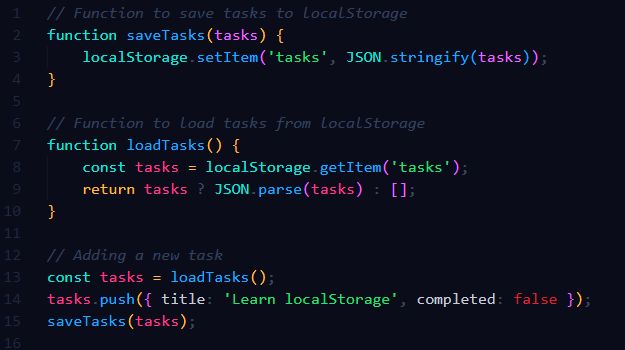
  • 𝙡𝙤𝙘𝙖𝙡𝙎𝙩𝙤𝙧𝙖𝙜𝙚 -

𝗹𝗼𝗰𝗮𝗹𝗦𝘁𝗼𝗿𝗮𝗴𝗲 in JavaScript is a type of web storage that allows websites to store data persistently in a user’s browser. Unlike 𝘴𝘦𝘴𝘴𝘪𝘰𝘯𝘚𝘵𝘰𝘳𝘢𝘨𝘦, which stores data for a single session (until the browser tab is closed), 𝘭𝘰𝘤𝘢𝘭𝘚𝘵𝘰𝘳𝘢𝘨𝘦 retains data even after the browser is closed and reopened.

Why would one use 𝘭𝘰𝘤𝘢𝘭𝘚𝘵𝘰𝘳𝘢𝘨𝘦?
→ Data remains available across browser sessions, so users can return to your site later and still have their data.
→ Reduces the need for repeated server requests, improving load times and reducing server load.
→ Simple API for storing, retrieving, and removing data.
→ Typically allows for 5-10MB of storage per origin, which is more than cookies.

However, one should not store any valuable / important information since the data stored in 𝘭𝘰𝘤𝘢𝘭𝘚𝘵𝘰𝘳𝘢𝘨𝘦 is accessible through JavaScript, so it can be susceptible to cross-site scripting (XSS) attacks.
1721065433564

4 Likes

𝐃𝐚𝐲 𝟕 of 100DaysOfCode

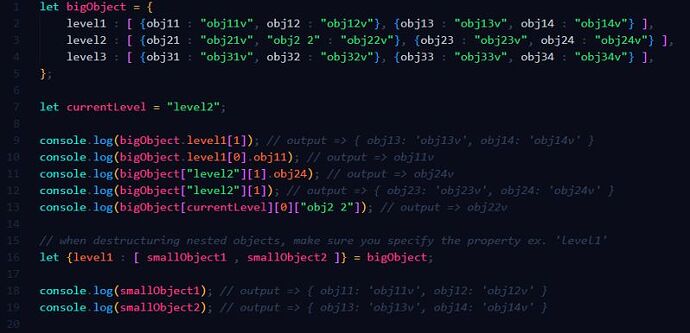
  • 𝘼𝙘𝙘𝙚𝙨𝙨𝙞𝙣𝙜 𝙊𝙗𝙟𝙚𝙘𝙩 𝙋𝙧𝙤𝙥𝙚𝙧𝙩𝙞𝙚𝙨 -

Coming from a C background perspective, I thought that, in JavaScript, object properties would be very much like the structures in C and can only be accessed by using the dot notation, while bracket notation is used for array properties.

Little did I know, that was only one way in JS. Objects in JS are collections of key-value pairs, and there are several ways to access the values stored within these objects.

→ 𝗗𝗼𝘁 𝗡𝗼𝘁𝗮𝘁𝗶𝗼𝗻:

  • Syntax: 𝘰𝘣𝘫𝘦𝘤𝘵.𝘱𝘳𝘰𝘱𝘦𝘳𝘵𝘺

→ 𝗕𝗿𝗮𝗰𝗸𝗲𝘁 𝗡𝗼𝘁𝗮𝘁𝗶𝗼𝗻:

  • Syntax: 𝘰𝘣𝘫𝘦𝘤𝘵['𝘱𝘳𝘰𝘱𝘦𝘳𝘵𝘺']
    This method is useful when the property name is dynamic or not a valid identifier (e.g., contains spaces or starts with a number).

→ 𝗨𝘀𝗶𝗻𝗴 𝗩𝗮𝗿𝗶𝗮𝗯𝗹𝗲𝘀 𝘄𝗶𝘁𝗵 𝗕𝗿𝗮𝗰𝗸𝗲𝘁 𝗡𝗼𝘁𝗮𝘁𝗶𝗼𝗻:
Same as Bracket Notation, but the property name is stored in a variable, allowing for a more flexible access of the properties.

→ 𝗗𝗲𝘀𝘁𝗿𝘂𝗰𝘁𝘂𝗿𝗶𝗻𝗴𝗔𝗰𝗰𝗲𝘀𝘀𝗶𝗻𝗴 𝗡𝗲𝘀𝘁𝗲𝗱 𝗢𝗯𝗷𝗲𝗰𝘁𝘀:
Nested objects can be accessed by chaining dot or bracket notation, or mixing between them.

→ 𝗗𝗲𝘀𝘁𝗿𝘂𝗰𝘁𝘂𝗿𝗶𝗻𝗴:
Destructuring assignment can be used to extract values from objects and store them in variables.

Each of these methods offers flexibility depending on the situation, such as the need for dynamic property access or dealing with nested structures.

2 Likes

𝐃𝐚𝐲 𝟖 of 100DaysOfCode

  • 𝙄𝙢𝙢𝙪𝙩𝙖𝙗𝙞𝙡𝙞𝙩𝙮 & 𝘿𝙚𝙚𝙥𝙁𝙧𝙚𝙚𝙯𝙞𝙣𝙜 :snowflake: -

In JavaScript, objects are mutable by default. This means that their properties can be changed after they are created. However, there are times when we want to ensure that an object remains immutable — preventing any modifications to it or its nested objects.

Why is 𝘐𝘮𝘮𝘶𝘵𝘢𝘣𝘪𝘭𝘪𝘵𝘺 important?
→ Immutable objects ensure that the state cannot be modified unexpectedly, making the code more predictable and easier to understand.
→ With immutability, tracking changes and understanding state transitions becomes simpler, which aids in debugging and testing.
→ It simplifies the implementation of undo and redo functionalities, like those in text editors, as previous states are easily retrievable.

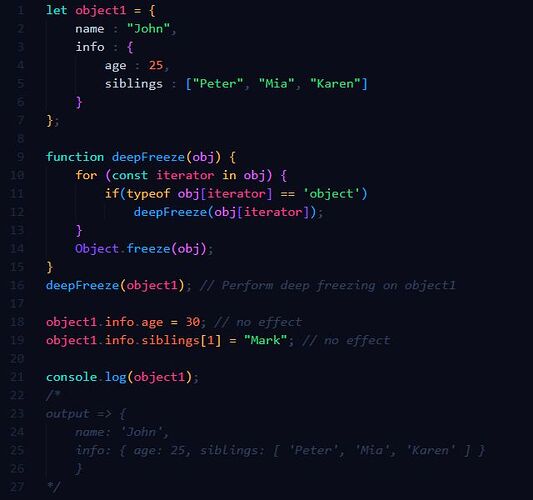
Here’s a practical way to achieve immutability using a technique called 𝐃𝐞𝐞𝐩 𝐅𝐫𝐞𝐞𝐳𝐢𝐧𝐠.

𝘋𝘦𝘦𝘱 𝘍𝘳𝘦𝘦𝘻𝘪𝘯𝘨 is achieved by recursively calling the build-in method 𝘖𝘣𝘫𝘦𝘤𝘵.𝘧𝘳𝘦𝘦𝘻𝘦() to ensure that all nested arrays and objects are frozen, and thus Immutable.

3 Likes

𝐃𝐚𝐲 𝟗 of 100DaysOfCode

  • 𝙁𝙤𝙧-𝙇𝙤𝙤𝙥𝙨 𝙞𝙣 𝙅𝙎 -

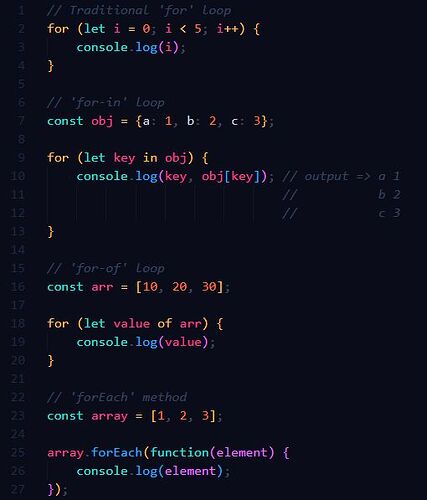
In JavaScript, other than the traditional for loop, there are several types of for loops each suited to different kinds of tasks.

→ 𝐓𝐫𝐚𝐝𝐢𝐭𝐢𝐨𝐧𝐚𝐥 ‘𝐟𝐨𝐫’ 𝐥𝐨𝐨𝐨𝐩:
This loop consists of Initialization (let i = 0), Condition (i < 5) and Increment (i++).
The traditional ‘𝘧𝘰𝘳’ loop is useful when you know in advance how many times you need to execute a statement or a block of statements.

→ ‘𝐟𝐨𝐫-𝐢𝐧’ 𝐋𝐨𝐨𝐩:
This loop iterates over the enumerable properties of an object. It’s typically used for iterating over the properties of objects.
However, ‘𝘧𝘰𝘳-𝘪𝘯’ should not be used to iterate over arrays where the order of elements is important because it iterates over all enumerable properties, not just the numeric indexes.

→ ‘𝐟𝐨𝐫-𝐨𝐟’ 𝐋𝐨𝐨𝐩:
The ‘𝘧𝘰𝘳-𝘰𝘧’ loop iterates over iterable objects like arrays, strings, maps, sets, etc. It’s preferred for arrays and other iterable objects.
This loop allows you to directly access the values of the iterable.

→ ‘𝐟𝐨𝐫𝐄𝐚𝐜𝐡’ 𝐦𝐞𝐭𝐡𝐨𝐝:
Although not a loop itself, the ‘𝘧𝘰𝘳𝘌𝘢𝘤𝘩’ method is commonly used for iterating over arrays. It’s a higher-order function that executes a provided function once for each array element.
This method is convenient but does not support ‘𝘣𝘳𝘦𝘢𝘬’ or ‘𝘤𝘰𝘯𝘵𝘪𝘯𝘶𝘦’ statements.

𝑰𝒏 𝑺𝒖𝒎𝒎𝒂𝒓𝒚:
→ Use a traditional 𝐟𝐨𝐫 loop for simple numeric iterations.
→ Use 𝐟𝐨𝐫-𝐢𝐧 for iterating over object properties.
→ Use 𝐟𝐨𝐫-𝐨𝐟 for iterating over iterable objects like arrays.
→ Use 𝐟𝐨𝐫𝐄𝐚𝐜𝐡 for array iterations when you don’t need to break out of the loop early.

2 Likes

𝐃𝐚𝐲 𝟏𝟎 of 100DaysOfCode

  • 𝘼𝙧𝙧𝙖𝙮 𝙈𝙚𝙩𝙝𝙤𝙙𝙨 -

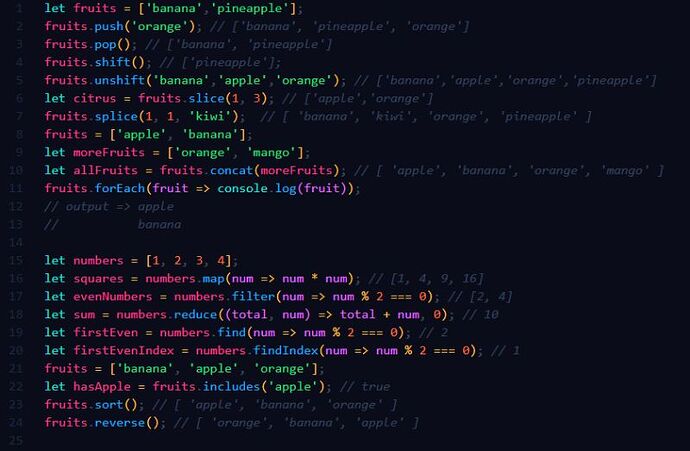
Array methods in JavaScript are built-in functions that you can use to perform common tasks on arrays, such as adding, removing, or manipulating elements.

→ 𝗽𝘂𝘀𝗵: Adds one or more elements to the end of an array.

→ 𝗽𝗼𝗽: Removes the last element from an array.

→ 𝘀𝗵𝗶𝗳𝘁: Removes the first element from an array.

→ 𝘂𝗻𝘀𝗵𝗶𝗳𝘁: Adds one or more elements to the beginning of an array.

→ 𝘀𝗹𝗶𝗰𝗲: Returns a shallow copy of a portion of an array into a new array object.

→ 𝘀𝗽𝗹𝗶𝗰𝗲: Changes the contents of an array by removing or replacing existing elements and/or adding new elements in place.

→ 𝗰𝗼𝗻𝗰𝗮𝘁: Merges two or more arrays.

→ 𝗳𝗼𝗿𝗘𝗮𝗰𝗵: Executes a provided function once for each array element.

→ 𝗺𝗮𝗽: Creates a new array with the results of calling a provided function on every element in the calling array.

→ 𝗳𝗶𝗹𝘁𝗲𝗿: Creates a new array with all elements that pass the test implemented by the provided function.

→ 𝗿𝗲𝗱𝘂𝗰𝗲: Executes a reducer function (that you provide) on each element of the array, resulting in a single output value.

→ 𝗳𝗶𝗻𝗱: Returns the value of the first element in the array that satisfies the provided testing function.

→ 𝗳𝗶𝗻𝗱𝗜𝗻𝗱𝗲𝘅: Returns the index of the first element in the array that satisfies the provided testing function.

→ 𝗶𝗻𝗰𝗹𝘂𝗱𝗲𝘀: Determines whether an array includes a certain value among its entries, returning true or false as appropriate.

→ 𝘀𝗼𝗿𝘁: Sorts the elements of an array in place and returns the array.

→ 𝗿𝗲𝘃𝗲𝗿𝘀𝗲: Reverses the order of the elements in an array in place.

2 Likes

𝐃𝐚𝐲 𝟏𝟏 of 100DaysOfCode

  • 𝙀𝙭𝙥𝙡𝙤𝙧𝙞𝙣𝙜 𝙈𝙤𝙣𝙜𝙤𝘿𝘽 -

MongoDB is a NoSQL database that offers a flexible, scalable, and powerful way to store and manage data. Unlike traditional relational databases, MongoDB uses a document-oriented model, making it perfect for handling unstructured or semi-structured data.

𝗪𝗵𝗮𝘁 𝗮𝗿𝗲 𝘀𝗼𝗺𝗲 𝗸𝗲𝘆 𝗳𝗲𝗮𝘁𝘂𝗿𝗲𝘀 𝗼𝗳 𝗠𝗼𝗻𝗴𝗼𝗗𝗕?

→ 𝐒𝐜𝐡𝐞𝐦𝐚-𝐥𝐞𝐬𝐬: MongoDB stores data in flexible, JSON-like documents, meaning you don’t need to define a schema upfront. This allows for easy data modeling and rapid iteration.

→ 𝐒𝐜𝐚𝐥𝐚𝐛𝐢𝐥𝐢𝐭𝐲: Designed with scalability in mind, MongoDB can handle large volumes of data and high traffic loads. It supports horizontal scaling through sharding, making it ideal for growing applications.

→ 𝐏𝐨𝐰𝐞𝐫𝐟𝐮𝐥 𝐐𝐮𝐞𝐫𝐲 𝐋𝐚𝐧𝐠𝐮𝐚𝐠𝐞: MongoDB offers a rich query language with support for ad-hoc queries, indexing, and real-time aggregation. You can easily retrieve and manipulate data using its expressive query syntax.

→ 𝐇𝐢𝐠𝐡 𝐏𝐞𝐫𝐟𝐨𝐫𝐦𝐚𝐧𝐜𝐞: With features like in-memory storage engine, replication, and sharding, MongoDB delivers high performance for read and write operations, ensuring your application runs smoothly.

𝗪𝗵𝘆 𝘆𝗼𝘂 𝘀𝗵𝗼𝘂𝗹𝗱 𝘂𝘀𝗲 𝗠𝗼𝗻𝗴𝗼𝗗𝗕:

→ 𝐅𝐥𝐞𝐱𝐢𝐛𝐢𝐥𝐢𝐭𝐲: The document model allows for storing complex data structures in a single record, making it easier to manage and evolve your data schema.

→ 𝐃𝐞𝐯𝐞𝐥𝐨𝐩𝐞𝐫-𝐅𝐫𝐢𝐞𝐧𝐝𝐥𝐲: MongoDB integrates well with popular programming languages and frameworks, providing extensive documentation and a strong community support.

→ 𝐂𝐥𝐨𝐮𝐝-𝐑𝐞𝐚𝐝𝐲: MongoDB Atlas, the cloud version of MongoDB, offers automated deployments, backups, and monitoring, so you can focus on building your application.

I’m looking forward to diving deeper into MongoDB and sharing more insights as I progress through this challenge.

1721501998899

3 Likes

𝐃𝐚𝐲 𝟏𝟐 of 100DaysOfCode

  • 𝙒𝙝𝙚𝙣 𝙩𝙤 𝙪𝙨𝙚 𝘿𝙊𝙈𝘾𝙤𝙣𝙩𝙚𝙣𝙩𝙇𝙤𝙖𝙙𝙚𝙙 -

->First, what is 𝘋𝘖𝘔𝘊𝘰𝘯𝘵𝘦𝘯𝘵𝘓𝘰𝘢𝘥𝘦𝘥?
𝘋𝘖𝘔𝘊𝘰𝘯𝘵𝘦𝘯𝘵𝘓𝘰𝘢𝘥𝘦𝘥 is an event that is fired when the initial HTML document has been completely loaded and parsed, without waiting for stylesheets, images, and subframes to finish loading.

This event is useful when you want your JavaScript code to interact with the DOM as soon as it is available, ensuring that all the elements you might need to manipulate are accessible.

->Now, when to use 𝘋𝘖𝘔𝘊𝘰𝘯𝘵𝘦𝘯𝘵𝘓𝘰𝘢𝘥𝘦𝘥?

Running code raw (without 𝘋𝘖𝘔𝘊𝘰𝘯𝘵𝘦𝘯𝘵𝘓𝘰𝘢𝘥𝘦𝘥) is only feasible if you place your script at the end of the <body> tag. This ensures that the DOM is already loaded by the time the script executes. This method can make your HTML and JavaScript more concise and readable but requires careful placement.

This approach is suitable for simpler scripts or when you have a clear structure, ensuring the script is at the end of the <body> to guarantee the DOM is loaded.

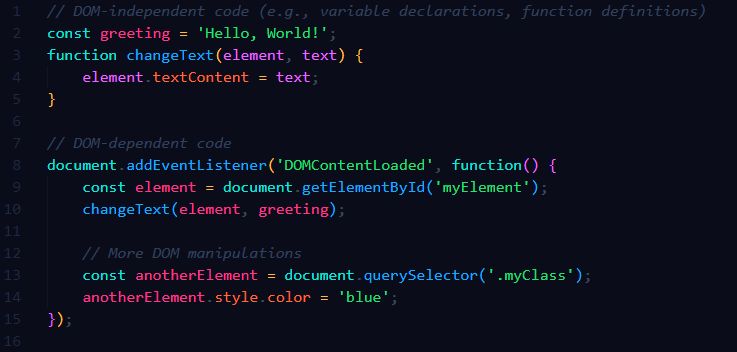
For most scenarios, breaking your code into DOM-independent and DOM-dependent parts is advisable. This provides a balance between ensuring your DOM manipulations are safe and keeping your code efficient.

This approach involves dividing your code into DOM-dependent and DOM-independent parts. You place DOM-independent code (like variable declarations, function definitions, or initial computations) outside the 𝘋𝘖𝘔𝘊𝘰𝘯𝘵𝘦𝘯𝘵𝘓𝘰𝘢𝘥𝘦𝘥 event listener, and DOM-dependent code inside it.

2 Likes

𝐃𝐚𝐲 𝟏𝟑 of 100DaysOfCode

  • :𝙝𝙖𝙨() & :𝙣𝙤𝙩() 𝙨𝙚𝙡𝙚𝙘𝙩𝙤𝙧𝙨 -

:𝘩𝘢𝘴 Selector:
The :𝘩𝘢𝘴 selector is a new addition to CSS that allows you to select an element if it contains a specific descendant. It’s essentially a parent selector, which we’ve long been waiting for in CSS.

:𝘯𝘰𝘵 Selector:
The :𝘯𝘰𝘵 selector is a CSS pseudo-class that allows you to exclude elements that match a certain condition. It helps in filtering out elements that you don’t want to style.

→ Combining :𝘩𝘢𝘴 and :𝘯𝘰𝘵:
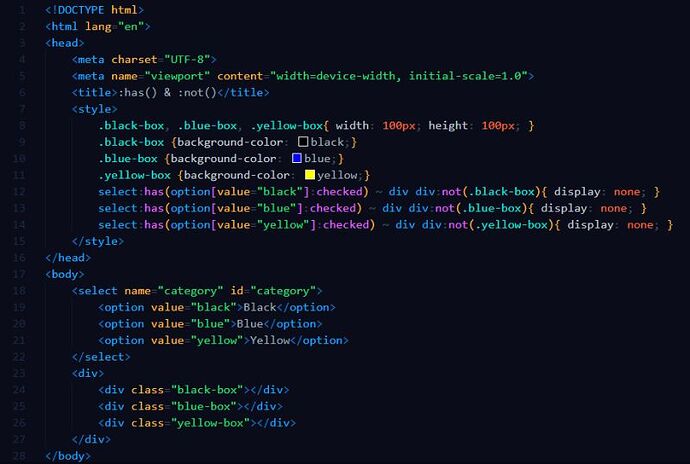
By combining these two selectors, you can create complex conditions for styling elements. For example, you can make a category filter using only HTML and CSS.

Below is a simple code that showcase the category filter example using the :has and :not selectors as well as :checked selector (returns true when a radio button / checkbox / option is checked or selected).

2 Likes

𝐃𝐚𝐲 𝟏𝟒 of 100DaysOfCode

  • 𝙑𝙖𝙧𝙞𝙖𝙗𝙡𝙚𝙨 𝙞𝙣 𝘾𝙎𝙎 -

Ever felt frustrated when you need to change a color or spacing value across multiple CSS rules? Say hello to CSS Variables!

→ 𝗪𝗵𝗮𝘁 𝗮𝗿𝗲 𝗖𝗦𝗦 𝗩𝗮𝗿𝗶𝗮𝗯𝗹𝗲𝘀?
CSS Variables, also known as custom properties, allow you to store values (like colors, fonts, or sizes) in one place and reuse them throughout your stylesheet. They make your CSS cleaner, more maintainable, and super flexible.

→ 𝗛𝗼𝘄 𝘁𝗼 𝗗𝗲𝗰𝗹𝗮𝗿𝗲 𝗩𝗮𝗿𝗶𝗮𝗯𝗹𝗲𝘀:
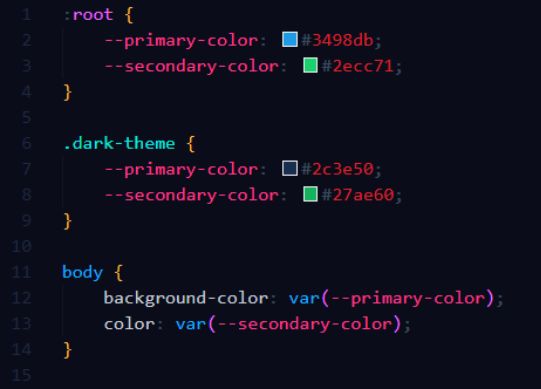
CSS variables are declared within a selector that defines their scope. They are typically defined in the ‘:𝐫𝐨𝐨𝐭’ pseudo-class to make them globally available throughout the document.

→ 𝗛𝗼𝘄 𝘁𝗼 𝗨𝘀𝗲 𝗩𝗮𝗿𝗶𝗮𝗯𝗹𝗲𝘀:
To use a CSS variable, you reference it with the 𝘷𝘢𝘳() function.

→ 𝗪𝗵𝘆 𝗨𝘀𝗲 𝗖𝗦𝗦 𝗩𝗮𝗿𝗶𝗮𝗯𝗹𝗲𝘀?

  1. 𝐌𝐚𝐢𝐧𝐭𝐚𝐢𝐧𝐚𝐛𝐢𝐥𝐢𝐭𝐲: Update the value in one place to change it everywhere.
  2. 𝐑𝐞𝐮𝐬𝐚𝐛𝐢𝐥𝐢𝐭𝐲: Use the same value across multiple rules.
  3. 𝐓𝐡𝐞𝐦𝐢𝐧𝐠: Easily switch themes by updating variable values.
  4. 𝐃𝐲𝐧𝐚𝐦𝐢𝐜 𝐒𝐭𝐲𝐥𝐢𝐧𝐠: Change values dynamically with JavaScript.
    1721751706222
2 Likes

𝐃𝐚𝐲 𝟏𝟓 of 100DaysOfCode :tada:

  • 𝙍𝙚𝙨𝙥𝙤𝙣𝙨𝙞𝙫𝙚 𝙉𝙖𝙫𝙞𝙜𝙖𝙩𝙞𝙤𝙣 𝘽𝙖𝙧 -

Today, I challenged myself to build a fully responsive navigation bar from scratch using only HTML and CSS. At first it was challenging to make it work seamlessly across all devices.

However, it was possible thanks to the CSS property @𝙢𝙚𝙙𝙞𝙖(𝙢𝙖𝙭-𝙬𝙞𝙙𝙩𝙝: x), which helps in applying styles based on the maximum width of the screen hence creating responsive web designs that look and function well on a variety of devices, from mobile phones to desktop computers.

3 Likes

𝐃𝐚𝐲 𝟏𝟔 of 100DaysOfCode

  • 𝙂𝙧𝙖𝙙𝙞𝙚𝙣𝙩 𝘽𝙤𝙧𝙙𝙚𝙧𝙨 -

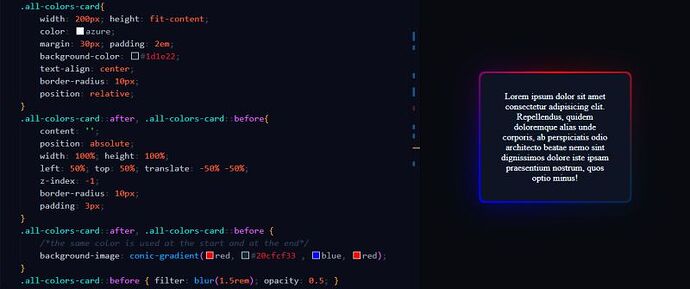
You probably think can’t you just use any gradient function (linear-gradient for example) as a value for the border-color property?

The answer to that would be no, you can’t.
So how can it be done?

Here is where the ::𝒃𝒆𝒇𝒐𝒓𝒆 & ::𝒂𝒇𝒕𝒆𝒓 pseudo elements come to play.

→ 𝐖𝐡𝐚𝐭 𝐚𝐫𝐞 𝐭𝐡𝐞𝐬𝐞 𝐩𝐬𝐞𝐮𝐝𝐨-𝐞𝐥𝐞𝐦𝐞𝐧𝐭𝐬?
The ::𝒃𝒆𝒇𝒐𝒓𝒆 & ::𝒂𝒇𝒕𝒆𝒓 pseudo elements in CSS are used to insert content before or after the content of an element. They are particularly useful for adding decorative or informative content without altering the HTML structure.

→ 𝐁𝐮𝐭 𝐇𝐨𝐰 𝐜𝐚𝐧 𝐭𝐡𝐞𝐲 𝐮𝐬𝐞𝐝 𝐟𝐨𝐫 𝐁𝐨𝐫𝐝𝐞𝐫𝐢𝐧𝐠?
These pseudo-elements can be used to create gradient borders by positioning them absolutely around an element, applying a gradient background, and extending their dimensions slightly beyond the element’s borders. This setup creates the appearance of a border with gradient colors without altering the element’s original structure.

2 Likes

𝐃𝐚𝐲 𝟏𝟕 of 100DaysOfCode

  • 𝙒𝙚𝙖𝙩𝙝𝙚𝙧 𝘼𝙥𝙥 -

Hello community, for the next few days I’ll be sharing some mini JavaScript projects that I’ll working on.

Today’s Project is a 𝗪𝗲𝗮𝘁𝗵𝗲𝗿 𝗔𝗽𝗽.

The Weather App fetches real-time weather data from an API and displays it in a user-friendly format. It’s a great way to practice handling API requests and manipulating DOM elements.

3 Likes

𝐃𝐚𝐲 𝟏𝟖 of 100DaysOfCode

  • 𝙍𝙖𝙣𝙙𝙤𝙢 𝙋𝙖𝙨𝙨𝙬𝙤𝙧𝙙 𝙂𝙚𝙣𝙚𝙧𝙖𝙩𝙤𝙧 -

The Random Password Generator creates secure passwords of varying lengths, ensuring a mix of uppercase, lowercase, numbers, and special characters. It also includes a convenient copy function to easily use the generated passwords.

Through this project, I learned about the navigator: clipboard property, the entry point to 𝗖𝗹𝗶𝗽𝗯𝗼𝗮𝗿𝗱 𝗔𝗽𝗶, which can be used to implement cut, copy, and paste features within a web application.

3 Likes

𝐃𝐚𝐲 𝟏𝟗 of #100DaysOfCode

  • 𝙌𝙍 𝘾𝙤𝙙𝙚 𝙂𝙚𝙣𝙚𝙧𝙖𝙩𝙤𝙧 -

The QR Code Generator creates QR codes for any given text or URL. This tool is incredibly useful for quickly sharing information in a compact, scannable format.

Feel free to scan the code in video and let me know your results. :smile:

3 Likes