I’m trying to have a trigger fire when a nested array is updated. I can’t seem to get the match statement to fire when this array is modified. This is basically what is returned in the change event.
[
  {"updatedFields":{"TopLevelArray.1.NestedArray.0.desc":"Test Value"},"removedFields\":[]}
]
I’m trying to match with the following but it doesn’t seem to work since the indexes are in the “updatedFields” document.
{"updateDescription.updatedFields.TopLevelArray.NestedArray":{"$exists":true}}
I would like for it to match when anything at all in “NestedArray” is changed.
Any ideas of how I can accomplish this?
2 Likes
Hi @Tyler_Queen,
I will need to test that to see if it’s possible.on trigger level , but have you considered parsing on trigger function and acting only on specific document?
Thanks
Pavel
Yes, I’m doing that in the attached function I just don’t want the trigger to fire every time the collection is updated.
Hi @Tyler_Queen ,
I could not find a way to do this on the match trigger expression as the field has a string path with “.” in its key 
So the only way I see is at the moment is in the function…
Thanks
Pavel
Hi,
Sorry to re-open this post, but I have the same issue.
Is there’s a way today to to this ?
It’s not really a problem to parse in the function but i’m confused about the billing of the triggers and the fact that we can’t filter a nested array.
In my case, i have a collection who contain an array and i need to watch for 2/3 kinds of update of an object in this array, but if the trigger is called at every update on this collection, it will be usefull for like 5% of theses calls.
So, potentially, we will be charged for a lot of useless calls in this trigger or it’s not related ?
Hi Pierre,
This doesn’t appear to be possible for a nested array because the updatedField key includes the array index which can’t be accounted for, as illustrated earlier in the thread:
{"updatedFields":{"TopLevelArray.1.NestedArray.0.desc":"Test Value"}
If it were a nested field (not array) being updated, then this could be used:
{"$expr":{"$eq":[{"$let":{"in":{"$size":"$$foo"},"vars":{"foo":{"$filter":{"cond":{"$eq":["topLevelField.nestedField","$$this.k"]},"input":{"$objectToArray":"$updateDescription.updatedFields"}}}}}},{"$numberInt":"1"}]}}
Regards
2 Likes
Laekipia
(Laure C)
7
I have a similar issue with my trigger’s match expression.
I have records with the following matrix field:
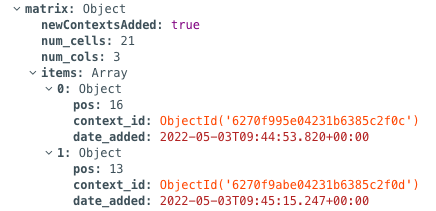
I want my trigger to fire every time an update is detected in matrix.items. Is it possible?
My match expression is: {"updateDescription.updatedFields.matrix.items":{"$exists":true}} . But this doesn’t seem to work (maybe because matrix.items is an array?). The trigger doesn’t fire.
2 Likes
When it comes to arrays, the challenge is the index part (i ) of the field name "matrix.items.i.field" , which dynamically represents what element in the array has been updated.
So, the rule to match those events would involve a regular expression, matching all "matrix.items.i.field no matter the value of i or field:
{
    "$expr": {
        "$gt": [
            {
                "$size": {
                    "$filter": {
                        "input": { "$objectToArray": "$updateDescription.updatedFields" },
                        "cond": { "$regexMatch": { "input": "$$this.k", "regex": "^matrix\\.items\\..*$" } }
                    }
                }
            },
            { "$numberInt": "0" }
        ]
    }
}
By tweaking the regex part of this rule, it can be applied to any other use case where a trigger needs to fire from an update to an array element.
For example, if the trigger needs to fire only when the pos field updates, ignoring updates to context_id or date_added fields, changing regex to "^matrix\\.items\\..*\\.pos$" would provide that functionality.
The rest of the event handling logic must then be implemented in the corresponding Function.
Best,
Alex
3 Likes
joe_hayden
(Joe Hayden)
10
The regex will miss when the first element gets added to an array as that doesnt have the ‘.NUMBER’. This one should grab it ^FIELD(?:\\.\\d+)?$
When I do :
realm.write(() => {
         person.cars.push(mycar);
        }
});
I receive a document with the index of the element that has been updated like
\"updateDescription\":{\"updatedFields\":{\"cars.1\":\"65f38ef80c055732995868c3\"}
However if I use unshift to add an element at the first position instead of using push (that add the element at the last position)
realm.write(() => {
         person.cars.unshift(mycar);
        }
});
the event that i receive does not contain the index part and become :
\"updateDescription\":{\"updatedFields\":{\"cars\":\"65f38ef80c055732995868c3\"}
For my use case using unshift instead of push fixed my issue
And my match expression is :
{“updateDescription.updatedFields.cars”:{“$exists”:true}}
To set up a Realm Trigger that matches an update on a nested array, you’ll need to carefully configure the trigger’s match expression to monitor the specific changes you’re interested in.
Step 1: Define the Trigger
Create a new trigger in your MongoDB Realm app, selecting the appropriate collection. Choose the “Update” operation type to monitor updates.
Step 2: Match Expression
In the match expression, use MongoDB query syntax to target the specific nested array. For example, if your documents look like this:
json
{
  "parentField": {
    "nestedArray": [
      { "key": "value" },
      { "key": "value" }
    ]
  }
}
You can match updates to nestedArray using:
json
{
  "updateDescription.updatedFields": {
    "$regex": "^parentField.nestedArray\\..*"
  }
}
1 Like
Thank you for your help.
My other use case is that I dont want to be triggered if a value is remove from the array
I would like to know how would be the filter if i just want to be triggered if a value is added to the array?
Best regards

