henna.s
(Henna Singh)
3
Complete BookLog Application
G’Day Folks,
I am excited to share that I solved the missing puzzle pieces of this application  It was a fun learning ride indeed.
The Bad Changeset error that I got previously was fixed after I logged in with a different user  I am very keen to know if you came across this similar error in your application and we could bang heads together on that…
Queries to display the list of Books and Authors
I am using the Recycler View library to display the list of books and Realm provides a recycler adapter that can easily display Realm Lists without changing the type to Array List
The code to set up Recycler View and execute the query to fetch Books is :
//realmlist is a copy of realm instance created after defining the config

 override fun onCreate(savedInstanceState: Bundle?) {
        super.onCreate(savedInstanceState)
        Timber.d("onCreate")
        user = bookLogApp.currentUser()

        Timber.d("User is $user")
        if (user == null) {
            // if no user is currently logged in, start the login activity so the user can authenticate
            startActivity(Intent(requireContext(), LoginActivity::class.java))
        } else {

            val config = SyncConfiguration.Builder(
                bookLogApp.currentUser(),
                bookLogApp.currentUser()?.id
            ).build()

            realmList = Realm.getInstance(config)
        }
    }

//layout for recycler view is set after the view is created
   override fun onViewCreated(view: View, savedInstanceState: Bundle?) {
        super.onViewCreated(view, savedInstanceState)
        listBinding?.rvBookList?.layoutManager = LinearLayoutManager(context)
        setUpRecyclerView()
    }

//recycler view is also setup after view gets created and realm recycler adapter is passed with realm list of books
    private fun setUpRecyclerView() {
       adapter = BookListAdapter(realmList.where(BookRealm::class.java).sort("name").findAll())
        listBinding?.rvBookList?.adapter = adapter
    }
The code for recycler adapter and view holder is as follows:
class BookListAdapter(books: OrderedRealmCollection<BookRealm>): RealmRecyclerViewAdapter<BookRealm, BookListHolder>(books, true) {

    override fun onCreateViewHolder(parent: ViewGroup, viewType: Int): BookListHolder {
        val view = LayoutInflater.from(parent.context)
            .inflate(R.layout.booklist_item_layout, parent, false)
        return BookListHolder(view)
    }

    override fun onBindViewHolder(holder: BookListHolder, position: Int) {
        val book = getItem(position)
        holder.bindValues(book)
    }
}

class BookListHolder(itemView: View) : RecyclerView.ViewHolder(itemView) {

    private val bookName = itemView.bookName
    private val authorName = itemView.authorName
    val stringBuilder = StringBuilder("")

    fun bindValues(book: BookRealm?){
        bookName.text = book?.name
        book?.authors?.forEach{
            stringBuilder.append(it.name).append(" ")
        }
        authorName.text = stringBuilder
    }
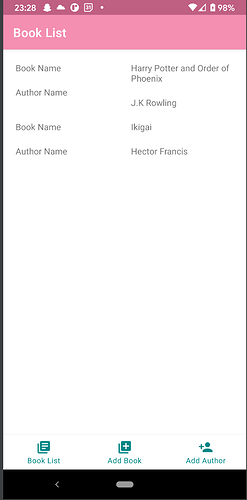
The Booklist display looks like below:
Few things to note:
- This is an MVP app showing how
book and author model classes are created and relationships established
- The app explains basic CRUD operations to perform to add book and author to the database and retrieve the list
- The app requires you have the required author added before you add the book. The edge cases of author not available or empty inputs may not be handled in the app.
- The inverse relationships are not synced to Atlas but they do exist.
- The app initially had a public strategy but it’s edited to user strategy now. Each user can read and write books and authors to their own realms/partitions.
The link to the full application is available on Github.  Please feel free to suggest any feedback that you may have.
Happy Realming, 
1 Like