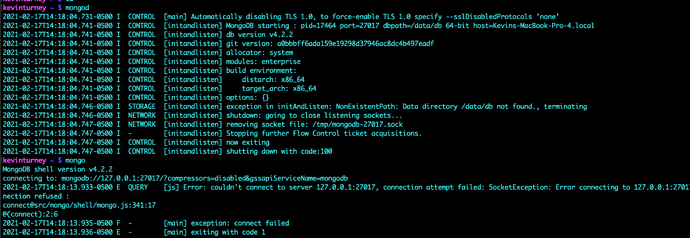
I am trying to run mongod in one terminal and then in another terminal, mongo to connect. From my home directory:
kevinturney ~ $ mongod
From what I understand, since macOS Catalina, root permissions are restricted. I tried creating /data/db and the result:
mkdir: /data/db: Read-only file system
I then tried this Medium post on creating /data/db in System
I uninstalled and reinstalled, tried stackoverflow and am completely stuck. How do do I sort this out?
steevej
(Steeve Juneau)
2
All directories accessed by mongod must be writable by the user with which you start it.
By default mongod uses /data/db to store its data. In your case, I suspect your username is kevinturney, so /data/db should be owned and be writable by user kevinturney.
More details at https://docs.mongodb.com/guides/server/install/
That is right.In Macos /data/db access is removed
In the link you shared it asks you to create the dir under /System/Volumes
Did you try that?Once dir is created you need to update the new dirpath in your mongodb config file
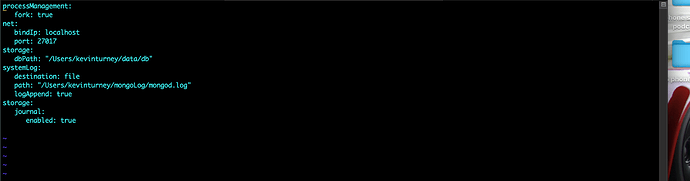
What I wound up doing was to create the data/db in my home directory. I also created the mongod.conf file:
Creating the dir in System/Volumes according to the article did not work for me.
When I started the daemon: mongod --dbpath=/Users/kevinturney/data/db and in another terminal tab, mongo, the processes started and the shell opened with no problems. With this configuration am I in good shape or are there problems with where I placed my directories that I don’t know about?
steevej
(Steeve Juneau)
5
When you start with
mongod --dbpath=/Users/kevinturney/data/db
you so not use the configuration file.
I think the quotes in the configuration might cause an issue if you ever use -f or –config to start mongod.
You should not have any issues with storing the data in you home directory.